Key Takeaways
- Scope first. Put POs on turns, capex, appliances, HVAC and contracted services. Leave utilities, insurance and taxes out. A rule that covers a $12 sink trap gets bypassed by field staff.
- Set thresholds by property size and category, and cap approvers at two per PO so most requests clear the same business day.
- Code every PO at the request stage to a property, a unit or common area, and a GL account. That’s what keeps owner reporting and job costing clean without month-end reclassification.
- Use blanket POs for recurring vendors like landscaping, janitorial and pest control, and match every invoice to its PO before you pay it.
- Pilot at one or two properties for 30 days, hold any invoice that has no PO, and revisit your thresholds at day 90.
Quick Answer
To implement purchase orders in a property management company, decide which purchases need a PO and write a one-page policy with dollar thresholds. Build an approval matrix, and code each PO to a property, unit and GL account. Load your vendors and set blanket POs for recurring services. Match invoices to POs before payment, and pilot the process with field staff before you roll it out to the full portfolio. With ProcureDesk, software setup takes 2 to 3 weeks, and the pilot adds about 30 days.
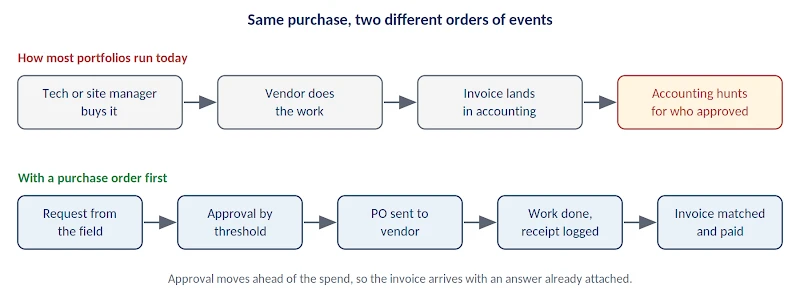
Most property management companies learn what a repair cost when the invoice lands in accounting. By then the tech has bought the parts, and the vendor has finished the job on a verbal okay from someone on site. The controller is left reconstructing who approved it.
A purchase order process moves that approval to before the money is spent. ProcureDesk helps property management controllers run this across a portfolio, with mobile requests for field staff, threshold-based approvals, and invoice matching that syncs to the accounting system.
The rollout is where most companies stumble. In our experience, the same six mistakes show up again and again:
- Setting the approval threshold so low that a $40 air filter run needs a sign-off, which trains the field to bypass the system.
- Creating POs in accounting after the invoice arrives, which documents the spend but can’t stop it.
- Treating landscaping, janitorial and pest control as one-off POs instead of blanket POs.
- Leaving off the property and unit code, so owner reporting still needs manual cleanup every month.
- Building a desktop-only process for maintenance techs who are standing in a supply house with a phone.
- Skipping the link to the accounting system, so staff have to enter everything twice.
The seven steps below avoid all six. They run from scoping and policy through vendor setup, invoice matching and field adoption, with an approval matrix and go-live checklist you can copy.
How do you know your property management company needs a PO process?
You need a PO process when accounting spends close week investigating invoices instead of reviewing them. These are the signs we see most often:
- Accounting can’t trace some invoices to an approver.
- Maintenance overruns show up in the month-end variance report, after the money is spent.
- Accounting has no PO to check invoices against, so duplicate payments and price differences go unnoticed.
- Owner statements need manual reclassification every month to get spend onto the right property and expense line.
- An audit or new-owner onboarding finds six figures of maintenance and capex spend with no documented approval.
- Some site managers have no written spending limit.
What does a purchase order do in a property management company?
A purchase order is a written authorization issued before a purchase, and it’s the step most property management firms skip. The usual flow runs backward: a tech buys parts, a vendor does the work, an invoice arrives, and accounting works out who said yes.
A PO flips that order. The request comes first, an approver signs off, and the vendor gets a PO number to print on the invoice. Accounting matches the invoice to that number and pays it.
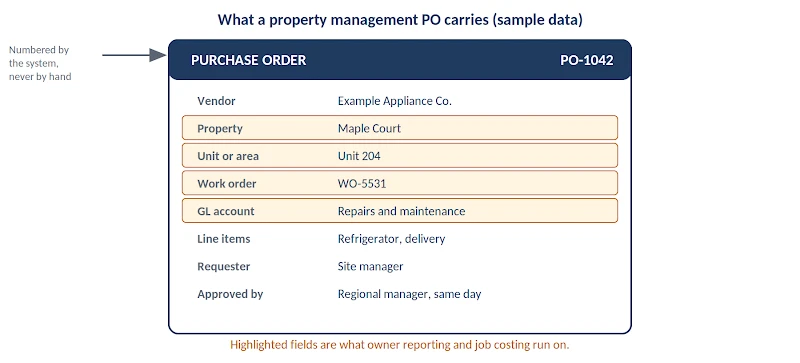
In a portfolio, a PO carries more than a dollar amount. It also carries the property, the unit or common area, the GL account, the work order it ties back to, and the name of whoever approved it. That’s the data your owner statements and job costing reports run on.
Homegrown processes usually break at the matching stage because these four documents get mixed up:
- Requisition: the request from the site manager or tech, before anyone has approved it.
- Purchase order: the approved commitment sent to the vendor.
- Receipt: confirmation that the work was done or the goods arrived.
- Invoice: the vendor’s bill, which should agree with the first three.
A dedicated purchase requisition step matters because it gives field staff one place to ask, and gives approvers one place to answer.
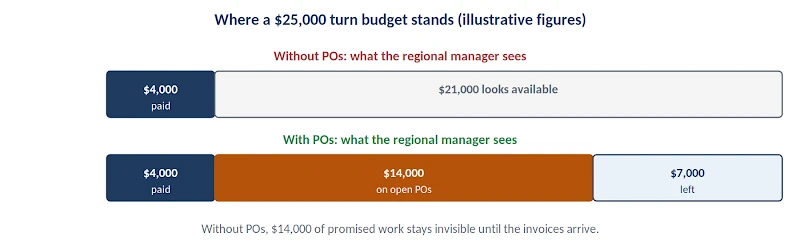
POs also give you committed-spend visibility. Say a 120-unit community has a $25,000 turn budget (an illustrative figure). With POs in place, the regional manager can see that $18,000 is already promised to vendors, made up of $4,000 paid and $14,000 on open POs. Without them, the same manager sees only the $4,000 of paid invoices and finds out about the rest in the variance report.
Property management has a few wrinkles that generic procurement advice skips. After-hours emergency repairs can’t wait for an approval queue. Trip charges and minimum-call fees make small jobs expensive. Capex above the management agreement limit needs owner sign-off, and some spend is reimbursable while other spend isn’t. Your process has to handle all four.
See what request-to-payment looks like across a portfolio
A short walkthrough of how a site manager’s request becomes an approved PO and follows the work to payment.
Step 1: Decide which purchases need a purchase order
Scope is the first decision. If a PO is required for a $12 sink trap, techs will buy it themselves and stop using the system.
Pull 12 months of AP data and sort it by vendor and by category. In most portfolios a small group of vendors and categories holds the majority of controllable spend. Start there.
Put POs on the categories where control pays for itself:
- Turns and make-readies
- Capex projects
- Appliances and HVAC
- Contracted services with variable extras
- Anything above your materiality line
Keep work orders and POs separate. A small reactive repair that falls under a vendor’s pre-agreed rate card, and stays below the owner’s approval limit, can run on the work order alone. The rate card already sets the price, so a PO would add paperwork without adding control. Quoted work, capex, materials and anything above the limit still need a PO.
Carve out the exceptions in writing. Utilities, insurance, taxes and mortgage payments don’t need a PO for each purchase, and neither do fixed contracts that already carry a signed agreement and a set monthly amount.
Then write down an emergency path. Emergencies can’t wait in an approval queue, so allow verbal authorization at the time and require a PO documented within 24 hours. Without that written rule, off-PO invoices tend to get labeled emergencies.
Keep the whole policy on one page. Long manuals go unread. For the general mechanics of a PO workflow, ProcureDesk’s purchase order process guide covers the stages from requisition to payment.
Step 2: Set approval thresholds and build your approval matrix
Your approval matrix answers one question: who signs off at what amount, for which category. The thresholds should reflect the size of the property and the volume of work. A 400-unit community and a 20-unit building shouldn’t share a $500 limit.
A workable pattern has four tiers. The site manager approves small spend. A regional or portfolio manager approves mid-range spend. The controller or VP of operations approves above that. Owner approval applies to capex above the limit in the management agreement.
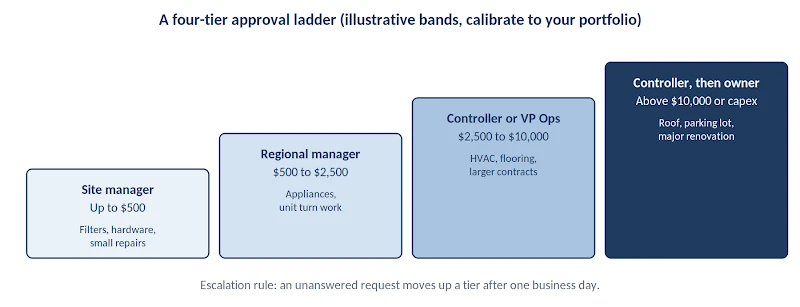
The table below is a starting point. The dollar bands are illustrative, so calibrate them against your own 12 months of AP data.
| Dollar band | Example spend | Approver |
|---|---|---|
| Up to $500 | Filters, hardware, small repairs | Site manager |
| $500 to $2,500 | Appliance replacement, unit turn work | Regional manager |
| $2,500 to $10,000 | HVAC repair, flooring, larger contracts | Controller or VP of operations |
| Above $10,000, or capex over the agreement limit | Roof, parking lot, major renovation | Controller, then owner approval |
| Any amount, by category | Legal, marketing, insurance-related | Routed to the category owner, not the property chain |
Four rules keep the matrix from becoming a bottleneck:
- Cap approvers at two per PO wherever you can. Every extra approver adds days and gives the field a reason to work around the process.
- Name a backup approver for every approver. One vacation shouldn’t stall turn work.
- Route by category as well as dollars. A $2,000 legal expense and a $2,000 HVAC repair shouldn’t take the same path.
- Set an escalation rule. If an approver hasn’t answered by the end of the next business day, the request moves up automatically.
ProcureDesk’s approval workflows route on vendor, amount, category or custom fields at the same time, which is what a matrix like this needs.
Step 3: Design PO numbering, property coding, and GL mapping
Property and unit coding is what separates a property management PO process from generic procurement.
Use sequential, system-generated PO numbers. Manual numbering schemes collide the first time two people create POs on the same day.
Then make these fields mandatory on every request:
- Property code, always.
- Unit or common-area code, wherever the spend belongs to one.
- GL account, mapped once at the category level so site managers don’t guess.
- Work order reference, if your maintenance system produces one, so a repair traces from resident request to vendor payment.
Decide the capex versus operating expense rule at the policy level and build it into the request form. Otherwise classification turns into a debate at month-end.
Allow split coding across properties for shared purchases like bulk supply orders. If the form can’t handle a split, staff work around it and you reclassify the spend at month-end.
Framework
Read the framework Use the PO-before-invoice rule to decide which spend must be approved before work starts.
Step 4: Set up vendors and use blanket POs for recurring services
Recurring contracted services are where much of a property management company’s spend sits: landscaping, janitorial, pest control, pool service and trash hauling. Issuing a fresh PO every month for a predictable service adds approvals without adding control.
A blanket purchase order authorizes a total amount or a time period up front. Monthly invoices draw down against it. You get control without repeated approvals.
Set the blanket amount from the contract value plus a defined allowance for extras. When the balance runs out, a new approval is required. That single rule catches scope creep on service contracts before it becomes a dispute.
Clean up the vendor master before go-live:
- Merge duplicate vendors.
- Confirm W-9s and insurance certificates are on file.
- Deactivate anyone you haven’t paid in a year.
Vendor controls also make it harder for an uninsured contractor to start work on one of your properties.
For high-volume items like filters, paint and appliances, load agreed pricing so field staff order at the right price by default. ProcureDesk connects to more than 200 punchout catalogs, and its property management page lists Home Depot Pro, Lowe’s Pro, Ferguson, Grainger and Sherwin-Williams Pro among the supplier catalogs.
Step 5: Connect purchase orders to invoice matching and your accounting system
Approval alone adds a step. The savings come when the invoice is matched to the PO before payment.
Two-way matching compares the PO to the invoice and catches price and quantity differences. Three-way matching adds the receipt, and it’s worth the extra step for materials and appliances, where a partial delivery is common.
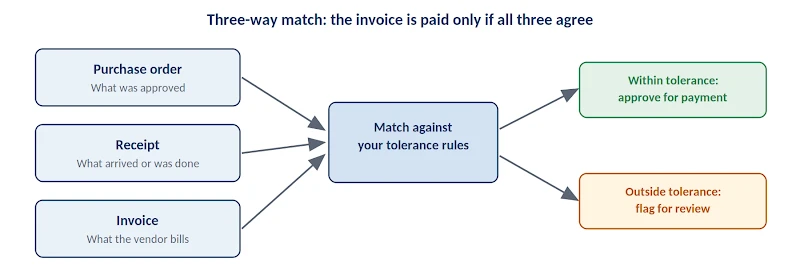
Set your tolerance rules before go-live. A common approach is to auto-approve variances under a small dollar amount or percentage and flag anything larger for review.
Then decide who confirms receiving at each property. Unconfirmed receipts are where three-way matching stalls most often, so assign receiving to a named person at each property.
If your team has to retype approved POs and invoices into the accounting system, expect adoption to drop. Approved commitments and invoices should sync to the books automatically.
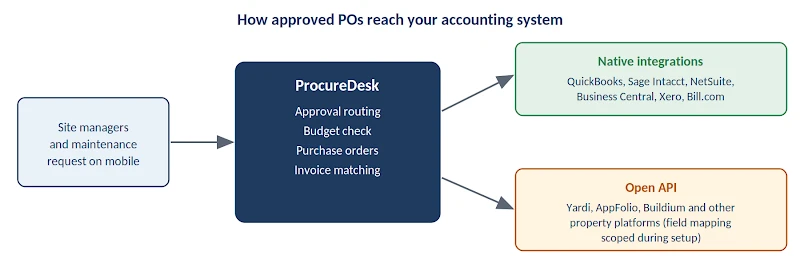
ProcureDesk syncs with QuickBooks, Sage Intacct, NetSuite, Microsoft Business Central, Xero and Bill.com. Its QuickBooks integration is one example. If your books live in a property accounting platform such as Yardi, AppFolio or Buildium, ProcureDesk’s open API can connect to it. Approved POs, vendors and invoices then move between the two without retyping.
It’s an API connection rather than a pre-built native connector, which means you should map the property, unit and GL fields up front with whoever administers your accounting platform. Ask any vendor how its sync works before you commit.
Comparison
See the comparison Weighing AP tools for the matching and sync side? See eight compared for property management.
Step 6: Roll out to site managers and maintenance staff without killing adoption
Adoption is the hardest part of a PO rollout. A tech standing at a supply counter won’t use a slow mobile form. If a request takes more than about a minute, they’ll buy first and explain later.
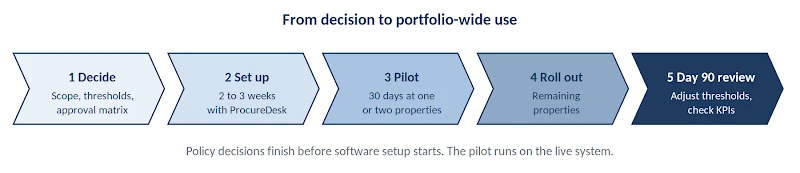
Pilot at one or two properties for 30 days before you go portfolio-wide. A small footprint shows you which thresholds are wrong and which vendors are missing before the whole portfolio is affected.
Train field staff on the request path only. They don’t need the whole policy. They need to know how to ask for a PO, how fast they’ll hear back, and what to do in an emergency.
Publish a service level. Something like “most requests are answered the same business day” gives the field a reason to trust the process.
Show site managers their own property budget and open commitments. Managers who can see how much of the turn budget is left have a reason to use the system.
Then enforce one rule without exceptions: an invoice with no PO gets held and sent back to the requester. Exceptions granted in month one tend to become habit.
Pair it with a second rule: no backdated POs. A PO raised after the work is done or the invoice arrives records the spend, but nobody approved it before the money was committed. The emergency path from Step 1 is the only exception, and those POs still need to be documented within 24 hours. Count every other after-the-fact PO as off-PO spend in your Step 7 numbers.
Step 7: Track adoption and spend control in the first 90 days
Track these six numbers to prove the rollout worked and to find where it’s leaking:
- PO coverage: the share of controllable spend that ran through an approved PO. Aim for steady improvement, not 100% in month one.
- Off-PO invoice count: by property and by requester, so you can see who’s bypassing the process and ask why.
- Approval cycle time: a rising number predicts falling adoption.
- Invoice exception rate: how often matching flags a mismatch.
- Duplicate payments avoided: the clearest dollar return you can show an owner.
- Budget variance by property: compare before and after to show owners that overruns are now blocked at the request stage.
Review your thresholds at day 90. The limits you guessed at in month one are often wrong in at least one direction.
Three ways to run purchase orders in property management, and where each breaks
You have three realistic options, and each one works until a specific point.
Spreadsheet and PDF POs cost little and work at a handful of properties. Approvals live in email, budget isn’t visible in real time, and matching is fully manual. If you’re starting here, a purchase order template gets the format right. The trigger to move off is volume: once you have multiple approvers and dozens of POs a month, email approvals stop being auditable.
The PO module in your accounting system keeps data in one place. The tradeoff is usually rigid workflows, limited mobile requesting, and awkward threshold setup by property.
A dedicated procurement platform adds configurable routing, mobile requisitions, catalogs and automated invoice matching. Multi-property portfolios usually end up here.
Whichever you pick, it has to write back to your accounting system. Otherwise your team maintains two records.
How ProcureDesk helps you implement purchase orders across a property portfolio
ProcureDesk is a procurement and AP automation platform built for mid-market finance teams, and its property management setup maps directly to the steps above. The company’s implementation runs 2 to 3 weeks, which leaves room for a 30-day pilot inside the first quarter.
Requisition to PO, on a phone. Site managers and techs create purchase requests from the field, attach photos of the issue, and flag emergency repairs for fast handling. That replaces text-message requests, which leave accounting with invoices it can’t trace. It also answers the biggest adoption risk from Step 6, because the request path is short.
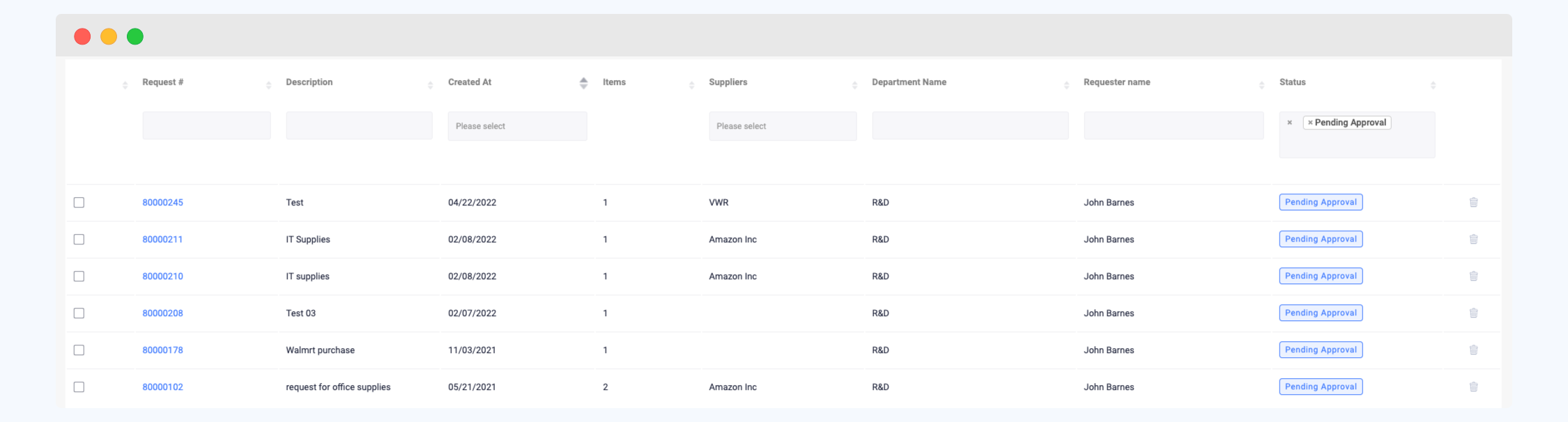
Approval routing that matches your matrix. ProcureDesk evaluates each request against a custom matrix on several criteria at once, not just the dollar amount. Approvers can act from their phone or with one click from the email. Out-of-office delegates cover vacations automatically, and escalation rules move a stalled request to the next approver when the response window passes. Property management customers also get emergency override options for urgent repairs.
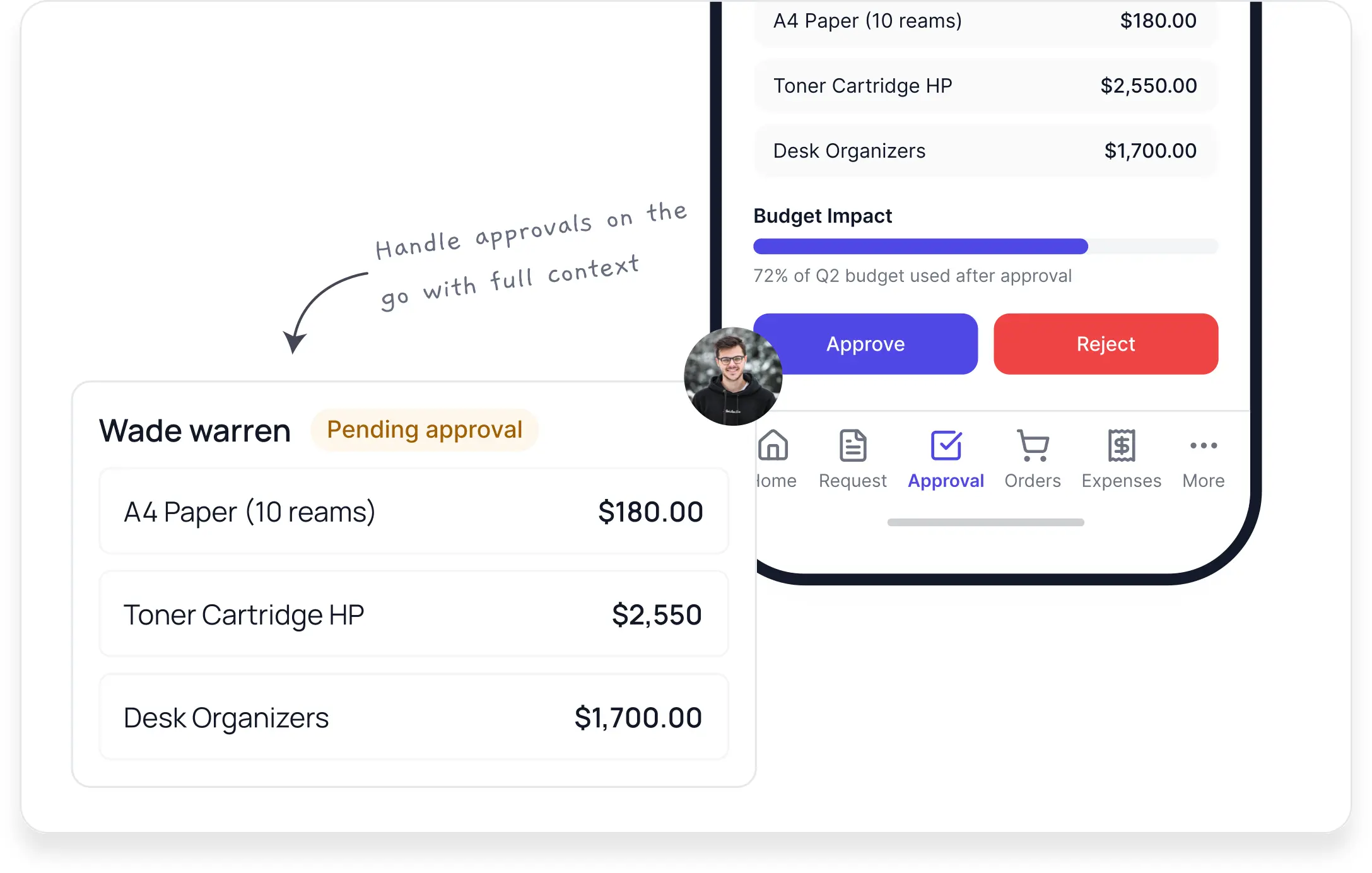
Budget checking at the point of request. Approvers see whether funds are available before they approve. Budget variance alerts flag overspending, and spend is tracked by property, vendor category and maintenance type. Budget reports pulled from the accounting system miss anything that hasn’t been invoiced yet, and committed spend on the PO closes that gap.
Property-level cost reporting. You can report maintenance cost per unit, compare similar properties, and see vendor performance across the portfolio. That’s the data owner reporting needs, and it’s captured when the PO is created instead of rebuilt at month-end.
Invoice matching and consolidated payment. ProcureDesk reconciles POs, receipts and vendor invoices automatically. It also lets you pay vendor invoices across all sites in one batch instead of building a separate payment run for every property.
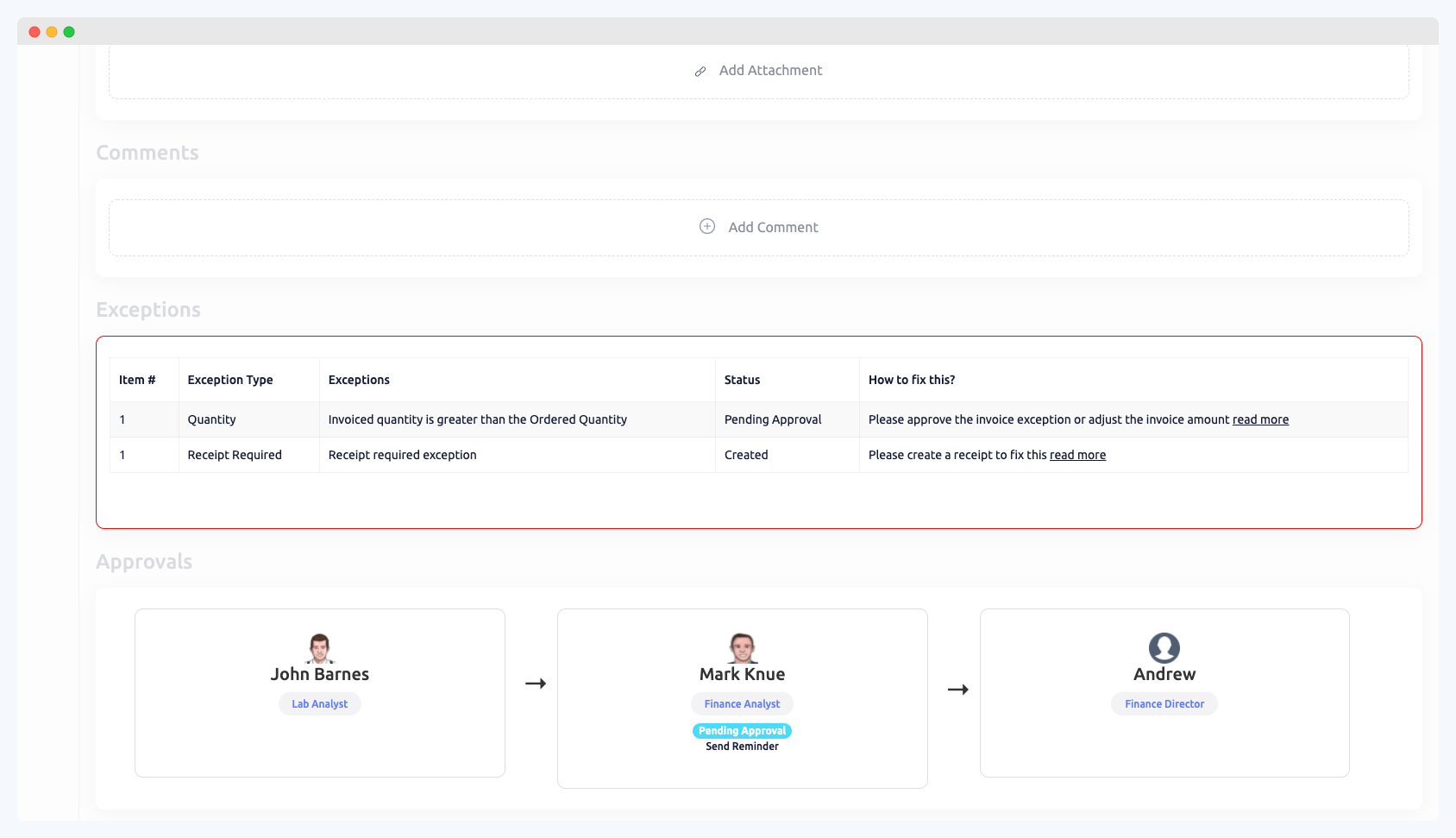
Accounting sync. Approved POs, vendors and invoices sync to QuickBooks, Sage Intacct, NetSuite, Microsoft Business Central, Xero and Bill.com, so there’s no retyping.
Open API for property platforms. If your books run in Yardi, AppFolio or Buildium, ProcureDesk’s open API can connect to them, so the approved PO and its property, unit and GL coding don’t get rekeyed. The field mapping is scoped during setup.
Done-for-you setup. The team onboards your maintenance contractors, landscapers, cleaners and supply vendors, configures approval workflows including emergency thresholds, and trains property managers on the mobile app. Your controller owns the decisions in Steps 1 through 4. ProcureDesk’s team handles the configuration around those decisions.
What multi-entity approval looks like in practice: Aeon
Aeon is a nonprofit affordable housing owner, developer and manager in Minnesota. It runs more than 5,000 apartments and townhomes across 58 properties and over 50 individual property entities, on Sage Intacct.
The company had three requirements it wouldn’t drop:
- Capture the entity and dimension codes Sage Intacct needs.
- Support multi-step approvals with two to four approvers depending on type and amount.
- Keep a deep two-way link to the ERP.
About 200 invoices were sitting unapproved out of roughly 500 processed each week.
After ProcureDesk went live, the backlog of 200 pending invoices cleared, and the team now processes 500 invoices a week without manual follow-up, across 50-plus entities on one workflow. Greg Stegman, Controller, rated the implementation 10 out of 10 and said: “I would have to pry with a crowbar to get ProcureDesk out of our team’s hands right now.”

Aeon’s case is an AP invoice approval story. It shows what the coding and routing in Steps 2 and 3 look like at portfolio scale: entity codes captured up front and approvals routed by type and amount.
Bring your draft approval matrix to a working session
Watch a mobile request route through your tiers, with budget on the approval screen and the invoice matched back to its PO.
Purchase order policy template and approval matrix for property managers
A one-page policy is enough. Build yours from these parts:
- Purpose: one sentence on why approvals happen before spend.
- Scope: which categories require a PO and which are exempt.
- Thresholds: your approval matrix, by dollar band and category.
- Emergency purchases: verbal authorization now, PO within 24 hours.
- No-PO, no-pay rule: invoices without a PO go back to the requester.
- No backdated POs: a PO created after the work or the invoice does not count as approval, outside the emergency path.
- Consequences: what happens to repeat off-PO spend.
The two clauses most policies forget are the emergency procedure and the written no-PO, no-pay rule. Add both.
A sample PO form needs these fields: PO number, vendor, property, unit or common area, work order reference, GL code, line items, delivery instructions and requester. Start from the ProcureDesk PO template if you want a format to adapt.
Use this go-live checklist before the pilot:
- Pull 12 months of AP data and rank spend by vendor and category.
- Decide which categories require a PO, and write the exemptions down.
- Set thresholds and name a backup for every approver.
- Clean the vendor master and confirm insurance and W-9s.
- Map categories to GL accounts, and set the capex rule.
- Pick one or two pilot properties.
- Train field staff on the request path and publish your response time.
Frequently asked questions about implementing purchase orders in property management
How long does it take to implement purchase orders in property management?
A focused rollout takes about a quarter: 2 to 3 weeks for software setup and 30 days for a pilot at one or two properties, then portfolio-wide use. Policy and threshold decisions should be finished before setup begins.
What dollar amount should require a purchase order?
There’s no universal number. Start where your controllable spend concentrates, using 12 months of AP data by vendor and category, then adjust at 90 days. Larger communities can carry higher limits than small buildings.
Do emergency repairs need a purchase order?
Yes, but after the fact. Give verbal authorization when the emergency happens and document the PO within 24 hours. Put the rule in writing so it doesn’t become a standing exception.
How do purchase orders work with a property accounting system?
POs start in the procurement workflow, and approved commitments and invoices sync to the accounting system so data isn’t entered twice. Confirm that the sync direction and the coding fields match how your books are structured.
Does ProcureDesk integrate with Yardi, AppFolio or Buildium?
Yes, through its open API. ProcureDesk can be connected to property management platforms such as Yardi, AppFolio and Buildium, and approved POs, vendors and invoices can sync without double entry. It’s an API connection rather than a pre-built native connector, so the property, unit and GL field mapping gets scoped during setup. Native integrations are available for QuickBooks, Sage Intacct, NetSuite, Microsoft Business Central, Xero and Bill.com.
Can owner approval be built into the workflow?
Yes. Route capex above the management agreement limit to owner approval as a defined step, and keep the approval on the PO record so it’s there for audits.
What should we do about recurring vendors like landscaping and janitorial?
Use blanket POs tied to the contract value plus an allowance for extras, instead of a new PO each month. Require a new approval when the balance is used up.
Who should own the purchase order process?
Accounting owns the controls and matching. Operations owns adoption. Both should agree on thresholds before launch.
What’s the difference between a requisition and a purchase order?
A requisition is the internal request to buy something. A purchase order is the approved commitment sent to the vendor. Separating them gives field staff a simple way to ask and gives approvers a clear point to say yes or no.
Your next step
Implementing purchase orders in a property management company comes down to a short list of decisions. Decide what needs a PO, who approves at each amount, and how spend gets coded to a property and unit. Then decide how recurring vendors are covered and how invoices match back before payment. Make those calls on paper, pilot them at one or two properties, and hold the no-PO, no-pay line.
See your PO process running on ProcureDesk
Mobile requests, approval routing from your matrix, budget checks, invoice matching and accounting sync. Setup takes 2 to 3 weeks.
Resources
- Property management procurement and AP: the complete guide
- Purchase order software for property management companies
- Purchase order process guide
- Approval workflows
- Purchase requisition software
- Blanket order glossary entry
- Three-way match glossary entry
- Purchase order template
- Aeon case study

About the author
Sachin Sharma
Sachin Sharma is the CEO of ProcureDesk and has spent over 23 years in procurement and supply chain technology. He previously led procurement operations at a Fortune 500 company before founding ProcureDesk. Connect with him on LinkedIn.