Tail spend management for the purchases nobody planned
Small, one-off buys from vendors you use once. Approved, paid and coded like the rest.
Built for Controllers who want every purchase on the record, not just the big ones.

- Who runs it
- Anyone can request. Budget owners approve. AP reconciles.
- When you need it
- New vendors every month, card statements nobody can explain, invoices with no PO.
- Works with



- Live in
- 2–4 weeks, set up for you. No IT project.
What tail spend actually is
Tail spend is the long list of low-value, infrequent purchases outside your main supplier contracts. McKinsey describes it as up to 80–90% of a company's purchase transactions but only 10–20% of its spend. Because each buy is small, it skips the process, and that's where vendor sprawl and surprise invoices come from.
Source: McKinsey, Long tail, big savings (2018)
Each purchase is too small to matter. Together, they're most of the transactions AP handles.
Request
Logged before buying.
Bought first, asked laterVendor
Checked or approved.
New vendor every weekApproval
Limit decides who signs.
Nobody signsPayment
Single-use card or PO.
Personal card, reimbursedReceipt
Prompted and attached.
Lost in an inboxBooks
Coded and synced.
Coded at month-end
Same small buys. Nothing off the record.
Five steps from one-off need to closed books
Each step shows who acts. The goal isn't more approvals. It's that small buys follow the same path as big ones.
Start with a request
Even a $40 buy starts as a request.
- Preferred items flagged in the internal catalog
- Punchout to 200+ supplier catalogs
- Off-catalog item by link or manual line
Keep the vendor list clean
New vendors are approved before they're paid.
- Supplier approval workflow for new vendors
- Inactive vendors can't be used on new orders
- W-9 check can block invoices from vendors with an expired form
New vendor request · Bright Signs LLC
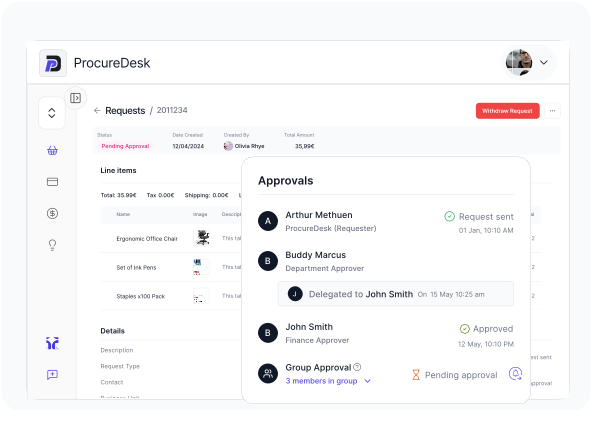
Approve by limit, not by habit
Small requests move. Larger ones route.
- Self-approval up to each person's limit
- Above the limit, the request escalates
- Budget owner sees the amount against budget
Approval rule · tail purchases
Pay with a single-use card
The card is issued after approval, for that purchase.
- Virtual card generated when the request is approved
- One-time use by default, with an expiry date
- Card blocked once the limit or date is reached

Reconcile without chasing
Receipts and statement lines meet in one place.
- Card transactions sync with a receipt prompt
- Statement lines matched as exact, partial or missing
- Syncs to your accounting system:

Bring last month's card statement. We'll show how each line would have run.
What happens when a tail purchase doesn't fit the rules
Tail spend is mostly exceptions. These are the common ones and where they land.
Known need
Office, lab or facility items through punchout or a preferred internal catalog.
One-off need
A vendor you'll use once, approved first and paid with a single-use card.
| The exception | What ProcureDesk does | Who usually resolves it |
|---|---|---|
| New vendor requested | Goes through the supplier approval workflow before any PO or payment. | Finance |
| Expired W-9 | Invoice creation is blocked until a renewed W-9 is uploaded, if turned on. | AP |
| Inactive vendor | Can't be picked on new orders. Reactivate or choose another vendor. | Finance |
| Above self-approval limit | Escalates to the next approver in the hierarchy. | Budget owner |
| Card receipt missing | Cardholder is prompted to attach it to the synced transaction. | Cardholder |
| Statement line unmatched | Shown as partial or missing match for AP to resolve. | AP |
| Card used up | Blocked automatically at its transaction limit or expiry date. | Automatic |
| Expense outside policy | Expense rules flag it for review. | Approver |
"Who usually resolves it" reflects common practice. Set owners to match your own policy.
Three tail purchases from an ordinary month
The conference booth banner
BeforeMarketing pays a new print shop on a personal card. AP finds out from the reimbursement.
AfterThe request goes in first. The vendor is approved and a single-use card pays the exact amount.
The lab's one-off reagent
BeforeA scientist emails a quote from a vendor nobody has used.
AfterThe vendor goes through approval, the PO goes out, and the invoice matches it.
The mystery card line
BeforeA $312 charge sits on the statement with no receipt and no owner.
AfterThe transaction syncs with a receipt prompt and the statement line matches it.
Illustrative scenarios based on common workflows.
What finance leaders say about getting small spend on the record
Finance teams that run purchasing and AP on ProcureDesk








Cerebral Therapeutics replaced Word POs and Excel tracking
Most of its spending goes to third-party vendors and service providers. With POs in Word and tracking in Excel, the team couldn't easily see spend by vendor over time. ProcureDesk now generates POs, tracks orders and syncs to Xero.
“We needed to know how much we had spent by vendor over time, and with the systems we had, it was extremely difficult to figure that out.”
GAGuy AnthonyCFO, Cerebral Therapeutics
“I think the biggest impact ProcureDesk has had for us is being able to avoid hiring people to continue to support our manual processes.”
GAGuy AnthonyCFO, Cerebral Therapeutics
“We were using multiple systems for different types of orders. As our order volume increased, the time that we were spending processing manual orders was also increasing. We needed to find a system that we could use for all purchases.”
ETOperations teamEvolveImmune Therapeutics
“Anybody within the company could order goods or services, and approval would only happen after the invoice arrived. We needed to put controls in place, and ProcureDesk became one of those must-have solutions.”
CWCameron WilliamsAccounting Manager, Metabolon
Results come from ProcureDesk customer data. Quotes are verbatim from published case studies.
Cards make small buys fast. They don't make them visible.
| Capability | Shared company cardCard and statement | Expense reportsReimbursement after the fact | ProcureDeskProcurement and AP automation |
|---|---|---|---|
| When control happens | After the charge | After the purchase | ✓Before the purchase |
| New vendors | Not checked | Not checked | ✓Approved before payment |
| Card exposure | Reusable card details | Personal cards | ✓Single-use card per approved request |
| Receipts | Chased at month-end | Attached late, if at all | ✓Prompted on the synced transaction |
| Accounting sync | Statement import | Manual entry | ✓QuickBooks, Sage Intacct, NetSuite, Business Central, Xero |
Standard capability at time of writing; confirm current features with each provider.
Five numbers that show tail spend is under control
Track these monthly, before and after you change the process. If they don't move, the process hasn't changed.
Spend on a PO or approved request
Share of tail spend that started as a request.
Should rise every month after go-live.Active vendor count
Vendors paid in the last 12 months.
Falling count means consolidation is working.One-time vendors
Vendors used once in the period.
High share points to missing catalog items.Unmatched card lines
Statement lines with no receipt at month-end.
Target: near zero before close.Catalog share
Share of tail orders placed through catalogs.
More catalog orders, fewer new vendors.Questions teams ask about tail spend management
What is tail spend?
Low-value, infrequent purchases outside your main supplier contracts. McKinsey estimates it makes up 80–90% of purchase transactions but only 10–20% of total spend.
What is tail spend management?
The process of bringing those small purchases under the same request, approval, payment and coding rules as everything else, without slowing people down. For the strategy side, see our CFO guide to tail spend.
Won't approvals slow down small purchases?
Not if limits are set well. Requests within a person's self-approval limit are approved automatically, and only larger ones route to a budget owner.
How do you stop vendor sprawl?
Flag preferred items in your internal catalog, route new vendors through a supplier approval workflow, and mark unused vendors inactive so they can't be picked on new orders.
How do single-use virtual cards work?
When a request with ProcureDesk Virtual Card as the payment method is approved, a card is generated for that purchase. Cards are one-time use by default and are blocked after their transaction limit or expiry date. Virtual cards are an add-on.
Do we still need expense reports?
Card transactions sync into ProcureDesk with a receipt prompt, and statements match lines as exact, partial or missing, which removes most of the manual expense-report work.
Can we block vendors without a valid W-9?
Yes. With the W-9 compliance check turned on, invoices can't be created for a supplier whose W-9 has expired until a renewed form is uploaded.
How is this different from a corporate card program?
Cards control spend after the swipe. ProcureDesk starts at the request, so the vendor and amount are approved before money moves, and the card is issued for that purchase.
Which accounting systems does it sync with?
QuickBooks Online, Desktop and Enterprise, Sage Intacct, NetSuite, Business Central and Xero, with Bill.com for payments.
How long does setup take?
2 to 4 weeks, done for you, including approval limits, catalogs and accounting sync.
Small purchases. Same rules as the big ones.
See how your own tail would run. Setup takes 2 to 4 weeks, and we do it for you.


Resources
Company



© Copyright 2026, All Rights Reserved by PROCUREDESK