Procurement software for property management, coded to every property and owner entity
Your site teams order repairs, turns and supplies every day, and the invoice shows up weeks later with no PO, split across properties nobody coded. ProcureDesk gets maintenance spend approved before the work starts, codes every line to the right property, GL account and owner LLC, and shows finance what each property has committed before the invoice lands.







Who this is for, and who it isn't
Most software sold to property managers runs leasing, tenants and rent. ProcureDesk does a different job: it controls what your properties spend, from the repair request to the vendor payment, and it runs beside your property management system. Here's the line, before you spend time on a demo.
✓Built for you if
- You manage a multi-property portfolio, often with a separate owner LLC per property, and you're the Controller, VP of Finance or Accounting Manager who answers to owners and lenders
- Site managers and techs order repairs, turns, HVAC work and supplies on a verbal okay, and accounting finds out what it cost when the invoice arrives
- One landscaping or janitorial invoice covers a dozen properties, and someone splits it by hand in a spreadsheet
- Invoices sit with approvers who haven't logged in, and you only hear about it when the vendor calls
- Your books run on Sage Intacct, NetSuite, QuickBooks, Business Central or Xero, with or without Yardi or AppFolio on the leasing side
- You couldn't tell an owner today what their property has committed this month without a day of digging
—Look elsewhere if
- You need a property management system for leasing, tenant communication or rent collection. ProcureDesk doesn't replace Yardi, AppFolio or Buildium. It runs beside them
- You need work-order dispatch and technician scheduling. That's your maintenance platform's job
- You run a handful of units and pay a few invoices a month. The controls here are more than you need
The spend is committed in the field before accounting ever sees it
A tech walks a unit, calls the plumber, and the work is done the same afternoon. That's how a property should run. The trouble starts three weeks later, when the invoice arrives with no PO, no property code and no record of who said yes.
The estimate and the invoice don't match
A $700 repair estimate turns into a $3,200 invoice. Nothing flags the difference, because there was no approved commitment on the books to check it against.
Invoices stall on someone's desk
Out of a few hundred invoices a week, dozens sit with a regional or off-site approver. Nobody can see whose desk they're on until a vendor puts the account on hold.
One bill, twelve properties, coded by hand
A landscaping contract covers twelve sites. A roofing bill mixes a repair with a capital replacement. Twelve near-identical utility bills go to twelve different GLs, and the fifth one lands on the wrong property because it looks like the fourth.
The wrong entity, on the wrong owner's statement
When each property is its own LLC, a miscoded invoice doesn't just break the GL. It shows up on the wrong owner's report, and now you're explaining a coding error instead of fixing one.
No audit trail an owner or lender will accept
Approvals happen by text and email. When an owner or auditor asks who approved a $14,000 HVAC replacement and why, the answer is a search through someone's inbox.
Approve the work before it starts, without slowing the site down
You set the rules by property, category and amount. ProcureDesk applies them at the request, so the approval, the property code and the budget check happen before a vendor is called.
A site manager or tech submits the request from the mobile app: the property, the unit or common area, and the vendor's quote. Routine items under your threshold are approved on the spot. Anything larger routes to the right approver by property and amount.
The approved PO goes to the vendor with its number. Finance sees the commitment against that property's budget the moment it's made, not when the invoice arrives.
The site confirms the work was done. When the invoice comes in, ProcureDesk matches it to the PO and the receipt, flags only the exceptions, and posts the coded result to your accounting system.
How each kind of property spend gets controlled
| Spend type | Typical items | How it's handled |
|---|---|---|
| Repairs and maintenance | Plumbing, electrical, appliance repair | Mobile request with the vendor quote, auto-approved under the property threshold |
| Unit turns | Paint, flooring, cleaning, appliances | PO per turn, coded to property and unit, checked against the turn budget |
| Contracted services | Landscaping, janitorial, pest control | Blanket POs with a set amount, invoices split across properties line by line |
| Capital projects | Roofs, HVAC replacement, parking lots | Approval above your limit, flagged capex at the line, tracked to the property |
| Supplies | Filters, bulbs, hardware, janitorial supplies | Punchout catalogs at contracted pricing, coded at checkout |
| Utilities and recurring bills | Water, power, waste | Invoice-first routing, coded to the right property GL with no PO required |
Invoices land on the right property, matched before payment
By the time an invoice arrives, ProcureDesk already knows which property it belongs to, which owner entity pays for it, and what was approved. Your AP team stops splitting bills in spreadsheets and reviews only the ones that don't line up.
Capture
Vendors email invoices to a dedicated inbox. ProcureDesk reads the invoice data with OCR, so nobody keys it in.
Match
Each invoice is checked against the PO and the receipt: price, quantity and scope.
Clear or flag
A clean match goes straight to approval. A mismatch, like a $700 estimate billed at $3,200, is flagged with the reason before anyone pays it.
Code and split
Property, unit, GL account and owner entity carry over from the request. Multi-property invoices split at the line, with capex and repairs separated on the same bill.
Approve and post
Approvers get an email the moment an invoice reaches them and can approve from there. Approved invoices post to your accounting system with no rekeying.
Duplicate invoices are flagged before they’re paid. Late-payment fees drop because approvals aren’t waiting on one person’s inbox. Month-end close gets shorter because the match is done before the close starts. See invoice matching →
A budget for every property, checked before the work starts
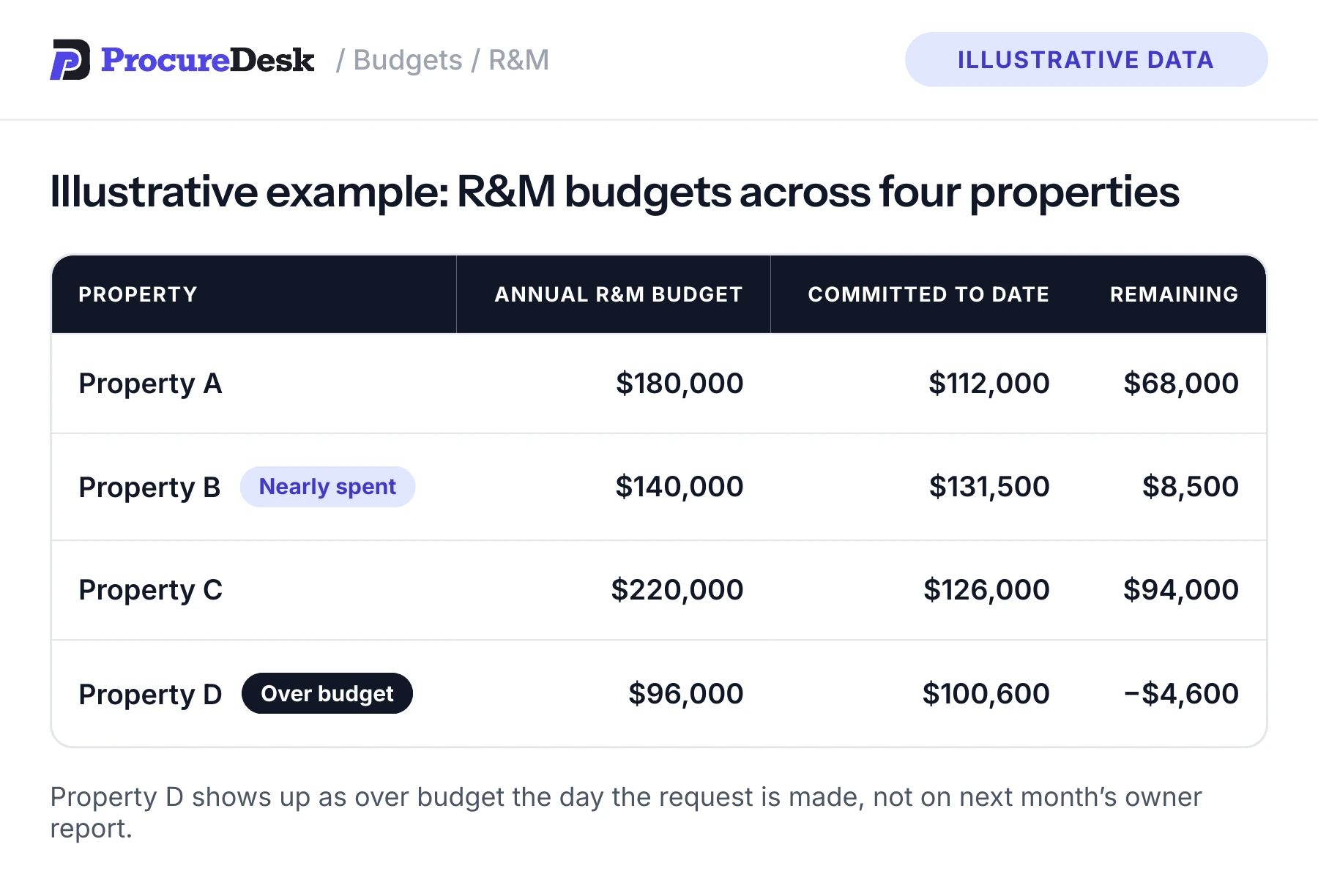
A portfolio can sit under budget on repairs while one building blows through its allowance by summer. ProcureDesk sets the budget per property and per category, then checks every request against what's left, including what's already committed and not yet invoiced.
- Set a budget for each property, then split it by category: repairs, turns, contracted services, capital
- See committed spend as well as paid invoices, so next month's bills show up this month
- Give property and regional managers their own budget view, so they own approvals without finance chasing them
- Roll every property up by owner entity or portfolio for owner and lender reporting
What a property finance team actually needs
Your site teams aren't at desks, your owners want clean reports, and your finance team is small. Everything below assumes all three.
Mobile field requests
Site managers and techs submit requests and approvers act from their phone. Mobile app →
Multi-property invoice coding
Split one invoice across properties, units and owner entities at the line, with capex flagged separately. Invoice coding →
Property-level budgets
A budget for each property, checked at the request, rolled up by entity or portfolio. Budget management →
Invoice-first or PO-first
Automate AP on the process you run today and add POs property by property. Purchase order software for property management →
Blanket POs for contracted services
Set an amount for landscaping, janitorial or pest control and draw it down as invoices arrive. Blanket purchase orders →
200+ punchout catalogs
Order maintenance supplies from Home Depot, Grainger, Amazon Business and more at your contracted pricing, coded to the property at checkout. Punchout catalogs →
Full audit trail
Every request, approval, change and payment recorded against the property and the person, ready for owners, lenders and auditors. Reporting →
What property finance teams see after switching
Our implementation lead said, 'give it to me, I'll get it set up for you' — and it was ready for us to start looking at and testing. We're kind of looking at each other like, this is too good to be true.

Beside your property management system, posting to your books
Three jobs, three systems. Knowing which one you need saves everybody a call.
Your property management system
Yardi, AppFolio or Buildium run leasing, tenants, rent and work orders. They stay exactly as they are.
ProcureDesk
Everything your properties buy: requests, approvals, POs, budgets by property, invoice coding, matching and payment.
Your accounting system
Sage Intacct, NetSuite, QuickBooks (Online, Desktop and Enterprise), Microsoft Business Central or Xero. ProcureDesk syncs vendors, GL codes, properties and entities in, and posts approved invoices back with no rekeying.
Guides for property management finance teams
How much of your spend is approved before it happens?
Answer nine questions on pre-approval, PO coverage, approval automation and month-end close. See where uncontrolled spend is hiding and what to fix first.
Take the 3-minute scorecardSee what manual AP is costing you
Enter your monthly invoice volume, minutes per invoice and AP hourly cost. You get the annual cost of processing invoices by hand, and what that looks like automated.
- Invoices per month
- Minutes per invoice
- AP hourly cost
- Annual spend
Property management procurement, answered
Is ProcureDesk a property management system?
No. ProcureDesk handles what your properties spend: requests, approvals, purchase orders, invoice coding, matching and payment. Yardi, AppFolio or Buildium keep running leasing, tenants and rent, and ProcureDesk runs beside them.
Does ProcureDesk work with Yardi and AppFolio?
Yes. ProcureDesk connects to Yardi, AppFolio and Buildium today through an open API or batch file import.
Do we have to use purchase orders on day one?
No. You can start invoice-first: every invoice routes to the right approver and gets coded to the right property and entity. Turn on POs for turns, capex and contracted services when you're ready.
How do you code one invoice across several properties?
Each invoice line can be split across properties, units and owner entities, with capex flagged separately from repairs. The coding carries from the request to the invoice and posts to your accounting system.
Can each property be its own LLC?
Yes. Invoices post to the correct owner entity, approvals can route by entity, and you can report by property, entity or portfolio.
Can site staff request and approve from their phones?
Yes. Site managers and techs submit requests from the mobile app, and approvers act from their phone or the approval email.
How does invoice matching work?
ProcureDesk matches each invoice to its PO and the receipt the site confirmed. Clean matches go to approval, and mismatches are flagged with the reason, so AP reviews exceptions instead of every invoice.
Which accounting systems do you integrate with?
Sage Intacct, NetSuite, QuickBooks (Online, Desktop and Enterprise), Microsoft Business Central and Xero, plus Bill.com for payments.
How long does implementation take?
Two to three weeks. ProcureDesk's team builds your approval rules, property budgets, entity coding and accounting integration.
Who is this built for, and who should look elsewhere?
It fits property management companies running a multi-property portfolio, often with separate owner entities, and the Controllers and finance leaders who manage them. If you need a leasing or tenant system, or you pay a few invoices a month, ProcureDesk isn't the right fit and we'll tell you so on the call.
See it on your properties.
A 30-minute walkthrough built around your portfolio: your properties, your owner entities, your approval rules and your accounting system.



Resources
Company



© Copyright 2026, All Rights Reserved by PROCUREDESK