School procurement software for the business office that runs on one or two people
Teachers need supplies this week. Your board and auditors need every dollar tied to a budget, a fund and an approval. ProcureDesk replaces paper requisitions with one approved path from request to payment, codes every purchase to the right campus, program or grant before it's ordered, and shows you what's committed before the invoice arrives.







Who this is for, and who it isn't
School software covers a lot of ground: student information, enrollment, fund accounting, payroll. ProcureDesk does one job. It controls what your school buys, from the teacher's request to the vendor payment, and hands clean, coded transactions to your accounting system. Here's the line, before you spend time on a demo.
✓Built for you if
- You're the business manager, CFO or director of finance at a charter school, charter network or independent school, and purchasing runs through you
- Requisitions still travel on paper, by email or in a spreadsheet, with signatures collected by walking a form from office to office
- You track spending by campus, department, program or grant, and coding it correctly after the fact eats your month-end
- Your board, authorizer or auditor asks who approved a purchase and which budget it came from, and the answer is in a filing cabinet
- Your accounting runs on QuickBooks, Sage Intacct, NetSuite, Business Central or Xero
- Teachers buy from Amazon on personal cards and submit receipts later, because the approved way takes too long
—Look elsewhere if
- You need a student information system, enrollment or payroll. ProcureDesk doesn't do any of those
- You need a formal public-bid and solicitation system for a large district's sealed bids and RFP awards. That's a different category
- You make a handful of purchases a month and one person approves everything. The controls here are more than you need
The business office is the bottleneck nobody planned for
A teacher fills out a requisition. It goes to a budget manager for a signature, then to the business manager for approval, then to whoever places the order. If one person is out, the form sits. That's how a $60 order of classroom supplies takes a week.
Paper requisitions that wait in an inbox
Every form needs a physical signature, and every signature needs the right person in the building. Orders stall for days, and nobody can see where a request is.
Budgets you can only check after the money is spent
The budget lives in a spreadsheet the business manager updates by hand. By the time a department sees it's over, the orders are already placed.
Grant and program coding done at month-end
A purchase funded by a grant has to be coded to that grant, and the documentation has to back it up. When coding happens after the invoice arrives, it's guesswork, and fixing it before an audit takes days.
Workarounds on personal cards
When the approved path is slow, teachers buy it themselves and ask for reimbursement. The spend never touched a budget check, and the receipt shows up weeks later.
Audit questions answered from a filing cabinet
Auditors and boards want to see who requested, who approved, what was received and what was paid. With paper, that means pulling folders one at a time.
Make the approved way the fastest way to order
You set the rules once: who approves what, at which amount, for which budget. ProcureDesk applies them to every request, so teachers get supplies faster and the business office stops chasing signatures.
A teacher or department head opens ProcureDesk, picks items from an approved catalog or punchout site such as Amazon Business or Staples, and codes the request to a campus, program or grant. ProcureDesk shows what's left in that budget before it's submitted.
The request routes to the budget owner, then the business manager, based on amount and fund. Approvers act from email or their phone. Nothing is walked across the building.
The PO goes to the vendor. Staff confirm what arrived. When the invoice comes in, ProcureDesk matches it to the PO and the receipt and posts the approved, coded result to your accounting system.
How each kind of school spend gets controlled
| Spend type | Typical items | How it's handled |
|---|---|---|
| Classroom supplies | Paper, art supplies, science kits | Punchout catalogs, auto-approved under a set amount within the department budget |
| Grant-funded purchases | Intervention materials, staff training, devices | Coded to the grant at request, routed to the grant owner, documents attached |
| Technology | Chromebooks, licenses, accessories | Approval above your limit, receipt confirmed before payment |
| Facilities and services | Repairs, custodial, contractors | Quote attached, approval by amount, receipt confirmed before payment |
| Recurring contracts | Food service, transportation, copier leases | Blanket POs with a set amount, drawn down as invoices arrive |
| Athletics and activities | Uniforms, equipment, event costs | Program budget per season, tracked by category |
Invoices match themselves, so AP reviews only the exceptions
By the time an invoice arrives, ProcureDesk already knows what was ordered, which budget it came from and what was received. The business office stops hunting for paperwork and reviews only the invoices that don't line up.
Capture
Vendors email invoices to a dedicated inbox. ProcureDesk reads the invoice data, so nobody keys it in.
Match
Each invoice is checked against the purchase order and the receipt: price, quantity and item.
Clear or flag
A clean match goes straight to approval. A mismatch is flagged with the reason, such as a price difference or a missing receipt.
Code and post
The campus, program and grant coding from the request carries onto the invoice. Approved invoices post to your accounting system with no rekeying.
Pay
Pay by ACH, virtual card or check, or push approved invoices to Bill.com.
Duplicate invoices are flagged before they’re paid. Late-payment fees drop because approvals aren’t waiting on one person’s inbox. Month-end close gets shorter because the match is done before the close starts. See invoice matching →
A budget for every campus, program and grant
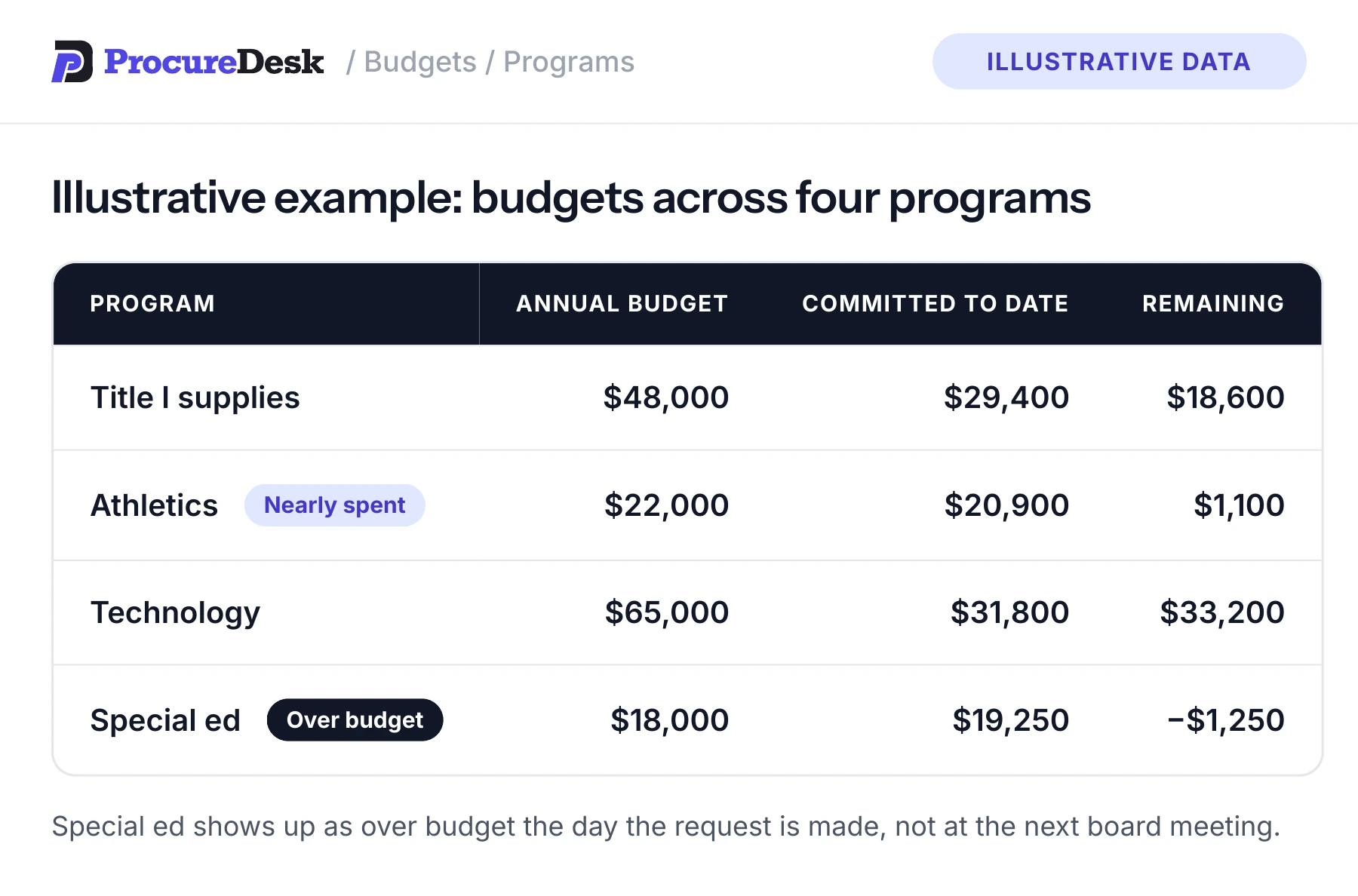
A schoolwide budget hides the problem. The school can sit under budget overall while one program is already overspent. ProcureDesk sets budgets at the level you report on, then checks every request against what's left.
- Set budgets by campus, department, program or grant, and see committed spend alongside paid invoices
- Code each purchase to its funding source when it's requested, not when the invoice arrives
- Give department heads and program owners their own budget view, so they own their approvals
- Pull every requisition, approval, receipt and invoice for a grant or program in one report when the auditor asks
What a school business office actually needs
Your requesters are teachers, not purchasing staff, and your business office is one or two people. Everything below assumes both.
Online requisitions
Replace paper forms with a request any teacher can submit in a few minutes. Purchase order software for charter schools →
Approvals by amount and fund
Route to the budget owner, the business manager or the head of school based on your rules. Approve from email or a phone. Mobile approvals →
200+ punchout catalogs
Amazon Business, Staples, CDW and more, with the budget and coding attached to every order. Punchout catalogs →
Budgets by campus, program and grant
Checked at the request, rolled up into one view. Budget management →
Blanket POs for recurring contracts
Set an amount for food service, transportation or leases and draw it down as invoices arrive. Blanket purchase orders →
Audit-ready reporting
Every request, approval, receipt and invoice in one record, searchable by vendor, program and grant. Reporting →
What school business offices see after switching
It's allowed me more opportunities to do business manager type stuff without being buried in the weeds. And ProcureDesk has been a huge factor in that. It's enabling me to have more free time to work on other things.

Beside your accounting system, not instead of it
Three jobs, three systems. Knowing which one you need saves everybody a call.
Your student information system
Enrollment, attendance, grades. ProcureDesk doesn't touch it.
ProcureDesk
Everything the school buys: requisitions, budgets by program and grant, approvals, POs, receiving, invoice matching and payment.
Your accounting system
QuickBooks (Online, Desktop and Enterprise), Sage Intacct, NetSuite, Microsoft Business Central or Xero. ProcureDesk syncs vendors, GL accounts and classes or dimensions in, and posts approved invoices back with no rekeying.
Guides for school business offices
How much of your spend is approved before it happens?
Answer nine questions on pre-approval, PO coverage, approval automation and month-end close. See where uncontrolled spend is hiding and what to fix first.
Take the 3-minute scorecardSee what manual AP is costing you
Enter your monthly invoice volume, minutes per invoice and AP hourly cost. You get the annual cost of processing invoices by hand, and what that looks like automated.
- Invoices per month
- Minutes per invoice
- AP hourly cost
- Annual spend
School procurement, answered
What is school procurement software?
It replaces paper requisitions and email approvals with one system for requesting, approving, ordering, receiving and paying for what a school buys. ProcureDesk adds budget checks by campus, program and grant at the moment of request, and posts the approved result to your accounting system.
Does ProcureDesk work for charter schools and independent schools?
Yes. It's built for school business offices that run purchasing with a small team, including charter schools, charter networks and independent schools.
Can we code purchases to a grant or program?
Yes. Each request is coded to the campus, department, program or grant when it's created, checked against that budget, and the coding carries through to the invoice and your accounting system.
How do approvals work when staff aren't at a desk?
Approvers get the request by email or on their phone and approve it there. Routing follows your rules by amount, department and fund.
Can teachers order from Amazon?
Yes. Amazon Business, Staples, CDW and 200+ other punchout catalogs are available inside ProcureDesk, with the budget check and approval built into the order.
How does this help with our annual audit?
Every purchase keeps its request, approvals, receipt and invoice in one record. You can pull the full trail for a vendor, program or grant without going through paper files.
What happens to invoices that arrive without a PO?
They route to the right approver with coding attached and are tracked as spend that bypassed the PO process, so you can see where they come from.
Which accounting systems do you integrate with?
QuickBooks (Online, Desktop and Enterprise), Sage Intacct, NetSuite, Microsoft Business Central and Xero, plus Bill.com for payments.
How long does implementation take?
Two to four weeks. ProcureDesk's team sets up your approval rules, budgets, catalogs and accounting integration, so your business office doesn't run an IT project.
Who should look elsewhere?
If you need a student information system, payroll or a formal public-bid system for a large district, ProcureDesk isn't the right fit, and we'll tell you so on the call.
See it with your budgets and your approvers.
A 30-minute walkthrough built around your school: your campuses, programs and grants, your approval rules and your accounting system.



Resources
Company


© Copyright 2026, All Rights Reserved by PROCUREDESK