Your PMS manages tenants. It does not manage maintenance spend. Compare the best procurement software options for property management companies in 2026, including ProcureDesk, Yardi, Precoro, and Tradogram.
TL;DR:
- The Scaling Gap: While your PMS handles tenants, it fails at maintenance spend, leading to “maverick spend” once you surpass 1,000 units.
- Invisible Leakage: Lack of controls results in duplicate payments (0.1% to 0.5% of AP spend) and price variance across properties.
- Close Efficiency: Manual reconciliation drags month-end close to 7–10 days; automation can reduce this to 2–3 days.
- Pre-Commitment Control: Procurement tools enforce budget checks and approvals before the work starts, not after the invoice arrives.
- Mobile Field Adoption: Punchout catalogs allow techs to shop approved vendors on-site, capturing SKUs and negotiated pricing automatically.
- Touchless AP: Automated three-way matching handles roughly 80% of routine invoices, allowing your team to focus only on exceptions.
- NOI Impact: Implementing a structured procure-to-pay workflow typically reduces total maintenance spend by 8% to 15% in the first year.
If you are managing between 1,000 and 30,000 units, you have likely crossed the threshold where informal purchasing stops being a minor annoyance and starts costing you real money.
At 1,000 units, you have multiple maintenance techs ordering from different vendors, a growing invoice backlog, and a finance team reconciling vendor bills without a matching purchase order in sight.
At 5,000 units, the problem has a name: maverick spend. At 10,000 units or more, it has a dollar figure attached and shows up in your NOI(Net Operating Income) every quarter.
Your property management system handles leasing, rent collection, and tenant communication well. But when a maintenance tech texts an HVAC contractor for an emergency repair, orders supplies from a personal Amazon account, or approves a subcontractor scope verbally, your PMS has no record of any of it. By the time the invoice arrives, the money is already committed.
ProcureDesk is a procurement and accounts payable automation platform built for finance teams managing 50 or more purchase orders and 100 or more invoices per month. Property management companies use it to put purchase controls in place before the spend happens, not after. Maintenance techs submit requests from their phones. Approvals route automatically. Three-way matching runs without manual input. See how it works for property management teams.
This guide covers where your PMS falls short on procurement, the best tools to fix it, and what a working field-to-finance workflow actually looks like.
Table of Contents
Why the Informal System Breaks Down at Scale
A property management company managing 200 units can often absorb informal purchasing. One or two maintenance techs, a small vendor list, a finance coordinator who knows every invoice by heart. When the volume is low enough, the workarounds hold.
The 1:100 staffing benchmark the industry uses (roughly one property management staff member per 100 units) tells you where operational complexity compounds. At 1,000 units, you have 10 or more staff across properties, multiple maintenance teams contacting vendors independently, and potentially 50 to 150 purchase orders in motion at any given time. The informal system does not scale with headcount.
Here is where the money leaks when purchasing is not structured:
No pre-approval before vendor contact. A tech calls a plumber directly. The scope expands from a $700 repair to a $3,200 job. Finance finds out when the invoice arrives. There is no PO to match it against and no record of who authorized the expanded scope.
Price inconsistency across properties. Without locked vendor catalogs, different properties pay different rates to the same supplier for the same service. Multiply that across 20 properties, and the variance adds up to real money.
Duplicate invoices. Vendors email invoices to the property manager, the maintenance supervisor, and the AP inbox simultaneously. Without automated matching, duplicates slip through. Industry benchmarks put duplicate payments at 0.1% to 0.5% of total AP spend. On $3M in annual maintenance vendor spend, that is $3,000 to $15,000 in preventable payments.
Month-end close drags on. Without POs and receipts sitting in a system, your AP team reconciles maintenance invoices manually. Controllers without procurement automation commonly report close taking 7 to 10 days. With automation, that typically compresses to 2 to 3 days.
No audit trail for owner reporting. When an owner asks why maintenance costs were up 22% last quarter, the answer lives across email threads, text messages, and spreadsheet tabs assembled after the fact.
A dedicated procurement system solves each of these problems at the source, before the vendor is contacted, rather than after the invoice arrives.
What Your PMS Can and Cannot Do for Procurement
Property management platforms are designed for tenant operations: lease administration, rent collection, maintenance ticketing, and owner reporting. These tools do those jobs well.
The moment a maintenance request triggers a purchase, most PMS platforms hit a wall.
What a typical PMS offers for purchasing: basic work order creation linked to a vendor name, manual PO entry if POs are generated at all, vendor contact storage, and basic invoice upload into an attached accounting module.
What that means in practice: your maintenance coordinator opens a work order, picks a vendor, and calls or emails them. There is no pre-approved scope, no budget check before the work starts, and no formal purchase order. The invoice arrives weeks later. By the time your controller sees it, the money is already committed.
A dedicated procure-to-pay system operates differently. Before a dollar moves, there is a submitted request, a real-time budget check, an approval from the right person, a generated PO, and a documented paper trail. When the invoice arrives, it matches automatically against the PO and receipt. Exceptions are flagged. Clean matches process without anyone touching them.
These two systems are designed to run alongside each other, not replace each other.
Best Procurement Software for Property Management: 2026 Reviews
As you scale past 1,000 units, your PMS handles tenants well but fails to control maintenance spend. This gap creates “maverick spend” and manual invoice backlogs that directly hit your bottom line.
This guide reviews the top procurement tools for 2026 to help you close the field-to-finance gap and protect your NOI.
1. ProcureDesk: Best for Multi-Site, High-Volume Maintenance Operations

Who Is It For
Property management companies managing 1,000 to 30,000+ units with distributed maintenance teams across multiple properties, processing 50 or more purchase orders and 100 or more invoices per month.
ProcureDesk is a full procure-to-pay platform covering the entire purchasing lifecycle, from the moment a maintenance tech needs something to the moment a vendor payment syncs to your accounting system. It is not a PMS replacement. It is the procurement and AP layer that sits on top of your existing accounting software and handles everything between “we need something” and “the invoice is approved and paid.”
How Punchout Catalogs Change the Way Your Team Buys
This is the feature that makes the biggest difference for maintenance-heavy operations. A punchout catalog is a direct integration between ProcureDesk and a supplier’s website. Instead of a maintenance tech visiting Home Depot Pro, Lowe’s, Amazon Business, or Grainger separately, and either ordering on a personal account or calling in a verbal order, the punchout lets them shop directly inside ProcureDesk.
Here is what that looks like in practice. Your tech opens ProcureDesk on their phone. They see a list of approved vendors for their property. They tap Home Depot Pro and the site opens within ProcureDesk.
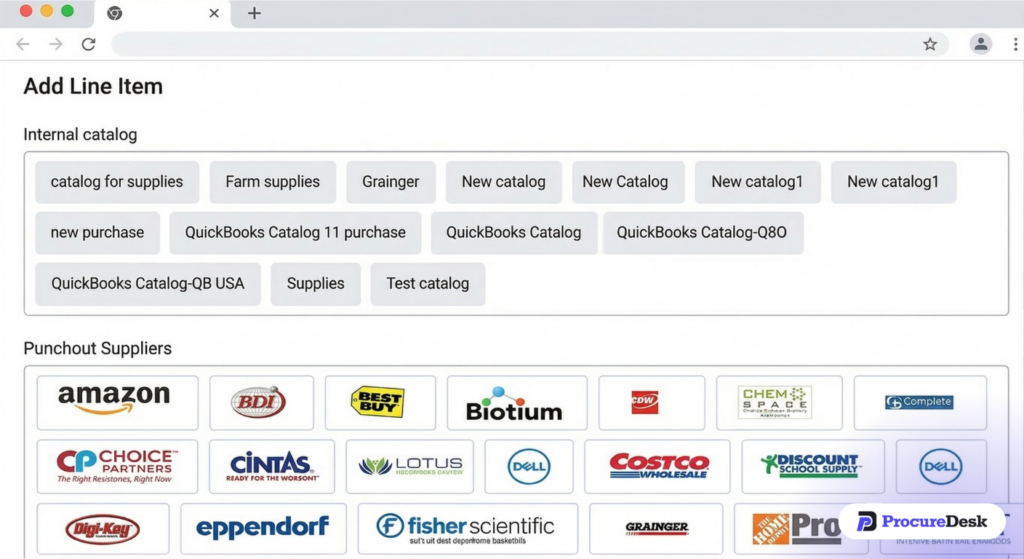
They browse exactly as they normally would and add items to their cart. When they are done, they hit submit. The cart does not check out on the Home Depot site. Instead, it converts into a purchase request inside ProcureDesk, with every item, SKU, quantity, and your negotiated price already populated.
No manual entry. No personal credit card. No verbal order with no paper trail. The tech never had to leave ProcureDesk.
ProcureDesk integrates with 200+ vendor punchout catalogs, including Home Depot Pro, Lowe’s, Amazon Business, Grainger, and Fastenal. These are exactly the suppliers your maintenance teams already use. You are not asking them to change where they buy. You are changing how the purchase gets documented and approved.
For finance teams, punchouts solve a problem that is hard to solve any other way: getting field staff to follow the purchasing process without making it harder than just texting the vendor directly.
The punchout experience is as easy as shopping online, which is why adoption holds up across distributed teams. Learn more in the full purchase order management overview.
How the Mobile App Keeps Field Staff in the Loop
Maintenance teams work on-site, not at a desk. Any procurement tool requiring desktop access for purchase requests will see low adoption among techs, and the process breaks down exactly where you need it most.
ProcureDesk’s mobile app gives field staff full purchase request functionality from any phone. A tech on a job can open the app, select the vendor, browse the punchout catalog, add items, select the property and budget code, and submit for approval in under three minutes.

Once the request is submitted, the tech gets a phone notification when the PO is approved. When items arrive, they log the receipt in the app, note any delivery discrepancies, and confirm quantity received. That receipt record is what makes automated three-way matching possible later.
Approvers also work from mobile. Regional directors can review requests, see real-time budget impact, and approve or reject directly from their phone. No VPN. No laptop required.
Budget Control Before the Invoice Hits
ProcureDesk lets you set budgets by property, department, project, vendor, and spend category. When a tech submits a request, the system checks available budget in real time before routing for approval. Approvers see exactly how much of the property budget has been used and what the new request would do to it.
Approval thresholds are configurable: routine supply orders under $500 can auto-approve, while subcontractor jobs over $2,000 route to the regional manager. Requests that would exceed budget are either automatically denied with a message explaining why, or flagged for a manager to override.
No one discovers budget overruns at month-end because the system flags them before the money is committed.
Three-Way Matching That Runs Without Your AP Team
When a vendor invoice arrives, ProcureDesk automatically compares it against the PO and the logged receipt. If all three documents align, the invoice processes without human review. If anything is off, the system flags the exception and routes it to the right person.
After implementation, most companies find exceptions represent less than 20% of total invoice volume. Your AP team handles the 20%, not the 100%.
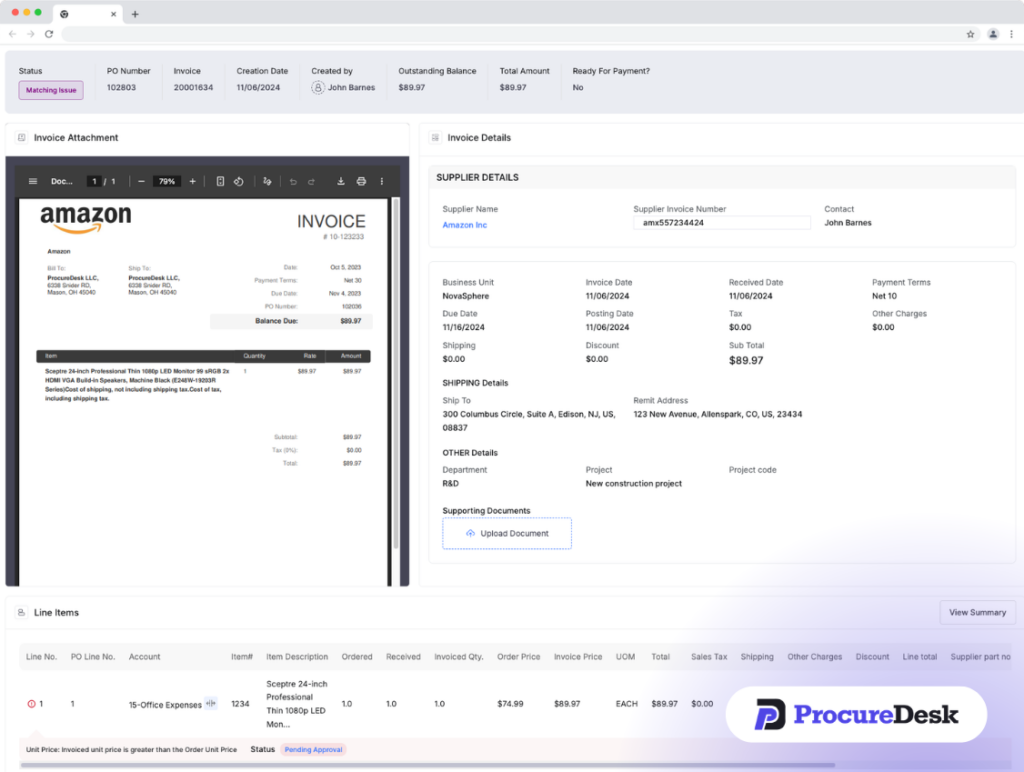
This is how invoice processing time drops. Not because your team works faster, but because they stop touching invoices that do not need them. Learn more about how AP automation software handles this at scale.
ERP and Accounting System Integration
ProcureDesk connects directly to QuickBooks, Xero, NetSuite, Sage Intacct, and Microsoft Business Central via API. Approved invoices sync automatically. No rekeying. No exports. Companies on NetSuite can read about that specific integration here.
Implementation Timeline
ProcureDesk deploys in 2 to 4 weeks. Their team configures your approval workflows, sets up punchout catalogs, builds your budget structure, and maps your property hierarchy before you go live. There is no internal IT project required.
Pricing
Purchasing Automation package starts at $518/month. The complete P2P package, which adds AP automation, is $850/month. Both include 10 user seats and free white-glove onboarding.
What users liked (Capterra and G2):
- Punchout catalogs with e-invoicing save significant time and eliminate manual entry
- Easy to implement and train new staff with no formal training required
- Responsive customer support that resolves issues quickly
- Price-competitive relative to alternatives at the same capability level
- Eliminates the manual invoice chasing that previously consumed AP team hours
- Flexible workflows that can be adjusted as the business changes
What needs improvement (Capterra and G2):
- No native payment processing within the platform; payments are handled through your accounting system
- The mobile app has been described by some users as less sophisticated than the desktop experience
- Budget search and visibility within reports could be more intuitive
- Occasional bugs, though users note the support team resolves them promptly
Schedule a demo to see how ProcureDesk handles multi-site maintenance purchasing.
2. Yardi Procure-to-Pay (Marketplace + PayScan): Best for Operators Already Running Yardi Voyager

Who Is It For
Large institutional property management companies already running Yardi Voyager as their core platform, typically managing 5,000+ units with dedicated IT resources for implementation.
Yardi’s Procure to Pay suite is built directly into Voyager. It includes Yardi Marketplace (an online catalog with access to over 2 million MRO products), PayScan (invoice capture and processing via OCR), VendorCafe (vendor information and onboarding), VendorShield (vendor compliance and credentialing), and Bill Pay (vendor payments).
If you are already a Voyager customer, the suite is worth evaluating because there is no separate integration to build. Purchasing data, property codes, and budget structures carry over directly. The mobile app supports field purchasing against previous orders, which speeds up repeat maintenance purchases.
The key limitation to understand: Yardi Procure to Pay is not a standalone product. You must be a Voyager customer to use it, and each module is priced separately. Implementation timelines run 3 to 12 months depending on scope.
What users liked (Capterra and G2):
- Deep integration with Voyager eliminates the need to build a separate connection
- Comprehensive feature set for large-scale portfolio operations
- 2 million+ MRO products available through Marketplace
- Portfolio-wide spend visibility once fully configured
What needs improvement (Capterra and G2):
- Steep learning curve; multiple reviewers report taking weeks to become proficient
- Modules are priced a-la-carte, so costs compound as you add capabilities
- Support quality is inconsistent at scale, with some users reporting slow response times and unanswered tickets
- UI described by multiple reviewers as dated and clunky in places
- Not viable for teams not already on Voyager, as adopting the procurement suite requires adopting the full PMS
Who Should Look Elsewhere
If you are not already on Voyager, or if you need procurement controls in place within 30 to 60 days, ProcureDesk deploys faster, costs less to get started, and does not require a PMS migration.
3. Precoro: Best for Mid-Portfolio Spend Control

Who Is It For
Property management companies managing 1,000 to 3,000 units that need clean procurement workflows with multi-currency support for portfolios with international exposure.
Precoro is a cloud-based procure-to-pay platform covering purchase requisitions, approval routing, PO management, three-way matching, budget tracking, and integrations with QuickBooks, NetSuite, and Xero. Teams consistently rate the interface as clean and easy to learn.
One structural limitation matters for property management: Precoro limits users to two punchout catalog integrations. If your maintenance teams need to order from Home Depot Pro, Lowe’s, Amazon Business, and Grainger, two punchouts will not cover your full vendor set, and part of your purchasing will end up outside the system.
Pricing: Core plan starts at $499/month. Enterprise pricing available for larger teams. Note that the NetSuite integration carries an additional fee.
What users liked (Capterra and G2):
- Intuitive, user-friendly interface that most teams adapt to quickly
- Strong customer support with an account manager who is actively responsive
- Good integration with NetSuite, QuickBooks, and Xero
- Invoice tracking in a centralized environment eliminates email chains between AP and departments
- Customizable workflows and approval routing that adapts to complex structures
What needs improvement (Capterra and G2):
- Capped at two punchout catalog integrations, which limits field purchasing for high-vendor-count operations
- Approval notification system has gaps; some users reported missing payment deadlines due to delayed alerts
- Comments and attachments from purchase requests do not always carry through to the generated PO, requiring manual re-entry
- Cannot batch-print purchase orders, which slows high-volume teams
- UI design described by some reviewers as needing a visual refresh
4. Tradogram: Best for Smaller Portfolios Moving Off Spreadsheets

Who Is It For
Smaller property management operators in the 1,000 to 2,000 unit range processing moderate purchasing volume who want a structured alternative to email-based purchasing without a large software investment.
Tradogram is a cloud-based procurement platform with core features for controlling and monitoring vendor spend. It is one of the few platforms in this category offering a free tier, though the free plan is limited to five transactions per month. The paid Premium plan starts at $168/month, which makes it the most affordable paid option on this list.
The platform covers purchase requisitions, approval routing, PO management, supplier management, two- and three-way matching, and project-based budgeting. For smaller operators with a manageable vendor list and straightforward approval needs, it provides enough structure to move purchasing out of email.
Pricing
Free plan (five transactions monthly). Premium plan starts at $168/month. Custom enterprise plans available.
What users liked (Capterra and G2):
- Fast, user-friendly interface that most people learn quickly
- Easy to clone previous purchase requests, which speeds up repeat ordering
- Works across multiple locations and departments with low friction
- Instant approval notifications keep requesters updated on status
- Responsive live chat support for quick questions
What needs improvement (Capterra and G2):
- Vendor emails sent through Tradogram frequently land in recipients’ spam folders, creating communication gaps
- Item numbers in the catalog change without notice, making it hard to reorder from history
- Expense line categorization is rigid, causing some costs to be posted under incorrect categories
- Coming from more robust tools like SAP, several users found the interface less intuitive than expected
- QuickBooks sync has been reported as unreliable when updating previously synced transactions
The Field-to-Finance Workflow That Actually Works
The core challenge in property management procurement is the gap between where purchasing decisions are made (at the property, by maintenance staff) and where financial accountability lives (in the finance office).
Here is what closing that gap looks like when the workflow is designed correctly, using ProcureDesk as the model.
Step 1: Purchase intake from the field
A maintenance tech at Property #7 needs a water heater. Instead of calling the supplier directly, they open ProcureDesk on their phone, tap the approved HVAC vendor from the punchout list, browse and select the unit, and submit. The request is created automatically with all item details populated. This is the moment maverick spend stops.
Step 2: Budget-aware routing
The system checks available budget for Property #7 in real time. If the request is within threshold, it auto-approves and a PO is sent to the supplier automatically. If it would exceed budget, it routes to the regional manager with the budget impact displayed in the approval notification.
Step 3: PO generation and vendor communication
The approved PO is sent to the vendor automatically. They can acknowledge it through the ProcureDesk portal and provide delivery updates. Your purchasing team sees PO status without calling the supplier.
Step 4: Receipt confirmation on site
When the water heater arrives, the tech logs the receipt in the mobile app, confirms quantity, and notes any delivery issues. That receipt record is tied to the original PO and makes automated matching possible.
Step 5: Automated invoice matching
The supplier submits their invoice electronically. ProcureDesk compares it against the PO and receipt. Everything matches. The invoice processes without human review. Discrepancies get flagged and routed to AP. Routine invoices never touch your team.
Step 6: Sync to accounting
The approved invoice pushes to QuickBooks, NetSuite, Xero, or Sage Intacct automatically. The procure-to-pay automation loop closes without manual entry.
This workflow applies consistently across every property and every maintenance team. You configure the rules once and the system enforces them.
Owner-Ready Reporting: Turning Procurement Data Into a Portfolio Asset
When a property owner asks why maintenance costs were up 22% last quarter, you need a specific answer, not a summary assembled from email threads.
A dedicated procurement platform generates spend reporting as a byproduct of the process. Because every request, PO, receipt, and invoice flows through one system, the data is clean, consistent, and auditable.
With ProcureDesk’s spend dashboard, property management teams can generate reports showing maintenance spend by property, spend by vendor with year-over-year comparisons, budget utilization by property and category, and invoice cycle times. That data has direct value in owner conversations. It demonstrates that spending is pre-approved, vendor relationships are actively managed, and the finance team is operating with the rigor that justifies the management fee.
Read more about how the full purchase requisition software workflow supports this kind of reporting.
3 Questions to Ask Your Controller This Week
- How do we verify what a vendor will charge before they do the work? If the answer is “we trust them” or “we get a verbal quote,” you do not have purchasing controls.
- When did we last pay a duplicate invoice, and how would we know? For operations without automated matching, the honest answer is usually “we do not know.” On $5M in annual maintenance vendor spend, duplicate payments at industry average rates represent $5,000 to $25,000 in preventable losses.
- How long does month-end close take, and how much of that is reconciling maintenance expenses? If your Controller is spending more than half of close reconciling property expenses that should have been pre-matched, the bottleneck is upstream in procurement, not in AP.
Frequently Asked Questions (FAQ)
Which procurement software integrates with AppFolio or Yardi?
AppFolio has limited native procurement capabilities. Yardi’s procurement suite requires an active Voyager subscription. ProcureDesk operates independently of your PMS and integrates with your accounting system, whether that is QuickBooks, NetSuite, Xero, or Sage Intacct. It can run alongside AppFolio or Yardi without conflict.
What are punchout catalogs and why do they matter for property management?
A punchout catalog is a direct integration between your procurement software and a supplier website. Maintenance staff shop within ProcureDesk using their phone or laptop. Items, pricing, and quantities populate the purchase request automatically. Negotiated pricing is locked. ProcureDesk integrates with 200+ vendor punchout catalogs. Learn more in the full procure-to-pay system overview.
How do property managers reduce maintenance vendor costs through procurement?
Maintenance cost reduction through structured procurement comes from three areas: vendor price locking through approved punchout catalogs, eliminating scope creep through pre-approved POs before vendor contact, and catching duplicate or inflated invoices through automated three-way matching. Companies moving from informal purchasing to a structured P2P workflow typically see 8% to 15% reduction in total maintenance spend within the first year.
Is Yardi Marketplace a good option if we are not already on Yardi Voyager?
No. Yardi Marketplace requires an active Voyager subscription. If you are not already a Voyager customer, adopting Yardi’s procurement tools means adopting Yardi’s full PMS simultaneously. For companies that need procurement controls now, ProcureDesk deploys in 2 to 4 weeks without requiring a PMS change.
Getting Started
Your PMS will always be the system of record for tenant operations. That is what it is built for.
But maintenance and operations spend moving through text messages, verbal approvals, and unmatched invoices compounds with every property you add. The right procurement platform controls that spend at the source, before the invoice arrives.
ProcureDesk gives property management finance teams punchout catalogs that make it easy for field staff to buy correctly, a mobile app that captures receipts on-site, budget controls that check spend before it happens, three-way matching that closes the invoice loop automatically, and a clean audit trail that makes owner reporting and year-end close faster.
Implementation takes 2 to 4 weeks. Onboarding is done for you.