Read a summarized version with:
This article is written for the CAS practice lead who is absorbing 6 to 10 hours per client per month of unpaid AP cleanup work, and ProcureDesk solves it by giving the CAS firm a single platform to install at the client, automate the mechanical work, and convert that capacity into a billable spend advisory service.
TL;DR
- Most CAS firms absorb 6 to 10 hours per client every month of unpaid AP cleanup work. That’s roughly 40% of total team time spent on tasks the client never sees.
- The fix is not faster invoice processing. It is moving upstream to spend control, where every purchase is captured before the invoice arrives.
- Sachin Sharma’s four-stage maturity model gives you a 15-minute diagnostic to run on every client and identify who is ready to buy advisory.
- In the webinar’s worked example, one CAS firm moved five clients from $275/mo to $950/mo. Annual revenue went from $16,500 to $57,000 on the same client base.
- The 90-day roadmap: pick one client, baseline their current state, implement, document the before-and-after, formalize the offer, then roll out.
If you run a client advisory services (CAS) practice, you already know the math. Your team is closing 10 client books a month, and somewhere in the middle of every close cycle, somebody is reclassifying invoices, chasing approvals on behalf of the client, and trying to reconstruct what was actually purchased from a vendor description that just says “office supplies, $4,217.
That work is real. It takes 6 to 10 hours per client every month. And in most CAS engagements, it is invisible to the client and unpaid by the firm.
This article is for CAS practice leads at CPA firms with 5 to 50 mid-market clients. Those clients run 100 to 1,000 employees, on QuickBooks, Sage Intacct, NetSuite, or Xero. The goal: move the absorbed AP cleanup work into a billable advisory tier. Most CAS-growth articles tell you to “go advisory” and stop there. This one gives you the framework, the pricing math, and the 90-day plan. All of it is pulled directly from a 60-minute webinar that ProcureDesk’s CEO Sachin Sharma ran with CPA Academy.
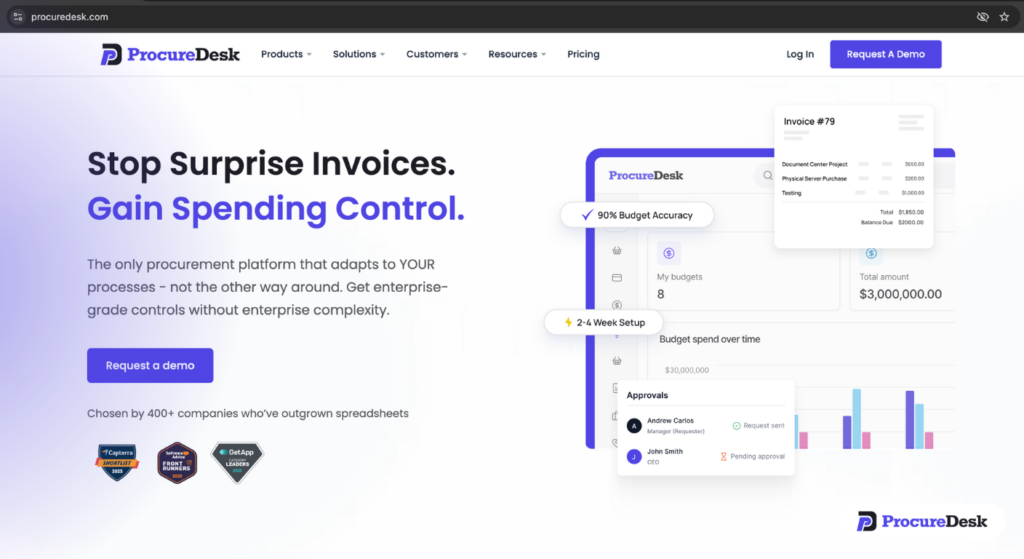
ProcureDesk is the procure-to-pay platform that CAS firms install at their mid-market clients to operationalize this exact transition.
Table of Contents
What are client advisory services?
Client advisory services (CAS) are recurring, advisory-focused engagements where CPA firms move beyond compliance work to help clients with spend control, budgeting, vendor management, and financial decision-making. CAS engagements typically generate three to five times the monthly revenue of basic bookkeeping by delivering ongoing strategic value rather than transactional reporting.
The challenge most CAS practices run into is figuring out where to start. The framework below, drawn from Sachin’s CPA Academy webinar, gives you a diagnostic you can run on every client in under 15 minutes.
1. The invisible work problem (and what it’s costing your firm)
When ProcureDesk surveyed its CAS partner base, the answer came back consistently: 6 to 10 hours per client, every month, spent on work the firm is not billing for. Reclassifying invoices. Chasing approvals. Reconciling credit card spend that nobody flagged. Reconstructing the spend story for management at month-end.
In our onboarding work with mid-market finance teams, we’ve found that this pattern is not the exception. It is the default state of any client running on QuickBooks or Sage Intacct without a procurement layer underneath. Across a 10-client book, that is 60 to 100 unbilled hours every month. Roughly 40% of CAS team time is spent on tasks the client does not see and does not pay for.
The reason this happens is structural, not lazy. The client’s accounting system, whether that’s QuickBooks, Sage Intacct, or NetSuite, only captures spend after an invoice is entered. Everything that happened before the invoice (the purchase decision, the vendor selection, the approval, the GL coding) lives in email threads, Slack messages, and the heads of people who made the purchase. The CAS team has to reconstruct it.
This is also why standard AP automation tools (Bill.com, Ramp, Stampli) do not solve the CAS firm’s problem. They make invoice processing faster, which is useful, but they still operate after the spend has happened. The CAS firm still gets the surprise invoice. The client still has no audit trail before the purchase. The cleanup work is still there, just slightly faster.
2. The four-stage spend control maturity model
Every client your firm works with sits in one of four stages. The model is the same one ProcureDesk uses with its CAS partners to assess where each client is, what work is still being absorbed, and which tier of advisory service that client is ready to buy.
Stage 1: Reactive
The client says: “I get invoices I didn’t expect for spend I did not approve.”
Symptoms: no purchase approval process, vendors paid post-spend, vendor spend only discovered at month-end, no audit trail on who approved what.
What it costs your firm: approximately 6 hours per month per client of cleanup, high error rate in GL categorization, 7 to 10 day month-end close. Billing wise, you are not getting paid for any of it.
Stage 2: Visible
The client says: “I can see what was spent, but only after it happens.”
Symptoms: basic spend reporting in QuickBooks or a spreadsheet, monthly review by the finance team, but no systematic approval before purchase. A purchase order policy might exist on paper, but nobody follows it.
The classic example: the client has a $50,000 line item from Staples for the year. What did they actually buy? That information is not in the invoice. It is in the head of whoever placed the order. So your team is still spending hours reconstructing the spend picture.
Stage 3: Controlled
What changes for the CAS firm at Stage 3, in Sachin’s words: month-end closing in three to four days, no surprise invoices, and compliance is automated.
Symptoms: defined purchase request process, multi-level approval workflows tied to budget, automated three-way matching (PO + receipt + invoice), and exceptions routed to the right person without your team chasing.
What it costs your firm: dramatically less. The client owns the approval workflow. The system flags exceptions. Your team handles strategic work, not invoice forensics.
Stage 4: Advisory
In Sachin’s words from the webinar: at Stage 4 you act as a strategic partner to the client. The conversation moves from “process my invoices” to “how are you allocating your capital today, and where should you be spending money?”
This is the tier where margin lives. Spend negotiation, budget design, vendor consolidation, payment term optimization, audit readiness. All of it is billable, all of it is recurring, and all of it depends on having the underlying data captured at Stage 3.
As Sachin puts it in the webinar: stage three is where you start seeing efficiency from a process standpoint. Stage four is where your margin lives.
3. How to identify clients ready for spend advisory
Not every client is a fit. Sachin’s framework excludes some clients on purpose. Here is the screen.
Strong fit:
- 100 to 1,000 employees
- Multiple departments or locations making purchases
- 200+ active vendors paid regularly
- Month-end close currently takes 4+ days
- Your firm is absorbing AP cleanup work
- Client uses QuickBooks (Online, Desktop, or Enterprise), Sage Intacct, NetSuite, Microsoft Business Central, or Xero
Not a fit:
- Under 20 employees (spend volume too low to justify advisory pricing)
- Solo practitioners or owner-operators making most purchase decisions themselves
- Clients buying mostly compliance or tax work, not bookkeeping
- Clients on payroll or tax-only engagements
The simplest screening question is the one Sachin asks every CAS firm: how much unpaid AP cleanup time are you absorbing for this client? If it is 5+ hours per month, that client is a candidate.
ProcureDesk publishes a Spend Control Maturity Assessment as part of the webinar materials. It’s a 10-question diagnostic you can run with any client in under 15 minutes.
4. The three-tier pricing model: “$275 to $950 per month, same five clients”
Most CAS firms underprice advisory because they package it the same way they package bookkeeping. Sachin’s three-tier model fixes that.
Tier 1: Foundation (basic AP and bookkeeping)
What it covers: invoice processing, basic categorization, monthly close, standard reporting.
This is what most CAS engagements default to. Pricing is typically a fixed monthly fee in the $250 to $400 range, depending on volume.
Tier 2: Controlled AP (process design and three-way matching)
What it covers: setting up the client’s PO workflow, configuring approval routing, automating three-way matching, owning the exception management process.
The outcome you are selling here is operational: faster close cycle, fewer surprise invoices, audit-ready process. Pricing typically lands at $600+ per month because you are now managing process, not just transactions.
Tier 3: Advisory (quarterly spend reviews and capital allocation)
What it covers: quarterly spend reviews, vendor consolidation analysis, payment term negotiation, budget design, cash flow forecasting, policy design, compliance readiness.
This tier is priced on value delivered, not hours worked. The starting point is typically $950+ per month, but it scales with the size of the spend you are advising on.
In Sachin’s worked example: one CAS firm moved five clients from $275 a month to $950 a month. Same five clients. Most of the mechanical work now automated by ProcureDesk. Annual revenue went from $16,500 to $57,000.
The reason the math works is that the underlying tooling absorbs the mechanical work the CAS team used to do for free. The team’s hours shift from invoice cleanup to spend strategy. Same hours, higher margin per hour.
5. The 90-day roadmap to launch your spend advisory practice
You do not roll this out to 50 clients on day one. The webinar lays out a 90-day sequencing plan you can lift directly.
Days 1 to 30: Focused assessment
Pick one or two clients that show clear Stage 1 or Stage 2 symptoms. Run the spend control assessment with them. Present the maturity model and the gap (where they are, where they could be, what it costs them). The goal in this phase is not to sell the advisory tier yet. It is to diagnose, document, and build the case.
Days 31 to 60: Implementation and baseline
Implement ProcureDesk with the chosen client(s). The ProcureDesk team handles the configuration, approval workflow setup, and accounting integration. Your team trains the client on the purchase request process and starts running the new workflow.
This is also when you baseline the metrics. How long was month-end close before? How many surprise invoices were arriving? What was your firm’s monthly hours absorbed on this client? You will need these numbers later.
Days 61 to 90: Formalize the offer
By day 60, you have run the new process for 30 days with at least one client. You have the before-and-after data. Now you formalize:
- Document the time savings vs. the previous process
- Build a case study (anonymized if needed) you can take to other clients
- Create an ROI summary tailored to your engagement model
- Define your three-tier pricing structure
- Roll out to your next two or three clients
The pattern most CAS firms follow is not “convert all clients at once.” It is “build the case study with one or two, then roll it out to the rest of the book over 6 to 12 months.”
How ProcureDesk works for the CAS firm
ProcureDesk is a mid-market procure-to-pay platform. It captures every purchase at the point of request, before the vendor is contacted, before a PO is issued, before an invoice arrives. Built for finance teams at companies with 100 to 1,000 employees on QuickBooks, Sage Intacct, NetSuite, Microsoft Business Central, or Xero.
Two tiers ProcureDesk explicitly does not serve. Enterprise organizations on Coupa or SAP Ariba, where deployment runs 6 to 12 months and the price tag is an order of magnitude higher. And small businesses under 20 employees, where spend volume does not justify a procurement system. The platform is purpose-built for the mid-market gap between those two tiers.
For the CAS firm, that means:
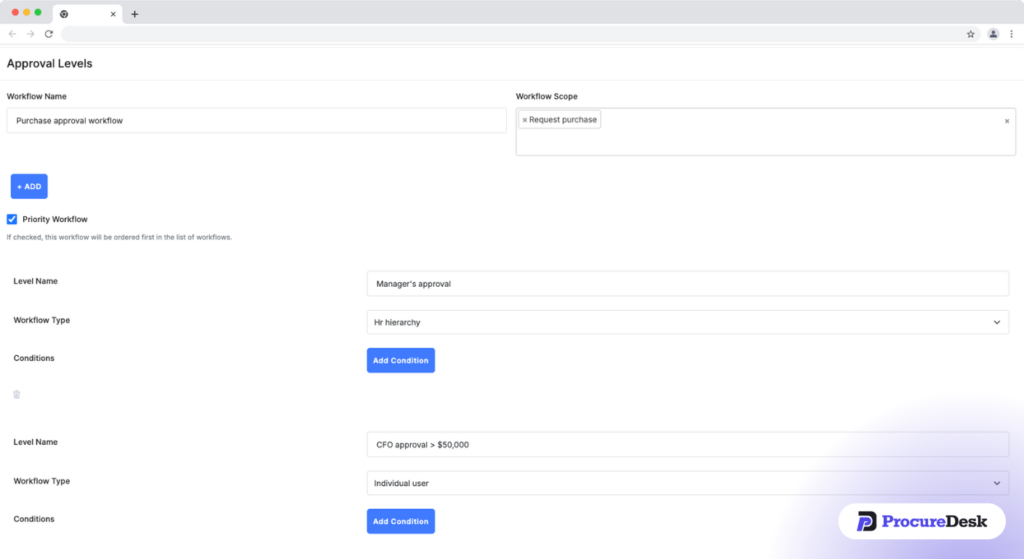
The client owns the approval workflow. Employees submit purchase requests in ProcureDesk. Approvers review and approve based on dollar amount, department, or category. No more emails to your team asking “who approved this?”
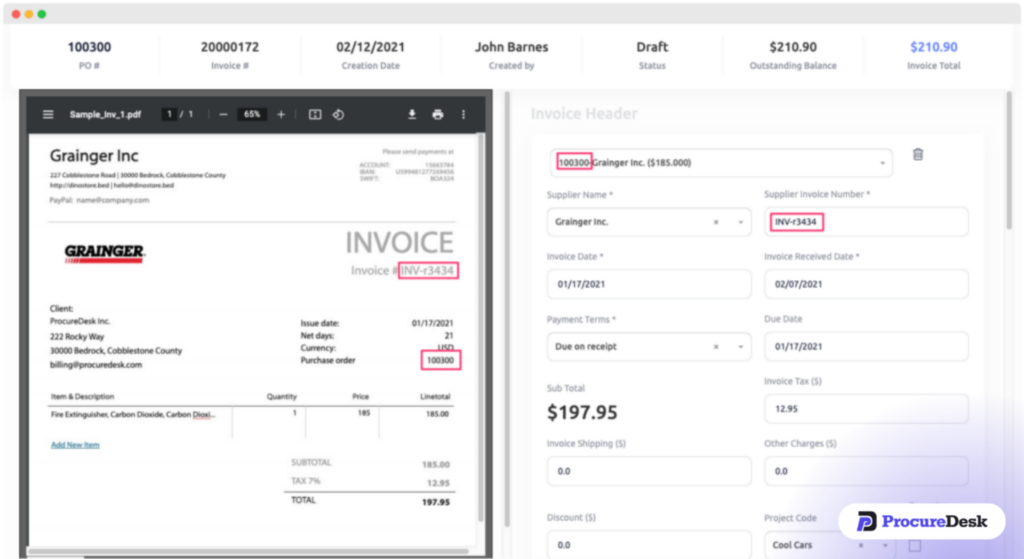
Three-way matching runs without your team. When an invoice arrives, ProcureDesk matches it to the PO and the goods receipt. If the price is off by $20, the system flags it and routes the exception to the buyer at the client’s end, not to you.
Real-time spend data, not month-end reconstruction. You can pull a spend report any time, broken down by department, category, vendor, or project. The data is captured at the request stage, so you no longer reconstruct it.

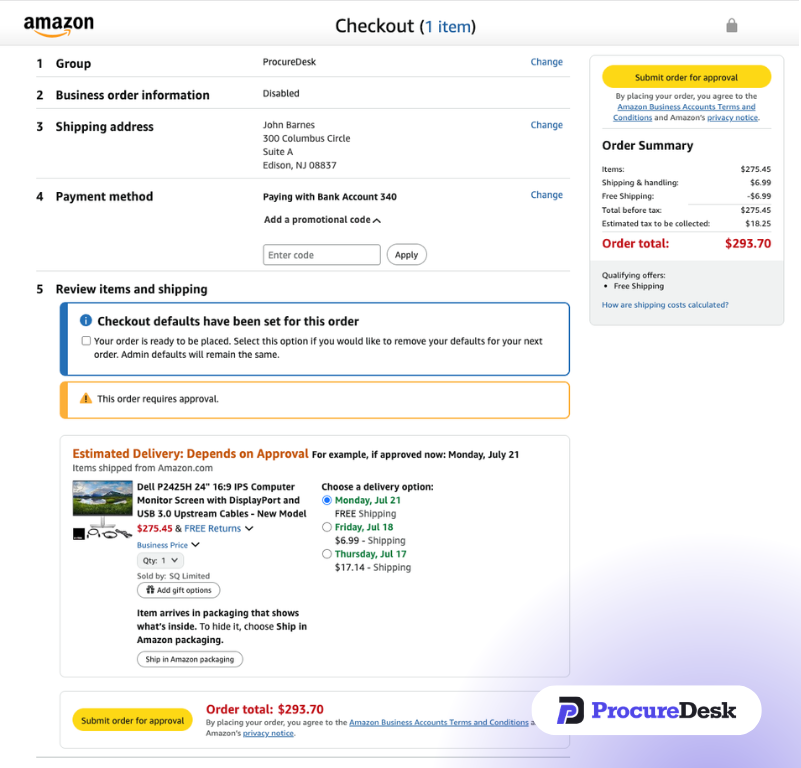
200+ punchout supplier catalogs. Amazon Business, Staples, Grainger, Thermo Fisher, McMaster-Carr, and 200+ more. Employees buy through ProcureDesk with one click, with budget validation and approval routing built in. This is what eliminates the “$50,000 from Staples but I don’t know what they bought” problem.
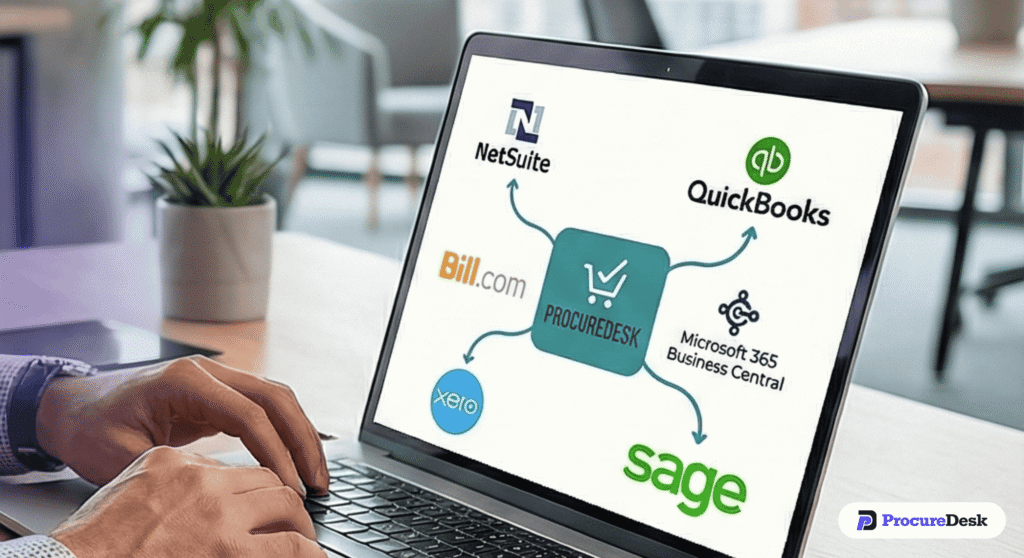
Native ERP sync. ProcureDesk syncs bidirectionally with QuickBooks Online, QuickBooks Desktop, QuickBooks Enterprise, Sage Intacct, NetSuite, Microsoft Business Central, and Xero. It does not replace the accounting system. It adds the procurement and AP layer the accounting system was never built to handle.
Done-for-you implementation in 2 to 4 weeks. ProcureDesk handles the setup: purchasing rules, approval workflows, accounting integration, supplier catalog configuration. The CAS firm and the client show up for training. No IT project. No 6-month deployment.
Customer example: Funai Lexington, a manufacturing company on QuickBooks, used ProcureDesk to reduce invoice processing time by 46%. The finance team recovered 30 hours per month of capacity. That is the kind of capacity a CAS firm can convert into advisory work.
Meet the speaker
Sachin Sharma is the Founder and CEO of ProcureDesk. He brings 20+ years of experience in procurement and AP automation. He has run internal procurement and AP teams (including for Fortune 500 clients), and consulted with organizations on best practices.Sachin built ProcureDesk to solve a problem he experienced firsthand: mid-market companies needed structured spend control without the cost or complexity of enterprise procurement systems. He hosts the Beyond AP Automation webinar series with CPA Academy and speaks at industry forums on how CAS firms can elevate from compliance work to advisory revenue.
What pushback you’ll hear (and how to handle it)
The Q&A at the end of the webinar is where most CAS firm leaders will find themselves. These are real questions from real CPA practitioners.
“My clients won’t pay more for advisory.”
Most clients are already paying for advisory work. They are just paying for it in late payment fees, in delayed shipments because vendors got paid late, in the Controller spending Saturday morning trying to figure out where the money went. The conversation is not “pay more.” It is “pay differently for the work you are already absorbing the cost of.”
“We don’t have bandwidth to implement this.”
ProcureDesk’s implementation is done-for-you. The ProcureDesk team configures the client’s workflow, sets up the integration with the accounting system, and trains the client’s team. Your CAS firm shows up for kickoff and final walkthrough. There is no 6-month deployment project on your firm’s side.
“We already use Bill.com (or Ramp, or another AP tool) for our clients.”
ProcureDesk is not another AP tool. AP tools manage what happens after the invoice arrives. ProcureDesk manages what happens before. If the client’s main problem is “invoice processing is slow,” Bill.com fixes that. If the client’s main problem is “I don’t know what was bought, who approved it, or whether it was on budget,” that is what ProcureDesk fixes. The two work alongside each other. ProcureDesk integrates with Bill.com for the payment step, but they solve different problems.
“What if my client pushes back on adding another tool?”
In most engagements, ProcureDesk consolidates rather than adds. Clients commonly run separate tools for purchase requests, approvals, expense management, and budget tracking. ProcureDesk replaces all of that with one platform that sits on top of the accounting system. The conversation is not “add another tool.” It is “consolidate the four you have.”
“Should we be pitching spend advisory to existing clients first?”
Sachin’s recommendation: yes, but start with one or two. Build the case study. Document the before-and-after. Then add it to your firm’s onboarding checklist for new clients. The firms that try to convert their entire book at once usually stall. The firms that pick two clients, build the playbook, and roll it out methodically usually scale.
FAQs about client advisory services
What are client advisory services?
Client advisory services (CAS) are recurring, advisory-focused engagements where CPA firms help clients with spend control, budgeting, vendor management, cash flow planning, and financial decision-making. CAS goes beyond bookkeeping and compliance work to deliver ongoing strategic value. The AICPA defines CAS as services where the practitioner develops findings, conclusions, and recommendations for client consideration. CAS engagements typically generate three to five times the monthly revenue of basic bookkeeping.
What’s the difference between client accounting services and client advisory services?
Client accounting services traditionally cover transactional work: bookkeeping, payroll, monthly close, and basic financial reporting. Client advisory services cover strategic work: spend control, vendor consolidation, cash flow forecasting, budget design, and capital allocation guidance. Many firms now use CAAS (Client Accounting and Advisory Services) to describe both layers together. The accounting layer ensures accurate books. The advisory layer helps clients act on those numbers and make informed decisions.
How much do client advisory services cost?
Client advisory services typically cost between $250 and $2,500+ per month, depending on the tier of service and the complexity of the client’s spend. Foundation-level CAS (basic bookkeeping plus close) usually runs $250 to $400 per month. Controlled AP service (process design, three-way matching, exception management) runs around $600 per month. Advisory tier (quarterly spend reviews, vendor consolidation, cash flow forecasting) starts at $950+ per month. Pricing is value-based, not hourly.
How do you start a client advisory services practice?
Start by selecting one or two existing clients who show clear symptoms of unbilled cleanup work: month-end close taking 5+ days, surprise invoices arriving without POs, and your team absorbing 5+ hours of monthly AP reconciliation. Run a 15-minute spend control assessment to baseline current state. Implement supporting technology like ProcureDesk, document the time savings over 30 days, then formalize the offer with three-tier pricing. Roll out to additional clients over 6 to 12 months.
What technology do CAS practices need to deliver advisory services?
CAS practices need three layers of technology. First, the client’s accounting system (QuickBooks, Sage Intacct, NetSuite, or Xero) for transactional records. Second, a procure-to-pay platform like ProcureDesk that captures purchases at the point of request, automates approval workflows, and enables three-way matching before invoices are paid. Third, reporting tools or BI dashboards for quarterly spend reviews. The procure-to-pay layer is what eliminates the manual cleanup work that absorbs CAS team capacity.
How fast are CAS practices growing?
Per the AICPA PCPS CAS Benchmark Survey 2024, the median CAS practice grows 17% year over year, with top-quartile practices growing 30% or more. CFO-level advisory engagements command 30% higher monthly recurring revenue than basic bookkeeping. According to CPA.com, advisory and consulting are clients’ single greatest unmet need, and clients who buy advisory services spend 43% more annually with their CPA firm than clients who do not.
Conclusion
Per the AICPA PCPS CAS Benchmark Survey 2024, the median CAS practice grows 17% year over year, and CFO-level advisory engagements command 30% higher MRR than basic bookkeeping. The firms growing fastest are not the ones with the most clients. They are the ones who figured out how to convert mechanical work into advisory work, and how to charge accordingly. The spend control maturity model gives you a diagnostic. The three-tier pricing model gives you a structure. The 90-day roadmap gives you a sequencing plan. ProcureDesk gives you the platform that does the mechanical work, so your team can do the advisory work.