Corporate cards
without the expense reports.
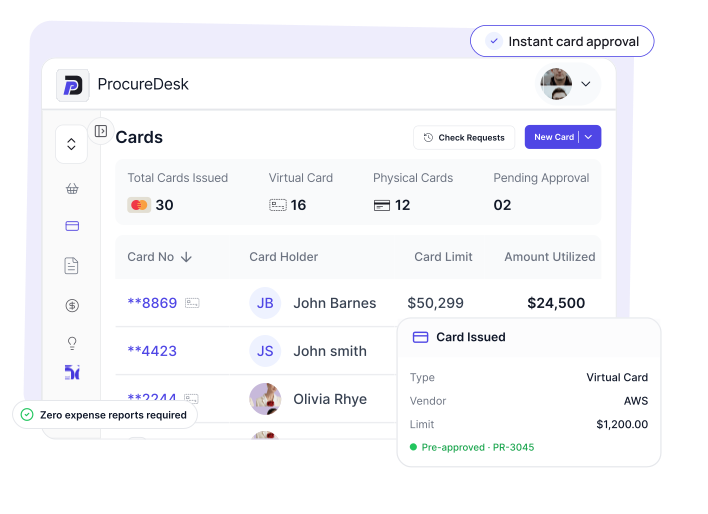
Issue virtual and physical cards directly from approved purchase requests. Every transaction is pre-approved, automatically reconciled, and earns cashback—all in one platform with your procurement and AP workflows.

 FEATURES
 Cashback on Every Purchase
Earn rewards that go back to your bottom line.
Zero Expense Reports
Employees spend, you get complete records automatically.
Pre-Approved Spending
Every card ties to an approved purchase request.
Instant Virtual Cards
Issue cards in seconds from approved requests.
Automatic Reconciliation
Transactions match to requests—no manual work.
One Connected Platform
Cards, procurement, and AP in a single system.
Trusted by





Why corporate cards create chaos in finance

Cards with no context
You issue cards with spending limits, but have no idea what they're actually for. When statements arrive, you spend hours matching transactions to vague descriptions and chasing employees for explanations. Every month-end becomes a reconciliation nightmare.

Expense reports nobody submits
Employees hate filling out expense reports—so they don't. Receipts pile up, deadlines pass, and your finance team burns 20+ hours monthly hunting down documentation. You're stuck between enforcing unpopular policies and accepting incomplete records.

Vendor setup for one-time purchases
Someone needs to buy something from a new vendor—once. But your process requires vendor onboarding, AP setup, and payment terms. So employees use personal cards or work around the system, and you lose visibility entirely.
How ProcureDesk eliminates card chaos
Pre-approved spending from purchase requests
Virtual cards are generated from approved purchase requests so every transaction has context and controls before a dollar is spent. Keep your finance team in control and eliminate all budget surprises instantly.
-
 Instant Issuance: Virtual cards generate upon request approval.
-
Spend Control: Cards are locked to approved amounts and vendors.
-
Full Context: Know what every purchase is for before it happens.
-
Zero Friction: Employees get what they need without budget surprises.
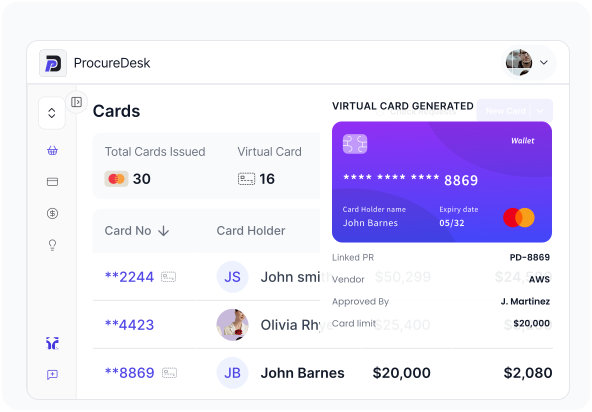
Zero expense reports for employees
ProcureDesk eliminates expense reports by turning the purchase request into the record. Transactions match automatically with requester, budget, and GL coding already attached, so month-end chasing stops.
-
Request Integration: The purchase request serves as the expense record.
-
Auto-Reconciliation: Transactions match approved requests instantly.
-
One-Tap Receipts: Snap a photo via mobile notification to finish.
-
No Manual Forms: Employees never have to create a report again.
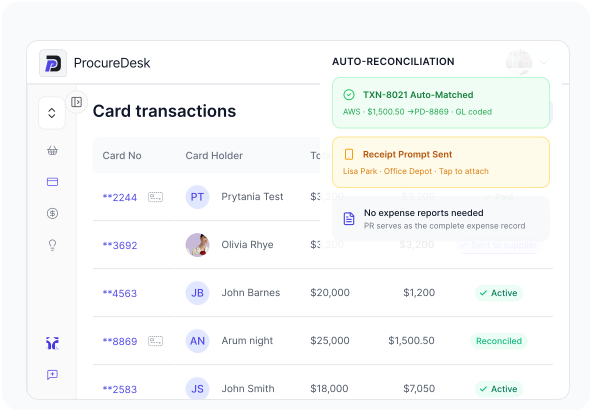
Skip vendor setup for one-time buys
Virtual cards allow for approved purchases from any vendor without the need for formal AP onboarding. Capture full spend visibility and documentation without the overhead of creating a new vendor record for every buy.
-
Instant Purchasing: Buy from any vendor without system onboarding.
-
Reduced AP Overhead: Skip payment terms negotiation for one-off buys.
-
Full Visibility: Every card transaction captures complete spend data.
-
Flexible Spending: Ideal for conferences, software, and emergencies.
From "Request" to "Reconciled" in 4 steps
Step 1: Request
Employees submit purchase requests through ProcureDesk, selecting card payment. The system captures everything—vendor, amount, purpose, budget, and GL coding—before any card is issued. No separate expense forms. No after-the-fact documentation.
Step 2: Approve
Managers review and approve requests based on your workflow rules. Approvals happen in seconds via email, mobile, or Slack. Once approved, the spending is authorized with controls locked in—amount limits, expiration dates, and merchant restrictions.
Step 3: Spend
Virtual cards generate instantly after approval. Employees receive card details immediately and complete their purchase. Physical cards work for in-person spending with the same controls. Employees just spend—no expense reports, no forms, no extra steps.
Step 4: Reconcile
Transactions match to requests automatically when charges post. Employees get a mobile prompt to attach receipts with one tap. Data syncs to your accounting system with complete coding. Month-end close happens without the usual card spend chaos.
Control your company spending today
Join 400+ finance teams who've eliminated manual expense reports and saved dozens of hours monthly on reconciliation with ProcureDesk.

2-4 weeks Implementation Time
Quick start with zero hassle.
24/7 Dedicated Support
Expert team at your service
100% Setup Included
We handle 100% of setup
CUSTOMER STORIES Finance teams close books faster with ProcureDesk cards

Our employees actually thank us for the card program now. No expense reports to fill out, no forms to submit—they just make their approved purchase and they’re done. Adoption was instant because there’s nothing to learn.
Mark F.
Controller
We used to spend the first week of every month chasing receipts and matching card transactions. Now every transaction is already tied to an approved request with full context. Our month-end close is 5 days faster and our auditors love the documentation.
Jim K.
CFO
The integration between purchase requests and card issuance changed everything. We stopped issuing cards and hoping for the best. Every card has a purpose, a limit, and an approval before it’s ever used. And we’re earning cashback on all of it.

Rowland K.
Finance Manager
Corporate Card Performance at a Glance

Of card transactions pre-approved with full context

Expense reports for employees to fill out

Faster month-end close
Common questions about ProcureDesk Corporate Cards



About Us


© Copyright 2026, All Rights Reserved by PROCUREDESK