Stop asking “where's that order?”, every PO, tracked end to end
Requested, approved, ordered, received, invoiced, most teams track PO status across email, spreadsheets, and memory. ProcureDesk is purchase order tracking software that shows the live status of every PO in one place, from request to matched invoice.
Request a demo- Live in 2–4 weeks
- Done-for-you setup
- No IT project
![Stop asking “where's that order?”, [purple]every PO, tracked end to end[/purple]](https://www.procuredesk.com/wp-content/uploads/2026/09/Purchase-Order-Software-for-Manufacturing-hero-.svg)
Trusted by finance teams at 500+ companies.













A PO you can't track is a purchase you can't control
Someone requested it. Someone approved it (probably). The vendor may have shipped it. The invoice may or may not match. Right now, answering “where is this order?” means a round of emails and a guess. When PO status lives in inboxes and spreadsheets, receipts get missed, duplicate orders slip through, and finance can't tell committed spend from actual spend. Tracking isn't busywork, it's how you catch problems before the invoice, not after.
Status is scattered
PO status lives across email, spreadsheets, and people's heads.
Receipts get missed
Without a clear received status, invoices get paid for goods that never arrived.
No line between committed and actual
Finance can't see what's on order vs. what's been billed.
 THE SOLUTION
ProcureDesk tracks every PO from request to matched invoice
Key Benefits
- See the live status of every PO, requested, approved, ordered, received, invoiced, in one view
- Track committed spend (on order) separately from actual spend (invoiced), in real time
- Confirm goods receipt so you never pay for what didn't arrive
- Auto-match POs, receipts, and invoices, with mismatches flagged before payment
- Report on PO status by vendor, department, and buyer, no more status-chasing emails
Ready to see every PO's status?
Join teams who track POs end to end instead of chasing them.
Book your demo todayThe results teams see
Averages across ProcureDesk customers
FREE TOOL · NO LOGIN · 3 MINUTESSee what procurement automation would save you
Enter your invoice volume, team size, and current process. The P2P ROI Calculator returns a line-by-line breakdown of the hours, cost, and early-payment discounts you would recover.
- Annual savings in dollars
- FTE hours recovered
- Payback period in months
- Your top savings category
 THE SOLUTION
How It Works
Finance and operations teams use ProcureDesk to track every PO from request to invoice
Step 1
Done-for-you setup
- Your vendors, approval rules, and catalogs configured for you
- Statuses mapped to your workflow
- No IT project on your side
 Step 2
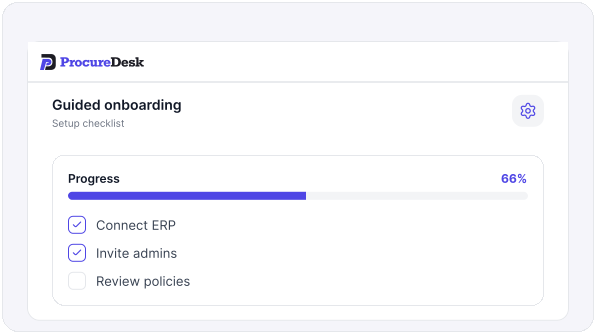
Every PO starts in one system
- Requests become POs with a clear owner and status
- Punchout catalogs for fast, correct ordering
- Everything tracked from the first click
 Step 3
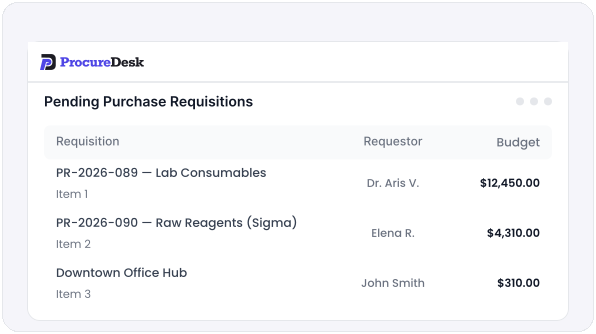
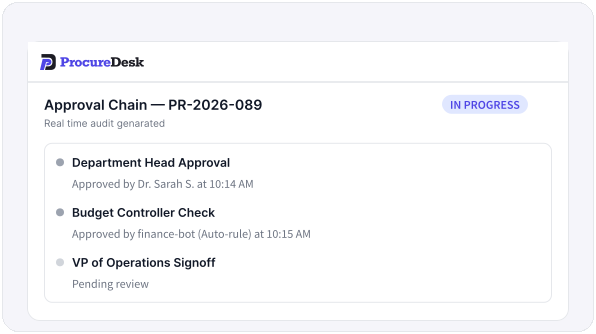
Approvals and orders are logged live
- Multi-level approval with a timestamped trail
- Automatic status updates as the PO moves
- Mobile visibility from anywhere
 Step 4
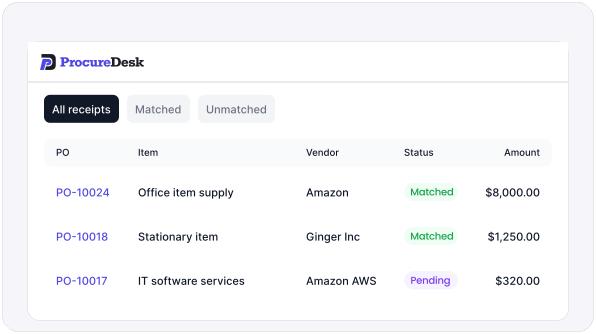
Receipts confirm what arrived
- Goods receipt updates PO status in real time
- Partial and full receipts tracked line by line
- No paying for what didn't show up
 Step 5
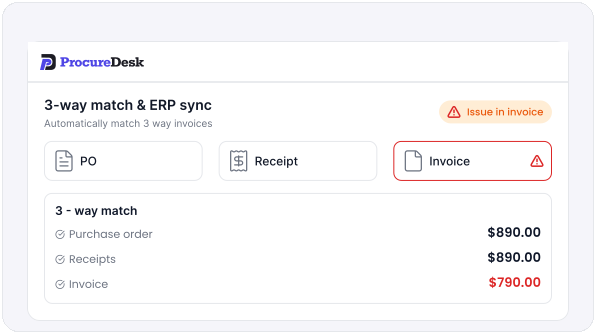
Invoices match and close the PO
- 3-way matched automatically
- Mismatches flagged before payment
- Synced to QuickBooks, Sage Intacct, or NetSuite
 INTEGRATION
Integration Capabilities
ProcureDesk syncs directly with the accounting systems finance teams rely on most See all ProcureDesk integrations.
Accounting Software Integration
(Online, Desktop, and Enterprise): OAuth 2.0 connection, real-time bill sync after approval, class and location coding, and multi-entity support across separate company files
Connects via Sage's Web Services API with full standard and custom dimension support, multi-entity aware, and invoices posted within seconds of approval
Token-Based Authentication with Department, Class, Location, and Custom Segment coding, plus OneWorld multi-subsidiary routing
Azure OAuth 2.0 with Global and Shortcut Dimension support and multi-company handling
OAuth 2.0 in under 10 minutes, with tracking-category coding and 2-way or 3-way matching
Built-In Payments
Send fully approved, coded bills out for payment by ACH, check, or card, with payment status tracked back against the PO and invoice — no separate payment tool to log into
Each integration is configured during our done-for-you implementation. IT involvement is typically under 30 minutes, and most customers go live in 2 to 4 weeks. No middleware is installed and your chart of accounts stays read-only, so ProcureDesk reflects your ledger without ever modifying it.
Request Integration DetailsWhy Teams Choose ProcureDesk
See how ProcureDesk keeps every PO tracked from request to matched invoice
Live in weeks, not months
Done-for-you implementation, operational in 2–4 weeks, no IT project.
One source of truth for every PO
Status, receipts, and matching in one place, no more spreadsheets and email threads.
Committed vs. actual, always clear
See what's on order and what's been billed, in real time.
CUSTOMER REVIEWWhat Our Customers Say
"There was a general lack of clarity around our budgets. Because we would not get invoiced right away, our budget reports were never fully accurate or up to date."
"We were experiencing late payments and potential missed invoices that got lost in the stack of papers. It just was not a truly transparent process."
"Anybody within the company could order goods or services, and approval would only happen after the invoice arrived. We needed to put controls in place, and ProcureDesk became one of those must-have solutions."
Frequently Asked Questions
Get answers to common questions about ProcureDesk purchase order tracking software
Every stage, requested, approved, ordered, received, and invoiced, plus matched or flagged, is tracked live for each PO. You see exactly where every order is, in one view, without chasing anyone.
Yes. Committed spend (what's on order) is tracked separately from actual spend (what's been invoiced) in real time, so finance always knows what's committed versus what's been billed.
Yes. Receiving updates each PO's status in real time, with partial and full receipts tracked line by line, so you never pay for goods that didn't arrive.
Yes. Native two-way sync with QuickBooks (Online, Desktop and Enterprise), Sage Intacct and NetSuite, with multi-entity support, so PO and invoice status stays in step with your books.
Most teams are live in 2 to 4 weeks. We configure your vendors, approval rules, catalogs, and status workflow for you, so there's nothing to build.
Yes. Receipts are tracked line by line, so a PO can be partially received and its status reflects exactly what has arrived and what's still open.
Every request runs through approval and lands in one system with a live status, so duplicate orders and off-process buys are caught before they turn into an invoice.
Yes. Approvers get one-tap mobile approval and full visibility into a PO's status and trail from anywhere, so nothing stalls waiting on a desk.
Yes. Dashboards surface aging and stuck POs by status, vendor, department, and buyer, so you can act on what's stalled instead of finding out at month-end.
Ready to track every PO in one place?
See what it looks like when every PO's status, from request to matched invoice, is visible in real time.
KEEP EXPLORINGRelated to purchase order tracking
Discover tools that help you manage purchasing, approvals, and invoices in one workflow.



Resources
Company


© Copyright 2026, All Rights Reserved by PROCUREDESK