Templates aren’t a process; they’re a liability. Implement a purchase order workflow that ensures budget governance and eliminates spend leakage today.
TL;DR: The Executive Summary
- Templates are a liability, not a process. Relying on Word or Excel creates massive visibility gaps, leading to unmanaged spend and significant audit risks.
- Real control requires orchestration. A “Real” workflow uses logic-based routing to ensure every dollar spent is authorized by the right stakeholder before the commitment is made.
- Automation is the only way to scale. Manual 3-way matching and budget tracking fail as company complexity grows; automated systems are required for audit-ready governance.
Table of Contents
Why Templates are the “Silent Killer” of Cash Flow
Most growing companies start with a simple PO template. It feels like control because there is a “form,” but in reality, it’s just digital paperwork that arrives too late to matter.
The Hidden Cost of Manual “Shoulder Taps”
When your process lives in an inbox or a Slack channel, “urgent” requests are handled via “shoulder taps”. These bypass your controls entirely. By the time Finance sees the invoice, the money is already gone. This is “Spend Leakage,” and it’s the primary reason budgets are busted by mid-quarter.
For a deeper dive into moving beyond these manual hurdles, see our guide on How to Set Up a Purchase Order Management System.
Why Spreadsheets Fail the Audit Test
Auditors don’t want to see a folder of PDFs; they want to see a Governance Trail. Spreadsheets lack:
- Version Control: You can’t prove which version of the “budget” was used at the time of approval
- Immutable Logs: There is no time-stamped record of who approved what.
- Validation: Spreadsheets don’t stop a user from entering a duplicate PO number.
What is a Purchase Order Workflow?
To compete in 2026, you need to move from “forms” to “orchestration.”
Defining Requisition-to-Pay (R2P) Orchestration
A purchase order workflow is a structured, end-to-end orchestration of the procurement cycle that ensures every commitment to spend is authorized, validated against budgets, and documented for audit-ready governance.
A modern, high-maturity workflow consists of three primary characteristics:
- Logic-Based Routing: Automated direction of requests based on department, project, or dollar amount.
- Real-Time Budget Validation: Checking funds before the PO is sent to the vendor.
- Closed-Loop Matching: Automatically linking the PO, Receipt, and Invoice (3-way match).
To understand the architecture required for this level of control, read more about Understanding Purchase Order Systems.
Building Your 5-Step System: The Operator’s Blueprint
Stop treating procurement like a filing task. Use this 5-step methodology to build a system of record.
Step 1: Mapping Your Authorization Matrix
You cannot automate a mess. Before touching software, you must define your “Rules of the Road”.
- Define Thresholds: Does a $500 spend need the same approval as a $50,000 spend?
- Identify Stakeholders: Who owns the budget? (Department Heads). Who owns the risk? (Legal/IT).
- Set the “No PO, No Pay” Policy: Establish the cultural rule that no invoice will be paid without a corresponding authorized PO.
Step 2: Configuring Logic-Based Routing
Once the matrix is mapped, bake it into a system that routes requests automatically. This eliminates the “Who do I send this to?” friction that kills employee adoption.
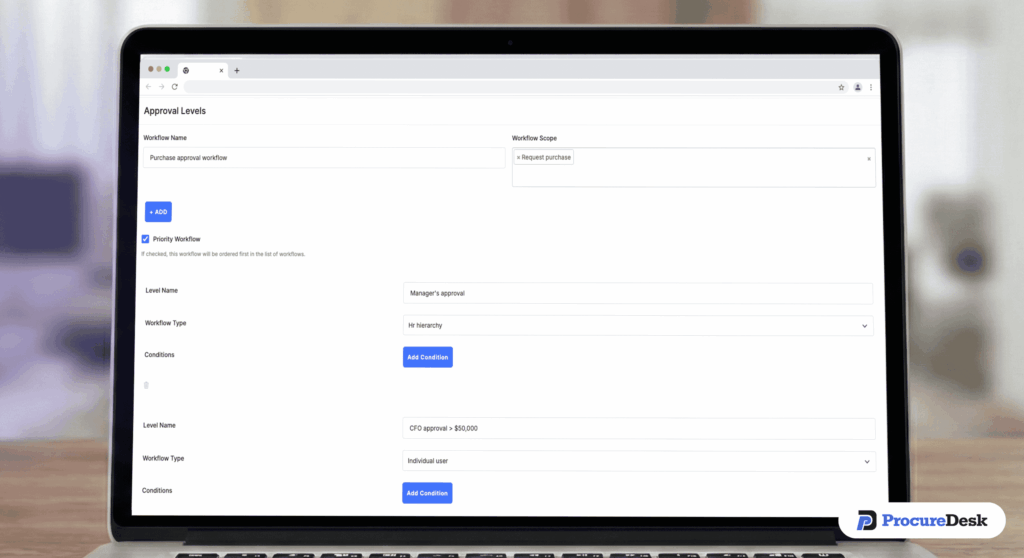
By using Configurable Workflow Orchestration, you can set rules like: “If Category = IT and Total > $10k, route to CTO for approval.”. Learn How to Design Procurement Approval Workflows for Speed to ensure your controls don’t become bottlenecks.
Step 3: Integrating Real-Time Budget Validation
The biggest mistake companies make is checking the budget after the spend happens. A “Real” PO workflow checks the budget at the point of the Requisition.

If a request exceeds the remaining budget, the system should either flag it for a “Budget Overage Approval” or block the request entirely.
Step 4: Standardizing Receipting for Accurate Accruals
Finance teams often struggle with month-end because of “Dark Spend”—liabilities they know exist but haven’t been invoiced for. By requiring employees to “Receive” items in the system, Finance gets an instant view of Unbilled Liabilities.
Step 5: Implementing Automated 3-Way Matching
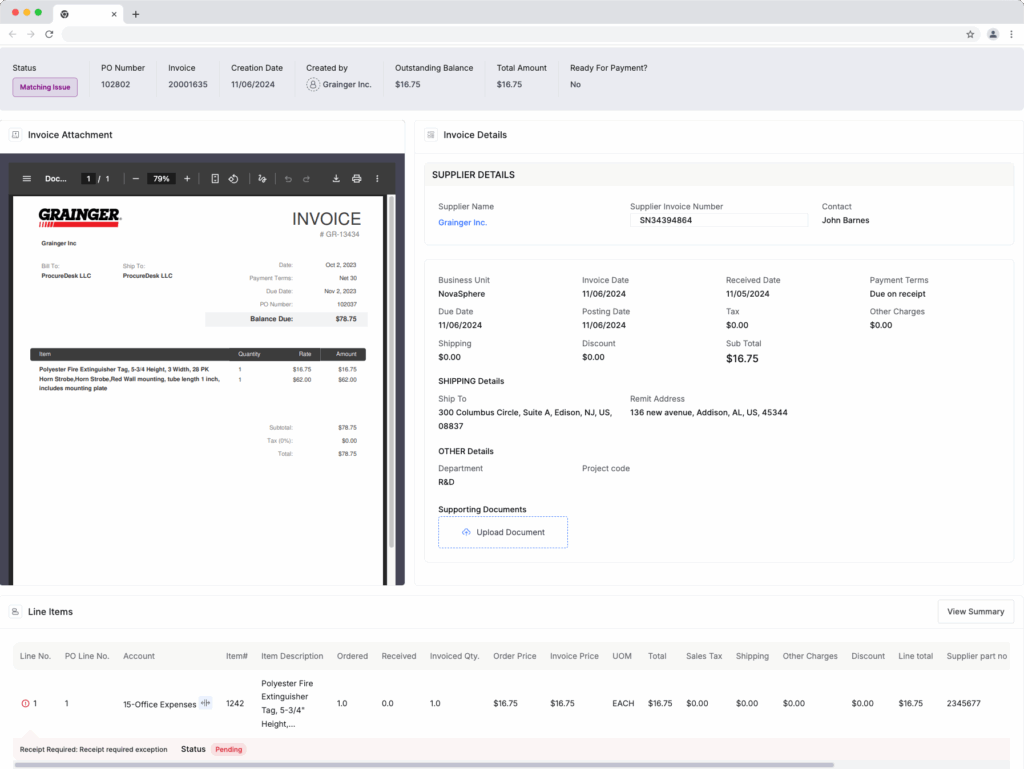
The “gold standard” of spend control is the 3-way match: the PO (what we ordered), the Receipt (what we got), and the Invoice (what they charged) must align. Automating this prevents:
- Overpayments: Paying for 10 items when you only received 8.
- Duplicate Invoices: Paying the same bill twice because it was sent to two different people.
For the full technical roadmap, follow our 6 Steps to Automate Your Purchase Order Process.
The ProcureDesk Advantage: Handling Global Complexity
As companies grow, simple workflows break under the weight of multiple entities and diverse departments.
Multi-Entity Spend Governance
Scaling companies need to manage different approval rules for different subsidiaries while maintaining a single “North Star” view of total spend. ProcureDesk allows you to centralize governance while decentralizing execution.
Closing the Books in Days, Not Weeks
When your PO workflow is orchestrated, the “matching” happens in real-time. You aren’t chasing managers for missing receipts on the 30th of the month.
| Feature | Manual Template (Weak/SMB) | Orchestrated Workflow (Enterprise) |
| Visibility | Check your spending (Reactive) | Audit-ready governance (Proactive) |
| Cost Control | Save money on supplies | Optimize spend leakage |
| Speed | “Easy to use” but slow | Configurable orchestration |
If you’re ready to move from planning to execution, see our Purchase Order Software Implementation Guide.
From Chaos to Spend Control
Your Next 30 Days: A Practical Transition Plan
Don’t try to boil the ocean. Start by replacing templates for your highest-spend department (usually Marketing or IT). Map their authorization matrix, move them into an automated routing system, and enforce the “No PO, No Pay” rule.
Within 30 days, the visibility gains—and the lack of “surprise” invoices—will provide the internal buy-in you need to roll out the system company-wide.
For everything you need to know about the fundamentals of PO management, consult The Ultimate Guide to Purchase Order Creation and Management.