An invoice lands in the AP inbox on June 1. It gets paid on June 18. Nobody can say where it sat for 17 days, and the vendor is already calling about the late fee.
If you run AP at a company with 100 to 1,000 employees, this page gives you the 2026 invoice processing time benchmarks in one place, with named sources. Most articles on this keyword explain what invoice processing is. This one tells you how long it should take, what it should cost, and what separates 3-day teams from 17-day teams.
ProcureDesk, a procurement and AP automation platform built for mid-market finance teams, is how our customers close that gap. Coast Flight, an aviation training company, cut invoice processing time by 30% after putting purchase orders in front of invoices. If you are choosing a system, start with our guide to invoice processing software.
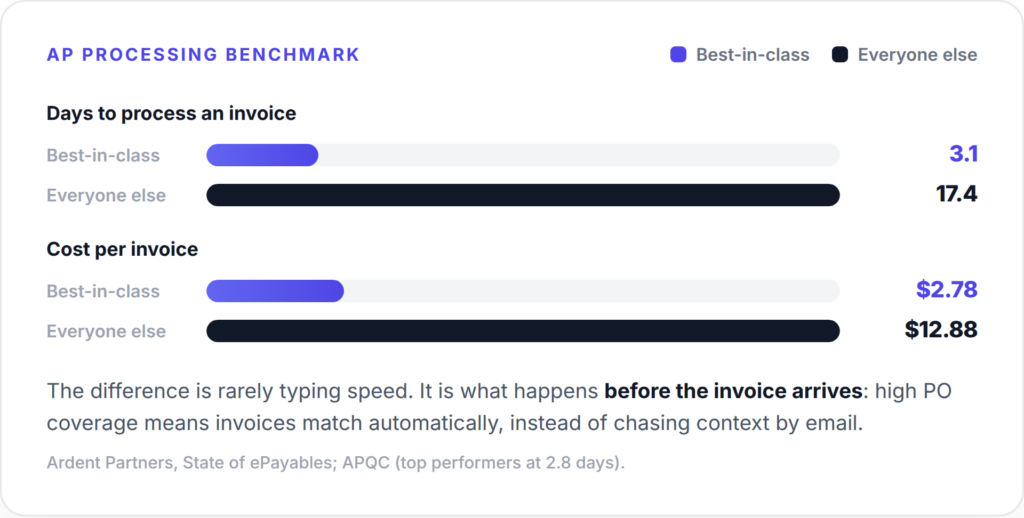
Table of Contents
The 2026 invoice processing benchmarks
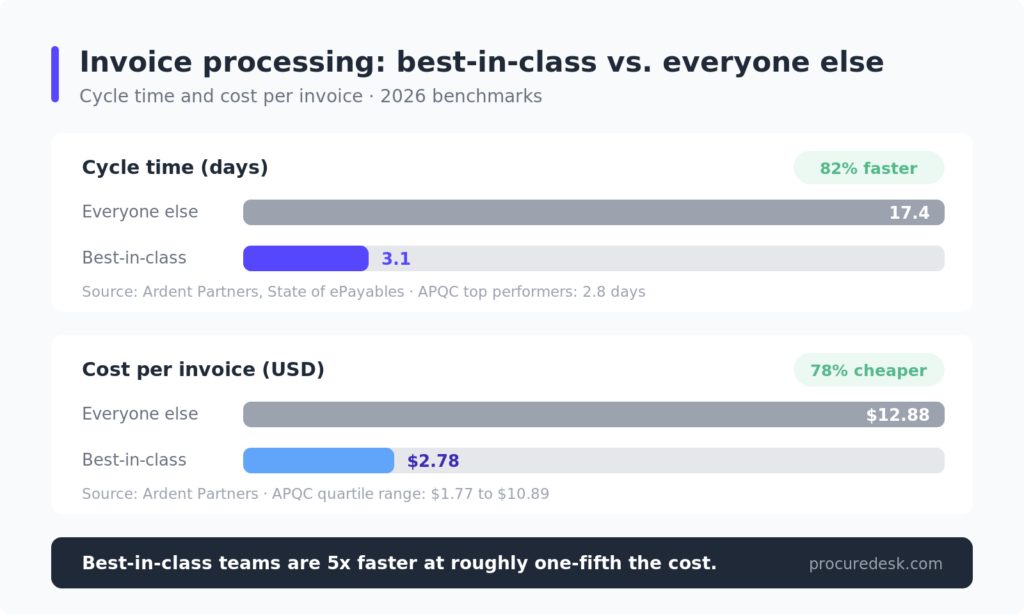
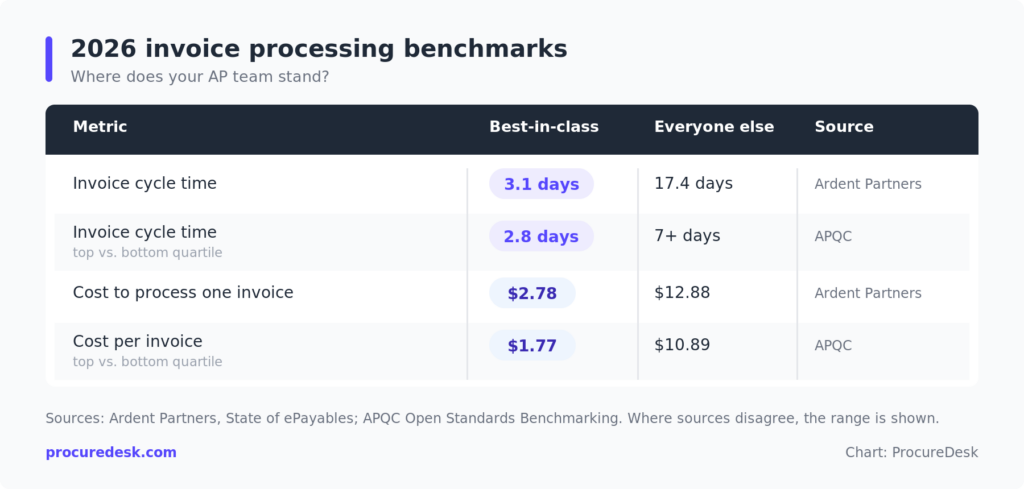
Two things stand out in this data. First, the gap is not 20% or 30%. Best-in-class teams are five times faster and almost five times cheaper per invoice. Second, the gap has held steady for years. Teams that fix the process pull away, and teams that add headcount stay where they are.
Why published benchmarks disagree (and which number to use)
If you have three tabs open right now, you have seen three different averages. Ardent Partners has published $12.88 and $13.11 as the average cost per invoice in different report years. APQC’s quartile data runs from $1.77 for the top 25% of companies to $10.89 for the bottom 25%. Average cycle times appear as 9.2 days in one Ardent edition and 17.4 days in another cohort cut.
The numbers differ for boring reasons, not because anyone is wrong. Each study uses a different survey year, a different definition of “processed” (approved versus paid), and a different mix of company sizes. Fully loaded cost models count software and overhead; labor-only models do not.
So do not benchmark against a single average. Use the spread: if your cost per invoice is above $10 or your cycle time is above 10 days, you are in the bottom half of every study cited here. If you are under $3 and under 4 days, you are top-quartile in all of them. The next section shows you how to get your own number.
A note on method: Ardent Partners surveys hundreds of AP teams annually for its State of ePayables series. APQC’s figures come from its Open Standards Benchmarking database. Where sources disagree, we show the range rather than blend them.
Want to skip the self-diagnosis? See how ProcureDesk handles invoice processing for teams at your stage in a 20-minute walkthrough.
How do you calculate invoice processing time?
Invoice processing time (also called invoice cycle time) is the number of calendar days from invoice receipt to payment approval or payment release. Pick one endpoint and apply it consistently. The formula: total days for all invoices paid in the period, divided by the number of invoices.
Run your own benchmark in 30 minutes
You need one export and one spreadsheet. Pull every invoice paid in the last 90 days from your accounting system, with received date, approved date, paid date, and PO reference.
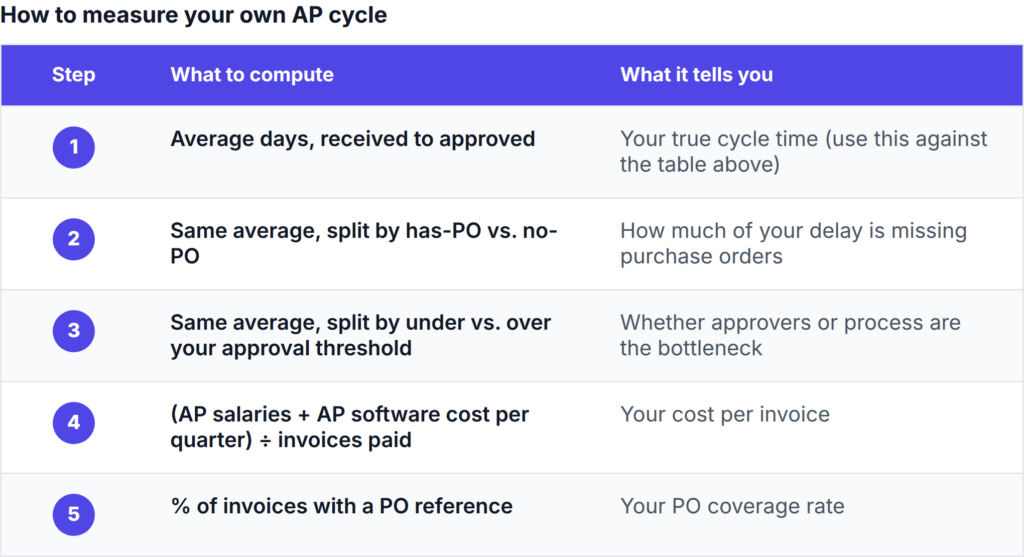
In our experience the no-PO segment usually runs 2 to 4 times slower than the PO-backed segment at the same company. That one split tells most Controllers where their 17 days actually go. It also gives you the before/after numbers you will want if you take a business case to your CFO.
What does good look like for a mid-market AP team?
The published averages blend 50-person startups with Fortune 500 shared-services centers. Neither looks like a company with 100 to 1,000 employees and a 1-to-3-person AP team, which is who this page is for.
At that size, a realistic 2026 target is: cycle time under 5 days, PO coverage above 90%, and most clean PO-backed invoices clearing with no manual touch. You do not need a shared-services center to get there. You need spend to start as an approved request instead of as a surprise invoice. Mid-market teams reach top-quartile numbers without adding headcount because the fix is sequencing, not scale.
What is a good invoice processing time in 2026?
Under 4 days is strong, and 3 days or less puts you with the best-in-class group in Ardent Partners’ data. Between 5 and 10 days is typical for mid-market teams with partial automation. Above 10 days means invoices are waiting on people, not processing.
One caveat: a fast cycle time with high error rates is not a win. Measure duplicate payment rate and exception rate alongside speed. Slow and accurate beats fast and wrong, but you do not have to choose.
How much does it cost to process an invoice?
Best-in-class teams spend $2.78 per invoice. The overall average is $12.88, per Ardent Partners. The cost is mostly labor: keying data from PDFs, matching invoices to POs by hand, emailing approvers, and fixing errors after payment.
At 500 invoices a month, the gap between $12.88 and $2.78 is roughly $5,000 a month in AP labor.
Run your own numbers with the ProcureDesk ROI calculator before your next budget conversation.
Why invoices actually take 17 days
Across our onboarding work with mid-market finance teams, the single best predictor of invoice cycle time is PO coverage. That is the share of invoices that arrive with a purchase order already in the system. Customers who fix PO coverage see the rest of the cycle compress on its own.
What we see across ProcureDesk customers (mid-market, 100 to 1,000 employees): 90% fewer invoices arriving without a PO after request workflows go live, an 80% reduction in invoice processing time, and month-end close down from 10 days to 4 on average. These are operating results from onboarding data, not survey averages.
Here is where the days go when coverage is low.
- The invoice arrives without context. No PO means AP has to find out who bought this, whether it was approved, and which GL code it belongs to. That hunt is measured in days, not minutes.
- Data entry waits for a person. Re-keying a PDF into QuickBooks takes minutes per invoice, but invoices queue until someone has a free afternoon.
- Approvals crawl through inboxes. An emailed approval request has no deadline and no escalation. Vacationing approvers stop the clock entirely. Clear invoice approval thresholds fix more of this than most teams expect.
- Exceptions surface at the worst time. Price or quantity mismatches get caught at month-end, weeks after delivery, when the trail is cold.
- Month-end pileups create their own delays. When matching happens in one batch, every problem invoice lands in the same week the books need to close. That is how a close stretches past day 10. If that sounds familiar, see our piece on why month-end close takes too long.
How to beat the benchmarks: control the spend before the invoice
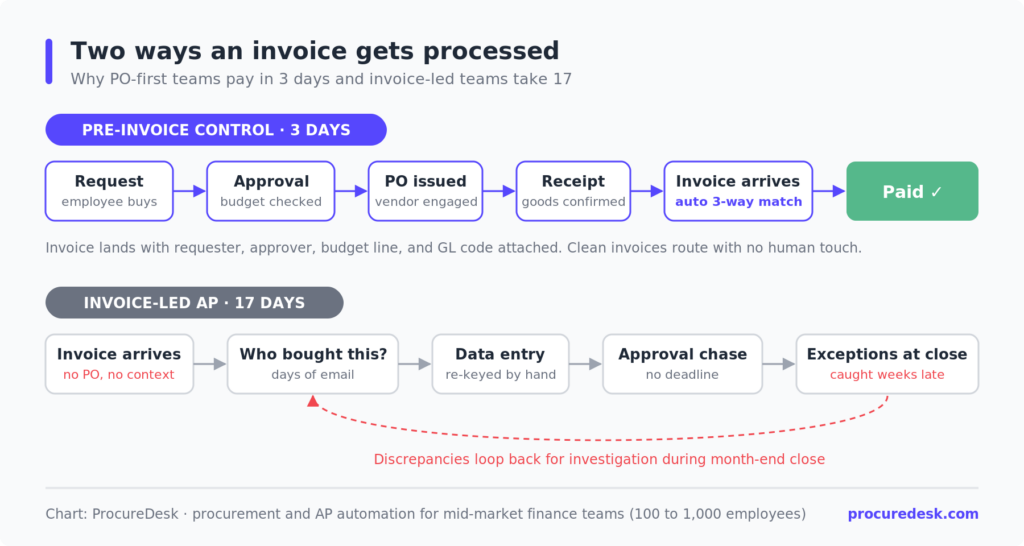
Invoice-led fixes (faster scanning, better OCR) attack steps 2 through 5. They help, but they leave step 1 alone, and step 1 is where the days hide. The teams hitting 3.1 days follow a different order of operations.
1. Put a PO in front of the spend
When a purchase starts as an approved request, the invoice arrives with its context attached: requester, approver, budget line, GL code. Matching becomes a lookup instead of an investigation. Track PO coverage monthly and set a target above 90%.
2. Let 3-way matching clear the clean invoices
Automated 3-way matching compares PO, goods receipt, and invoice, and flags only the mismatches. Clean invoices route straight to payment with no human touch. That is the mechanism behind touchless invoice processing, and it is how best-in-class teams get under $3 per invoice.
3. Set approval thresholds that match invoice risk
A $200 invoice against an approved PO does not need a second human review. Tiered thresholds with automatic escalation keep approvers focused on the invoices that warrant attention and keep everything else moving.
4. Catch exceptions in week one, not week four
When matching runs continuously, a price discrepancy surfaces the day the invoice arrives. The buyer still remembers the order, the vendor fixes it quickly, and month-end stays quiet.
For more tactics on the AP side, see faster invoice processing.
Where invoice-led AP tools stop short
Tools like Stampli and Bill.com start working when the invoice arrives. Stampli does invoice coding and approval collaboration well, and Bill.com handles payment execution well. But both sit after the commitment is made. If the invoice arrives without a PO, the investigation work, the budget surprise, and the unapproved spend have already happened.
ProcureDesk starts earlier: purchase request, approval, PO, receipt, then invoice. By the time the invoice shows up, the system already knows whether it should be paid. ProcureDesk also connects to Bill.com for the payment step, so the two can run together: ProcureDesk controls what gets spent, Bill.com processes what was spent.
How ProcureDesk gets mid-market teams to 3-day processing
Here is what changes for a Controller after go-live: invoices stop being mysteries. Each one arrives, finds its PO and receipt, matches, and routes itself. Your team reviews exceptions instead of processing everything.
ProcureDesk is built for mid-market companies with 100 to 1,000 employees, typically processing 100 or more invoices a month. Employees buy through 200+ punchout supplier catalogs, including Amazon Business, Staples, Grainger, Thermo Fisher, and McMaster-Carr. Every request starts in a controlled channel with budget checks and approval routing built in.
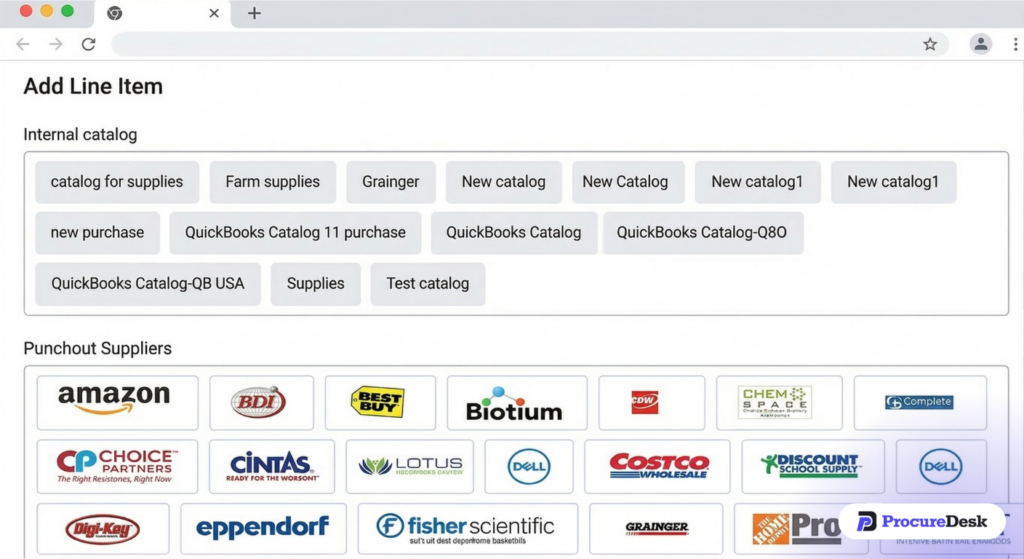
What that delivers, in customer terms:
- PO-backed invoices by default. Requests become approved POs before vendors are engaged. Customers report 90% fewer surprise invoices arriving without a PO.
- Automated 3-way matching with tolerance settings. PO, receipt, and invoice match automatically. Discrepancies get flagged before payment, not after. ProcureDesk customers report an 80% reduction in invoice processing time.
- Approvals that move. Multi-level routing with escalation replaces the email chase. Coast Flight cut invoice processing time by 30% with this workflow.
- Real-time sync with your accounting system. ProcureDesk connects to QuickBooks (Online, Desktop, and Enterprise), Sage Intacct, NetSuite, Microsoft Business Central, and Xero. It adds a procurement layer on top of your accounting software instead of replacing it. ProcureDesk customers cut month-end close from 10 days to 4 on average, and myDNA is one of them.
Implementation is done for you in 2 to 4 weeks, with purchasing rules, approval workflows, accounting connections, and supplier catalogs configured by our team. No IT project. Pricing is published at procuredesk.com/pricing.
See 3-way matching and the 200+ punchout catalogs live in a 20-minute walkthrough.
Getting started: a 30-day plan
Week one: measure your baseline. Pull 90 days of paid invoices and calculate cycle time, cost per invoice, and PO coverage. Week two: segment the slow invoices. Most teams find the bottom quartile shares one trait, usually no PO or one specific approver.
Weeks three and four: fix the policy before the tooling. Set approval thresholds, define which purchases require a PO, and publish the rule. Then evaluate systems against your real numbers. The ProcureDesk ROI calculator turns your invoice volume and cycle time into a cost-savings estimate you can put in front of a CFO.
ProcureDesk implementations run 2 to 4 weeks, and our team does the setup. The 30-day plan above can end with a working system, not a project kickoff.
The bottom line
Best-in-class AP teams process invoices in about 3 days for under $3 each. The average team takes 17 and spends $12.88. The difference is pre-invoice control: PO coverage, automated matching, and approval thresholds that fit invoice risk.
If you are a Controller or AP lead at a company with 100 to 1,000 employees, and your cycle time is in double digits, more AP headcount will not fix it. The process will. If you handle more than 100 invoices a month, ProcureDesk is worth 20 minutes of your time.
Your invoices take 17 days. Your peers do it in 3.
See how mid-market finance teams use PO-backed invoicing and automated 3-way matching to beat the 2026 benchmarks. Live in 2 to 4 weeks, setup done for you.