A month-end close checklist for Controllers covers the AP and procurement work that must clear before the GL can close: lock new PO entry on Day -5, clear the invoice approval queue on Day -4, run three-way matching on Day -3, build the GR/NI accrual list on Day -2, and post accruals on Day 0. For finance teams processing 100+ invoices a month, this upstream sequence decides whether close runs 3-4 days or 7-10. The difference is process, not headcount.
Read a summarized version with:
TL;DR
- Gap. Close runs late because of procurement and AP work that wasn’t completed before close started. Not slow accounting.
- Wrong assumption. Faster invoice processing doesn’t compress close. The lever is upstream: receipts, approvals, and three-way match all done by Day -3.
- Mechanism. Unlogged goods receipts, invoices stuck in approval queues, and accruals built on memory instead of receipt data each add days.
- Operating rule. Lock POs on Day -5. Clear approvals on Day -4. Three-way match on Day -3. GR/NI accruals on Day -2. Post on Day 0.
- ROI math. Manual close: 7-10 days at $12.88 per invoice (Ardent Partners 2025). Best-in-class: 3-4 days at $2.88. 4x cost reduction, 50% less close time.
- Outcome. myDNA: 7-8 days to 3. Coast Flight: 30% faster invoice processing. School in the Square: 2 days to 4 hours.
- Synthesis. Month-end close is a procurement and AP problem that accounting gets stuck solving. Fix the upstream sequence and Day 0 becomes a posting exercise.
Most month-end close checklists start at the accounting level: reconcile the bank, review the GL, close the sub-ledgers. They treat AP and procurement as inputs that arrive clean and ready to post.
They don’t.
The real reason close drags into week two isn’t slow accountants. It’s unmatched invoices sitting in an approval queue from five days ago. It’s open POs with no goods receipt.
It’s accruals that are built on guesswork because the receiving data isn’t in the system.
It’s the procurement side of the house not talking to the AP side until the books are already being closed.
This checklist is different. It covers the AP and procurement work that must be done before you touch the GL. Day -5 through Day 0. The specific tasks, who owns them, the failure points that kill close timelines, and how automation changes each step.
In our onboarding work with ProcureDesk customers, we’ve consistently seen month-end close compress from 10 days to 4 by solving the upstream problem, not just the accounting one. myDNA brought close from 7-8 days to 3. Here’s the playbook.
Who this checklist is forControllers and accounting managers at companies with 100–1,000 employees processing 50+ purchase orders and 100+ invoices per month. If you’re still running close manually across spreadsheets, email chains, and QuickBooks, every item on this list is a live risk.
Table of Contents
Why the AP and PO Side Blows Up Month-End Close
Controllers know the accounting steps cold. The problem is never the accounting steps.
The problem is the data that feeds them. And the data comes from procurement. When the procurement-to-AP handoff is manual and messy, you end up with three failure modes that kill close timelines.
Failure Mode 1: Open POs with No Goods Receipt
A purchase order goes out. The goods arrive. Nobody logs the receipt. Finance doesn’t know whether to accrue for those goods or wait for the invoice. At month-end, you’re either under-accruing (and restating) or over-accruing (and reversing in the next period).
The fix isn’t chasing people for receipts on Day 1 of close. It’s requiring receipts to be logged in the system before goods can move to the next step in the workflow. In ProcureDesk, the system prompts buyers to log the receipt when goods arrive and sends automated reminders if they don’t. By the time close starts, the receipt data is already there.
Failure Mode 2: Invoices Stuck in an Approval Queue
Best-in-class AP teams process invoices in 3.1 days. The industry average is 17.4 days (Ardent Partners, AP Metrics That Matter in 2025). The gap isn’t processing speed. It’s the approval cycle time.
When invoices arrive and sit in someone’s email waiting for approval, they don’t appear as committed spend. Finance can’t see them, can’t accrue for them accurately, and can’t close with confidence. Approval workflows that route invoices automatically, the way ProcureDesk does, eliminate the queue problem before it starts.
Failure Mode 3: GR/NI Accruals Built on Guesswork
Goods Received Not Invoiced (GR/NI) is the accrual you build for goods that arrived but for which no invoice has come in yet. If your receiving data is incomplete, your GR/NI accrual is a guess. If your GR/NI is a guess, your P&L is a guess.
Every audit and every board presentation built on that P&L carries that guess forward. The GR/NI report is only as good as the receiving data behind it. When procurement and AP live in the same system, that data is current by default.
Tired of hunting open POs at month-end?
ProcureDesk gives controllers real-time visibility into every open PO, every unmatched invoice, and every pending approval. See exactly what’s committed and what still needs to close.
30-minute walkthroughSchedule a demo tailored to your close processBring your current close workflow. We’ll show you where ProcureDesk fits — PO capture, 3-way matching, ERP sync — and what your close looks like once the manual gaps are closed.Request a demo →
If you’re still diagnosing why close runs late before you build the fix, start with Why Your Month-End Close Takes Too Long – it covers the five upstream root causes this checklist is designed to solve.
The Month-End Close Checklist: Day -5 Through Day 0
This timeline assumes a standard calendar month-end close. If your close target is Day 3 of the following month, work backwards from there. Each phase has a specific owner, a deliverable, and a failure point.
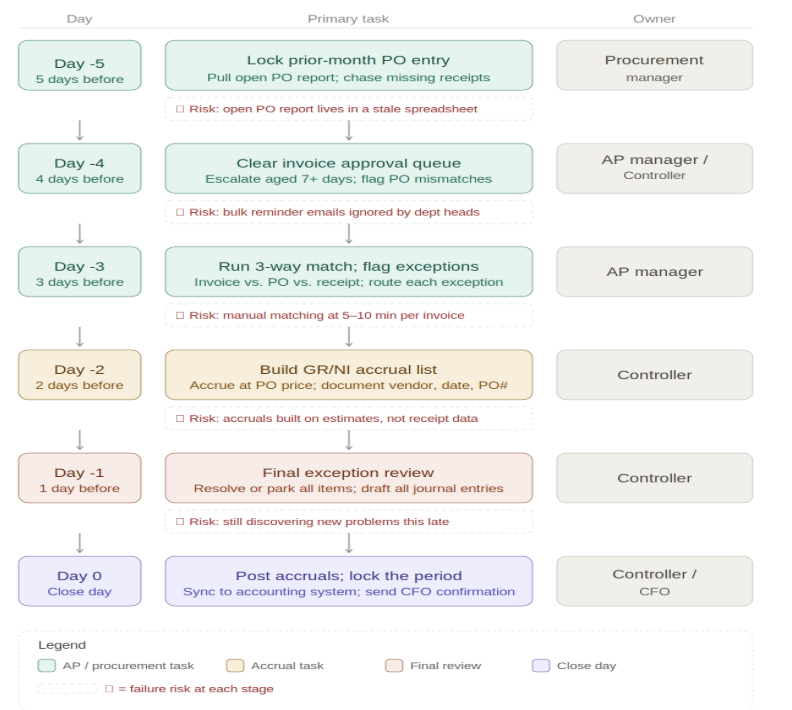
Figure 1: Month-end close process flow. Day -5 through Day 0. Each row shows the primary task, owner, and failure risk.
| Day | Primary Task | Owner | Category |
|---|---|---|---|
| Day -5 | Lock new PO entry; chase open receipts | Procurement Manager | Critical |
| Day -4 | Clear invoice approval queue | AP Manager / Controller | Critical |
| Day -3 | Run 3-way match; flag exceptions | AP Manager | Critical |
| Day -2 | Build GR/NI accrual list | Controller | Accrual |
| Day -1 | Final exception review; vendor follow-up | Controller | Critical |
| Day 0 | Post accruals; sync to accounting system | Controller / CFO | Critical |
Day -5: Lock New PO Entry and Chase Open Receipts
Five business days before close, two things need to happen simultaneously.
Lock new PO entry for the prior month. Any purchase order created after this point gets dated to the new month. Without this gate, goods and invoices bleed between periods, and your accruals are perpetually off.
Pull the open PO report. This is every purchase order where the goods receipt hasn’t been logged. Sort by dollar value descending. The top 20 items on that list are your close risk.
- Export all open POs from your procurement system (or pull the GR/NI report if you have one).
- Identify items for which goods should have been received, but the receipt hasn’t been logged.
- Send a targeted message to the person who ordered each item, asking them to log the receipt or confirm the goods haven’t arrived.
- Set a 24-hour deadline for response. Anything not confirmed is treated as a GR/NI accrual.
Common failure point: The open PO report doesn’t exist, or it lives in a spreadsheet that’s two days out of date. You’re chasing receipts the day before close instead of five days before.
ProcureDesk generates this report automatically. Every PO has a receipt status that updates in real time as users log goods received. On Day -5, you pull one report, and you have the complete picture. No spreadsheet archaeology.
Day -4: Clear the Invoice Approval Queue
This is the step most teams skip until Day -1. Don’t. Every invoice sitting in an approval queue on the last day of the month is a reconciliation problem waiting to happen.
On Day -4, your job is to get every in-period invoice either approved or deliberately parked for the next period. ‘In queue’ is not a status that closes books.
- Pull your pending invoice report. Every invoice dated to the current month that doesn’t have an approved status is on this list.
- Identify the approver bottleneck. Is it one department head who hasn’t touched their queue? That’s a phone call, not an email.
- Escalate anything over 7 days old. If an invoice has been waiting for approval for more than a week, it needs a decision today, not tomorrow.
- Flag any invoice with a PO mismatch. If the invoice total doesn’t match the PO, that’s a three-way match exception. Park it in the exceptions bucket and do not accrue for the full amount.
Common failure point: AP sends a bulk reminder email to all department heads. Department heads ignore it. Invoices sit. You find out on Day 0.
With automated invoice approval workflows, invoices route automatically to the right approver based on rules you set: department, dollar threshold, vendor, or project code. Approvers get notified by email and can approve directly from their inbox. No login required. No bulk reminders that get ignored.
Day -3: Run Three-Way Match and Flag Exceptions
Three-way matching means checking that the invoice matches the purchase order and the goods receipt on three dimensions: item, quantity, and price. If all three match, the invoice is clear for payment. If anything is off, it’s an exception that needs human review.
Manually, this takes an AP team member 5-10 minutes per invoice. At 100 invoices per month, that’s 8-17 hours of matching work. For a two-person AP team, that’s a significant chunk of close time.
- Match invoices to POs and receipts. For every invoice received this month, confirm: (1) there is a corresponding PO, (2) a receipt has been logged, and (3) the quantities and prices match.
- Document exceptions by category. Price variance (invoice price doesn’t match PO price), quantity variance (more invoiced than received), or missing PO (no PO exists for this invoice).
- Route exceptions for resolution. Price variances go to procurement or the vendor. Quantity variances go to the receiving team. Missing PO invoices go to the CFO or Controller for a decision on whether to create a retroactive PO or reject the invoice.
- Clear non-PO invoices. Recurring services (rent, SaaS, utilities) that don’t have POs need a two-way match: invoice vs. expected amount from the contract or prior month.
What good looks like: 85-90% of invoices match automatically. 10-15% go to exceptions. You spend your time reviewing the 10-15% that need attention, not manually matching all 100%.
ProcureDesk’s three-way matching runs automatically using OCR to read invoice data and compare it against the PO and receipt already in the system. Exception invoices are flagged and routed. Your AP team reviews exceptions, not every invoice. Coast Flight Training reduced invoice processing time by 30% this way.
Day -2: Build the GR/NI Accrual List
Goods Received Not Invoiced (GR/NI) is the liability account that captures the cost of goods you’ve received but for which the vendor hasn’t yet sent an invoice. If you skip this accrual or do it sloppily, your expenses are understated for the period and you’ll have a catch-up hit the following month.
By Day -2, your receipt data should be current (you chased this on Day -5). Now you’re building the accrual from what’s confirmed.
- Pull all receipts logged in the current period with no corresponding invoice. These are your GR/NI candidates.
- Filter to items where the invoice is genuinely delayed, not just late in the approval queue. An invoice that exists but isn’t approved yet is different from an invoice that hasn’t been submitted by the vendor.
- Use the PO price, not an estimate. If the PO is in the system, you have a committed price. Accrue at the PO rate. If the PO doesn’t exist (someone ordered informally), get a vendor quote or use the prior month’s invoice amount.
- Document each accrual with the PO number, vendor, and receiving date. When the invoice arrives next month, you need to reverse the accrual cleanly. If your documentation is thin, reversals become a mess.
- Get CFO sign-off on accruals above a materiality threshold. Your threshold depends on company size, but any GR/NI accrual above 2-3% of monthly revenue should have documented approval.
Common failure point: Accruals are built on memory or prior-month invoice amounts instead of actual receipt data. When the real invoice arrives 30% higher than the accrual, you’ve got a P&L restatement conversation.
When procurement and AP live in the same system, the GR/NI report is automatic. ProcureDesk shows every PO line where goods have been received and no invoice has been matched. The accrual list builds itself from real data, not from chasing down department managers to confirm what arrived and when.
Day -1: Final Exception Review and Vendor Follow-Up
Day -1 is a cleanup day, not a discovery day. If you’re discovering new problems on Day -1, something earlier in the process broke down.
What should happen on Day -1:
- Review your open exception list from Day -3. How many are resolved? What’s still outstanding? Anything unresolved by end of business today either gets a management decision (approve anyway, defer to next month, reject) or gets manually accrued.
- Call vendors directly for any missing high-value invoices. If a vendor invoices quarterly or is consistently late, you know who they are. Get the invoice amount confirmed over the phone and accrue on that number.
- Confirm your three-way match exception count. The goal is zero open exceptions by Day 0. Realistically, 2-3% of invoices may require additional review. Document each one with a resolution path and a responsible owner.
- Run a final check on the approval queue. Any invoice still sitting unapproved at this stage needs a hard deadline: approved by 5pm today or deferred to next month and accrued for.
- Validate that all accrual journal entries are drafted and reviewed. Don’t wait until Day 0 to write the JE. Have it ready to post at open of business.
Day 0: Post Accruals and Sync to Your Accounting System
If Days -5 through -1 went correctly, Day 0 is execution, not problem-solving.
- Post all GR/NI accruals to the GL. These should already be drafted.
- Post any additional expense accruals for items not yet invoiced (prepaid expenses, accrued liabilities).
- Sync your approved invoices to QuickBooks, NetSuite, or Sage Intacct. In ProcureDesk, this happens automatically when invoices are approved. The bill syncs to your accounting system with GL codes already attached.
- Run the AP aging report. Confirm what’s current, what’s 30-60 days, and what’s over 60 days. Anything over 60 days needs a decision: pay, dispute, or write off.
- Lock the period in your accounting system. Once the GL is locked, no new entries hit the prior period. Communicate this to the team.
- Send close confirmation to the CFO. This should include: total accruals posted, open invoice exceptions and their status, any known adjustments expected next period.
Compress your close cycleSee how ProcureDesk compresses this entire checklistMost of these steps take 3-5x longer when your procurement and AP systems aren’t connected. ProcureDesk runs three-way match automatically, routes approvals without email chains, and syncs to your accounting system.Watch a 30-minute demo of the close workflow →
3-4Days to close with ProcureDesk
7-10Days without procurement controls
The Five Reasons Month-End Close Runs Late (AP and PO Edition)
These aren’t abstract risks. They’re the specific failure points that appear in almost every manual close process. If your close consistently runs 7-10 days, one or more of these is the root cause.
| # | Failure Point | What It Looks Like | Days Added to Close |
|---|---|---|---|
| 1 | No goods receipt logged | You discover on Day -2 that half your open POs have no receipt. Manual chasing begins. | 2-3days |
| 2 | Invoice stuck in approval queue | AP can’t match or accrue for invoices nobody has approved yet. | 1-3days |
| 3 | GR/NI accrual built from estimates | Accruals are wrong. Restatements happen. CFO asks questions. | 1-2daysper restatement |
| 4 | No PO for a vendor invoice | Invoice arrives with no PO. Nobody knows if it’s legit. Gets parked. | 1-3days |
| 5 | Manual sync to the accounting system | AP exports a CSV, and someone re-enters it into QuickBooks. Errors occur. | 0.5-1day+ error correction |
How Automation Changes Each Step
Most of the items on this checklist take longer than they should because procurement and AP are disconnected. Procurement tracks orders in a spreadsheet or email. AP tracks invoices in QuickBooks. Neither system knows what the other is doing. Every close, someone manually bridges that gap.
Here’s what changes when you run procurement and AP through the same platform:
| Checklist Step | Without Automation | →With ProcureDesk |
|---|---|---|
| Open PO reportDay -5 | Export from spreadsheet; manually filter by receipt status. 45-90 minutes. | Auto-generated. One click. Receipt status updates in real time. |
| Receipt loggingDay -5 | Email reminders to department heads. Response rate: low. Chasing: high. | System prompts users to log receipts when goods arrive. Automated reminders. |
| Invoice approval queueDay -4 | Check email chains. Follow up with each approver individually. | Dashboard shows every pending invoice, approver, and age. Mobile approval in one tap. |
| Three-way matchDay -3 | Manual comparison of invoice vs. PO vs. receipt. 5-10 min per invoice. | Automatic. OCR reads invoice; system matches against PO and receipt. |
| Exception routingDay -3 | Email exceptions to the right person. Track resolution in a spreadsheet. | Exceptions auto-routed to responsible owner with resolution deadline. |
| GR/NI accrual listDay -2 | Manual reconciliation of receipts vs. invoices in spreadsheet. | Auto-generated GR/NI report from real receipt and invoice data. |
| Sync to accounting systemDay 0 | Export CSV, import to QuickBooks. Manual GL code entry. | Automatic sync with GL codes attached. QuickBooks, NetSuite, Sage Intacct, Xero, Business Central. |
The result: close goes from a 7-10 day scramble to a 3-4 day process with almost no manual coordination. The procure-to-pay system handles the handoffs automatically. The controller reviews exceptions and signs off, instead of orchestrating every step.
Implementation takes 2-3 weeks. No IT project. ProcureDesk’s team handles the setup, integrations, and supplier catalog configuration.
What a Good Close Timeline Actually Looks Like
Finance benchmarks can be misleading because they average across companies with very different accounting complexity, entity structures, and transaction volumes. But there are some useful reference points for controllers at mid-market companies.
| Close Stage | Industry Median | Best in Class |
|---|---|---|
| Invoice processing time | 17.4days | 3.1days |
| Cost per invoice processed | $12.88 | $2.88 |
| Invoice exception rate | 22% | 9% |
| Month-end close duration | 7-10business days | 3-4business days |
Source: Ardent Partners, AP Metrics That Matter 2025
The gap between median and best-in-class isn’t about accounting talent. It’s about process. Best-in-class AP teams have automated the three-way match, the approval routing, and the accounting system sync. Controllers at those companies spend close week reviewing outputs, not generating them.
What This Looks Like in Practice
These are results from companies that made the switch from manual close processes to an integrated procure-to-pay system.
myDNA: Month-end close went from 7-8 days down to 3 days after implementing ProcureDesk. The biggest driver was eliminating the manual reconciliation between procurement records and AP. The data was already matched when close started. See more customer case studies for similar close-time results.
Coast Flight Training (CFO Kevin Slatnick): 30% reduction in invoice processing time. The approval workflow meant invoices were reviewed and approved before they hit the accounting system, not after.
School in the Square: Approval time cut from 2 days to 4 hours. This alone took a full day off the close cycle because invoices that used to wait 48 hours for approval were cleared same day.
Equality Charter School: 87% reduction in PO cycle time. Orders that took 5 days to place were processed in under 24 hours. When purchasing moves faster and more completely, the AP side has complete data to close with.
Month-End Close Checklist: Quick Reference
Print or bookmark this version for your close cycle.
Day -5: Procurement Lock and Receipt Chase
- Lock prior-month PO entry in your procurement system
- Pull open PO report; filter to items with no goods receipt logged
- Notify purchasing managers and department heads to log receipts within 24 hours
- Flag all high-value open POs (sort by $ descending) as close-risk items
- Set any unconfirmed items as tentative GR/NI accruals
Day -4: Clear the Invoice Approval Queue
- Pull pending invoice report: all invoices dated this period without approved status
- Identify the top approver bottlenecks by name and department
- Escalate invoices aged more than 7 days directly (phone, not email)
- Flag PO mismatch invoices as exceptions; do not accrue at full amount
- Set hard decision deadline: approved or deferred by end of day
Day -3: Three-Way Match and Exception Routing
- Run three-way match on all received invoices (invoice vs. PO vs. receipt)
- Document exceptions by type: price variance, quantity variance, missing PO
- Route each exception to the responsible owner with a resolution deadline
- Process two-way match for service invoices (no receipt required)
- Target: 85-90% auto-matched; 10-15% in exceptions
Day -2: GR/NI Accrual List
- Pull all receipts logged this period with no matched invoice
- Distinguish delayed invoices (vendor hasn’t sent yet) from queue invoices (received, not approved)
- Accrue at PO price, not estimate; document PO number, vendor, and receipt date for each line
- Get CFO approval on accruals above materiality threshold
- Draft GR/NI journal entries; do not wait until Day 0 to write them
Day -1: Final Exception Review
- Review all open exceptions from Day -3; confirm resolution or escalate
- Call vendors directly for any missing high-value invoices; accrue on confirmed amount
- Final sweep of approval queue; hard deadline for any remaining approvals
- Confirm all accrual JEs are drafted and reviewed by Controller
Day 0: Post and Lock
- Post all GR/NI accruals and additional expense accruals to the GL
- Sync approved invoices to accounting system (QuickBooks, NetSuite, Sage, Xero, Business Central)
- Run AP aging report; flag anything over 60 days for a payment decision
- Lock the prior period in your accounting system
- Send close confirmation to CFO: total accruals, open exceptions, next-period adjustments expected
Frequently Asked Questions
How long should month-end close take for a company with 50-200 employees?
For a company processing 50-200 invoices per month with a 1-3 person AP team, a well-run close should take 3-5 business days. The Ardent Partners 2025 benchmark puts best-in-class at 3-4 days and the industry median at 7-10 days. If you’re consistently in the 7-10 day range, the issue is almost always upstream: incomplete receipt data, slow invoice approvals, or manual three-way matching.
What is a GR/NI accrual and why does it matter for month-end close?
GR/NI stands for Goods Received Not Invoiced. It’s the liability you record when you’ve received goods or services in the period but haven’t yet received the vendor’s invoice. Without this accrual, your expenses are understated for the period and overstated the following month when the invoice arrives. Accurate GR/NI accruals require reliable receiving data, which is why receipt management is the first step in this checklist.
What’s the difference between a two-way match and a three-way match?
A two-way match compares the invoice against the purchase order only: price and quantities match, invoice is cleared. This works for service invoices where there’s no physical delivery to confirm. A three-way match adds the goods receipt as a third document: invoice, PO, and receipt all must align before the invoice is approved for payment. Three-way matching is standard for any purchase involving physical goods and is a requirement for audit readiness.
Can I use this checklist if we don’t have formal purchase orders for everything?
Yes, but the accrual process becomes more difficult. For invoices with no corresponding PO, your options are:
(1) create a retroactive PO and match against it,
(2) approve the invoice based on a confirmed vendor amount, or
(3) reject and require a proper PO before payment.
The bigger fix is requiring POs before purchases happen. Without a PO, you have no committed spend data for the GR/NI accrual and no audit trail for the purchase.
How does AP automation affect the month-end close timeline?
AP automation reduces close time primarily by eliminating three manual steps: three-way matching (which runs automatically), invoice approval routing (which routes itself based on rules, not email chains), and accounting system sync (which happens automatically instead of via CSV export). Controllers using ProcureDesk report close times of 3-4 days vs. the 7-10 day manual baseline. The time savings come from upstream, not from faster accounting.
The Bottom Line
Month-end close takes too long because the upstream process is broken. Open POs with no receipts. Invoices stuck in approval queues. GR/NI accruals built from estimates instead of data. These aren’t accounting problems. They’re procurement and AP problems that accounting gets stuck solving at the worst possible time.
This checklist gives you a structured way to attack the AP and PO side of close before Day 0. Work the process from Day -5, and Day 0 becomes a posting exercise, not a fire drill.
If you’re running this checklist manually every month, you’re spending 5-10 hours on steps that a connected procure-to-pay system handles automatically. The open PO report builds itself. Three-way match runs without human input. Invoice approvals route to the right person before you even start the close process.
The companies seeing 3-4 day closes aren’t doing more work. They’re doing it earlier and with better data.
ProcureDesk is a procurement and AP automation platform built for mid-market finance teams (100-1,000 employees). It controls spending before the invoice arrives, with approval workflows and automated 3-way matching. Across ProcureDesk customers, month-end close compresses from 10 days to 4, and invoice processing time drops by 80%. The platform integrates natively with QuickBooks, NetSuite, Sage Intacct, Xero, and Microsoft Business Central, with implementation in 2-3 weeks.
Ready to take days off your close cycle?ProcureDesk sets up in 2-3 weeks. Our team handles the full configuration. You go live without an IT project.Schedule your 30-minute close workflow demo →
Integrates with
QuickBooksNetSuiteSage IntacctXeroMicrosoft Business Central
Resources
Additional reading and tools for controllers working on close process improvement.
- Procure-to-Pay System Guide: The Process and 2025 Software ListFull walkthrough of the P2P cycle and how automation changes each step→
- Best AP Automation for Manufacturing: Mid-Market GuideIndustry-specific guide with three-way matching details for manufacturers→
- The Invoice Approval Workflow and How to Automate ItDeep dive on approval routing and how to eliminate the queue backlog→
- How to Automate Your AP Invoice Approval ProcessStep-by-step guide to automated AP approval workflows→
- AP Automation Case Studies: Real-World ResultsVerified customer examples including manufacturing and biotech→
- Procure-to-Pay Process Optimization: Finding the Hidden CashComplete guide to P2P process improvement and cost reduction→
- AP Automation for QuickBooks: How It WorksFor teams running QuickBooks Online or Enterprise→
- How to Improve Your Accounts Payable ProcessAP best practices and process improvement strategies→
ProcureDesk · Procurement and AP Automation for Mid-Market Finance Teams · procuredesk.com