Tracking, processing, and filing 100+ paper invoices per month requires a lot of time, effort, and resources. Your accounts payable (AP) teams need to cross-check everything manually, which can lead to data entry errors and payment delays.
A paperless accounts payable software solution can help your AP team:
- Reduce 80% of paper invoicing
- Automate the matching of purchase orders with invoices
- Speed up invoice approvals
- Sync invoice data automatically with your accounting or ERP systems
In this guide, we’ll discuss paperless accounts payable software and its benefits. We’ll also share how ProcureDesk can help you implement and streamline your AP processes.
What is Paperless Accounts Payable Software?
Paperless accounts payable software is a digital solution that automates the process of receiving, approving, and paying invoices. It eliminates the need for manual data entry and paper documents.
It helps businesses reduce processing time, minimize human errors, and gain real-time visibility into their cash flow.
Here’s how AP paperless software works:
- Invoice capture: Automatically extracts data from invoices using OCR (optical character recognition) and AI, eliminating the need for manual entry.
- Invoice matching: Matches invoices with purchase orders and receipts for accuracy.
- Approval workflow: Routes invoices to the right approvers and sends reminders for pending approvals.
- Real-time tracking: Provides instant visibility into invoice status, approvals, and payments.
- Integration: Syncs with your accounting or ERP system for smooth data flow and reconciliation.
Common Challenges AP Teams Face with Paper Invoices
Here are some challenges AP teams face with paper-based invoices:
Manual Data Entry
When AP staff manually enter invoice details, the risk of errors increases. Your teams might miss payments, create duplicate entries, or record inaccurate data. This costs you money and affects your vendor relationships.
Storage and Retrieval Issues
A mid-sized company processing 100 invoices monthly creates 1,200 documents per year, filling multiple filing cabinets and consuming valuable office space.
Finding a specific invoice becomes a challenge. Your team wastes 10-15 minutes digging through folders for a single document. During audits, this problem multiplies when they need to pull 50+ invoices at once.
Lost invoices create real consequences. You can’t verify payments, resolve vendor disputes, or prove compliance. This leads to duplicate payments, frustrated suppliers, and failed audits.
The costs add up quietly. Storage space, filing supplies, and wasted labor hours drain your budget. Your team shuffles papers instead of focusing on strategic work like vendor negotiations or cash flow planning.
Environmental Impact
Paper invoices create environmental burden. You use thousands of sheets each year, contributing to deforestation and higher carbon emissions from printing and delivery. Over time, that waste adds up and harms your sustainability goals.
Hidden Costs
If your AP workflows are scattered across departments, it’s hard to track the true cost of your purchases. Your teams struggle to set accurate budgets, control spending, or apply stronger compliance rules.
Approval Delays
Paper invoices often get buried in email threads. Without automated routing or reminders, approvals move slowly, and your AP teams waste time chasing around managers. This leads to payment delays.
Why Mid-Sized Teams Choose ProcureDesk’s Paperless Accounts Payable Software
ProcureDesk provides AP automation and procurement software to growing and mid-sized businesses with around 50-250 employees. We’re commonly used by companies in biotech, manufacturing, professional services, non-profits, and education.
Our software helps you adopt paperless accounts payable processes by offering automated capture, approval workflows, OCR technology, smart matching, and built-in compliance controls.
It syncs invoice data directly with your accounting or ERP systems, allowing your AP team to manage your invoices from a single dashboard.
Here’s how ProcureDesk’s paperless accounts payable software eliminates manual work:
Digital Invoice Capture for Automated Processing
Poor-quality scans and inconsistent invoice layouts force AP teams to waste time reviewing and entering each invoice detail manually.
ProcureDesk’s invoice workflow software captures the invoice directly from your vendors or email threads.
It uses OCR technology to extract key details, including invoice header, vendor details, and line-item levels such as quantities, unit prices, and tax amounts.
Here are some ways ProcureDesk helps you implement paperless invoice processing:
Create Invoice From Email
The first step to automating your invoicing process is to bring all invoices into one place. If you don’t have a shared inbox for invoices, set up a dedicated email like invoices@yourcompany.com. This way, every vendor knows exactly where to send their bills.
The software automatically reads invoices sent to your inbox and uses OCR and AI to extract key details.
Instead of downloading files and entering data manually, you’ll see invoices created automatically and ready for approval within a single dashboard.
Here is an example of an invoice created by ProcureDesk:
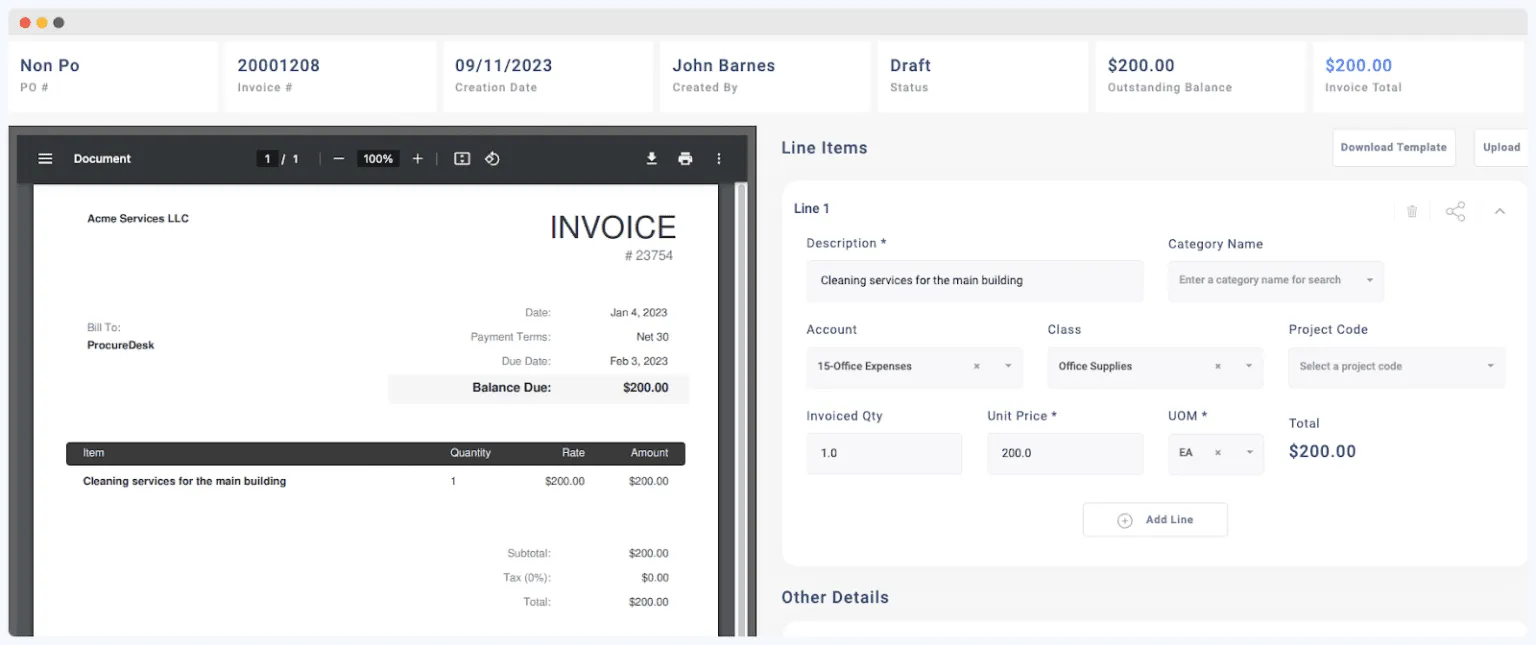
This simple setup keeps your invoice intake organized, speeds up processing, and gives your AP team more time to focus on strategic tasks, like negotiating pricing terms with vendors.
Vendor Portal For Supplier Self-Service
ProcureDesk provides a vendor portal that allows vendors to submit, update, and confirm invoices directly in the system.
They can log into the portal, submit invoices against open purchase orders, or create new invoices when needed. Once submitted, ProcureDesk automatically matches each invoice with the right purchase order and routes it for approval.
Vendors can also track the status of their invoices in real-time, reducing the number of follow-up emails your AP team receives.
Here’s an example of how vendors can use the portal for self-service on ProcureDesk:
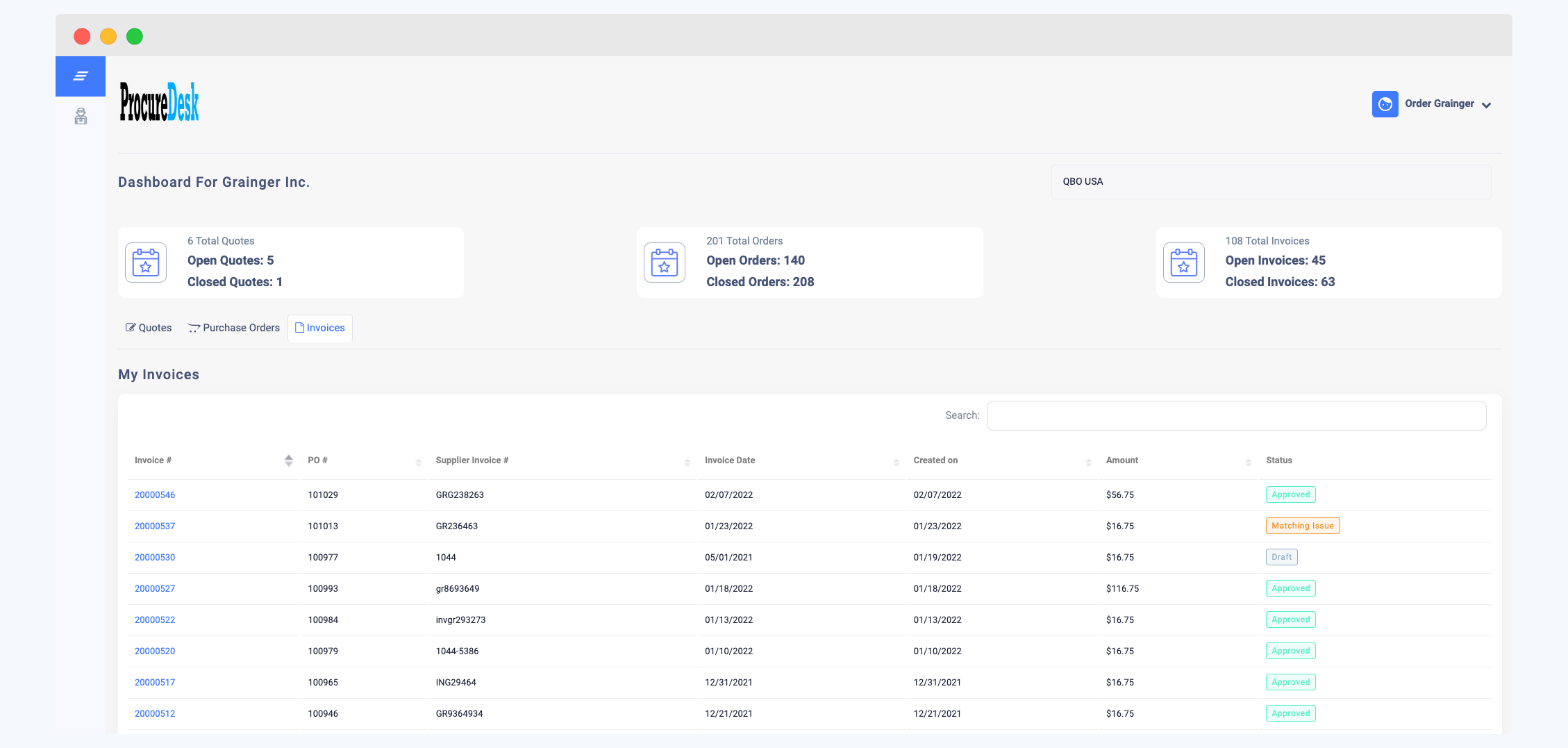
This self-service setup speeds up paperless invoice processing, improves accuracy, and strengthens your relationship with suppliers by giving them full visibility into their payments.
Electronic Invoices
Electronic invoices can be sent by vendors directly from their systems to ProcureDesk. There’s no need to email files or upload documents through the portal.
ProcureDesk instantly creates a digital record in your dashboard once it receives the invoice. The system then matches the invoice with related documents, like purchase orders and receipts.
Since all the information is transferred automatically, your AP team only needs to review and resolve any exceptions.
ProcureDesk supports common electronic data transfer protocols, including:
- EDI (Electronic Data Interchange): Enables buyers and suppliers to exchange invoice data directly between their systems.
- cXML (Commerce eXtensible Markup Language): A widely used format for sharing invoice and supplier information seamlessly.
This gives your AP process a fully automated workflow from start to finish.
Custom Workflows for Faster Approvals
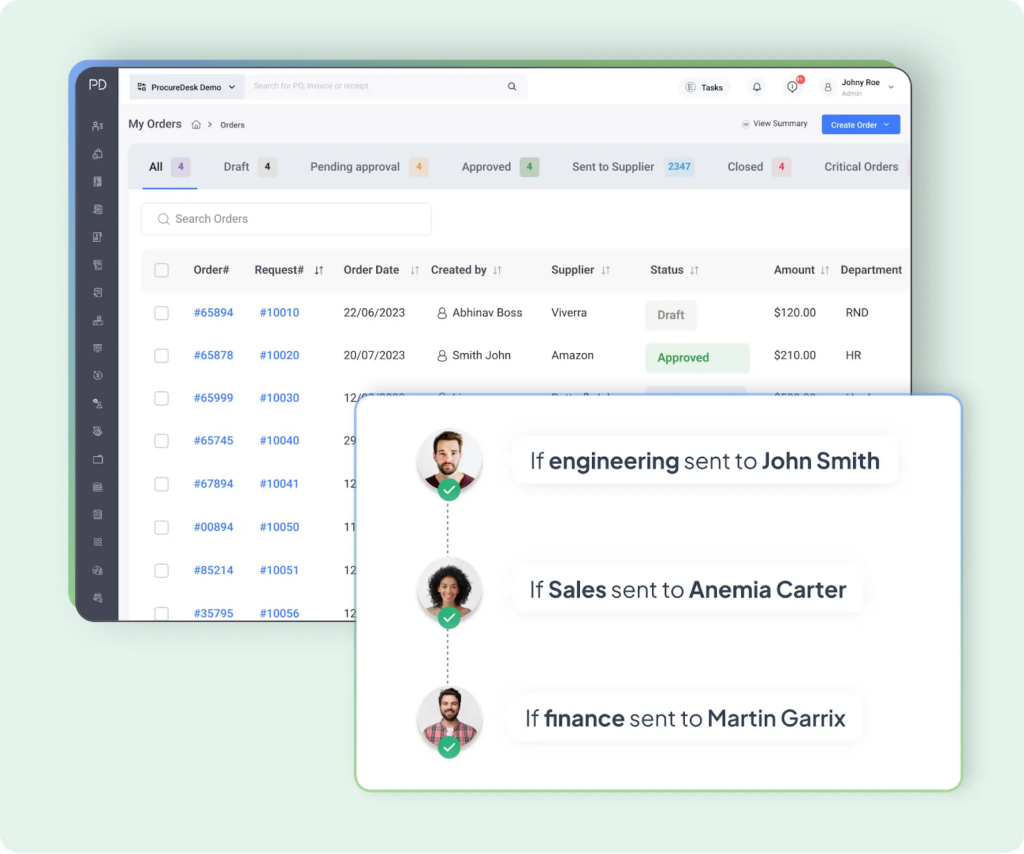
Manual approvals slow down your entire AP operations. Your AP teams spend more time sending reminders to managers to confirm invoices before proceeding with payments.
ProcureDesk lets you set custom approval workflows with multi-level functionalities. You can create workflows based on factors such as:
- Department or cost center
- GL code or project
- Invoice amount or approval threshold
Once you set workflow rules, the system automatically routes and sends notifications to the right reviewers.
For example, a U.S.-based aviation academy struggled to manage invoices across multiple locations. ProcureDesk helped the team build custom approval workflows that automatically routed invoices to the right department heads and budget owners.
ProcureDesk provides several options to approve invoices:
Email Approvals
Invoices can be approved directly from an email without the need to log in to the system. ProcureDesk supports built-in collaboration, so all the back-and-forth related to invoice approvals is handled within the system.
Mobile App
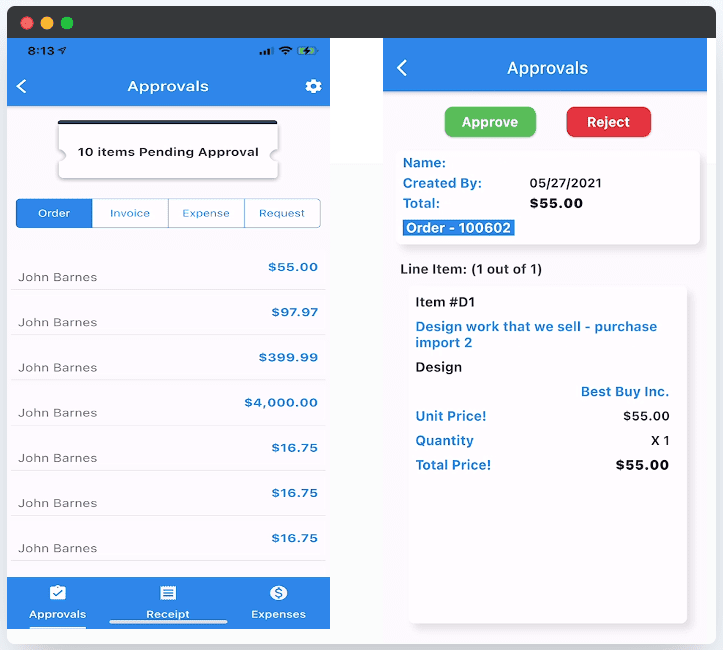
The ProcureDesk mobile app allows you to approve invoices on the go. As soon as an invoice is created, the approver receives a push notification on their phone. This allows them to quickly approve invoices outside the office.
Web app
ProcureDesk’s web app dashboard shows every pending request, so you can quickly review, comment, and approve without digging through emails.
The approval dashboard keeps everything organized and transparent, so you always know what’s waiting for your review.
ProcureDesk also sends daily summary reminders with a list of pending approvals. Your AP team can keep up with approvals without missing deadlines or holding up payments.
Automated Invoice Matching to Speed Up Payments
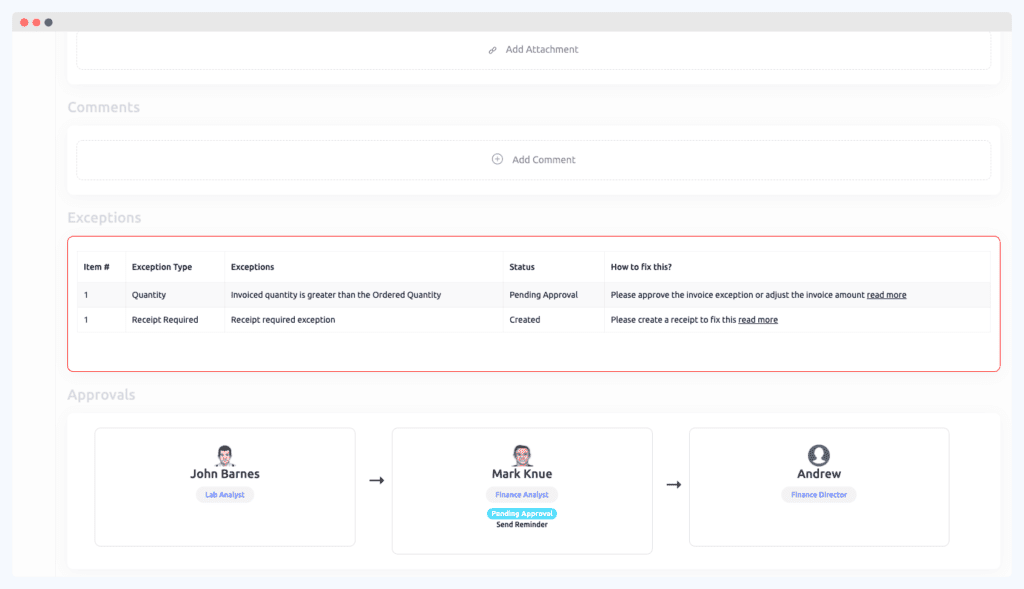
When handling paper invoices, matching them with purchase orders and receipts is labor-intensive. Your AP team has to dig through files or spreadsheets to confirm amounts and approvals manually.
ProcureDesk supports invoice matching software capabilities to streamline your AP process. The system compares invoice details and automatically flags discrepancies or missing information.
For example, if a receipt is missing, the system sends an automatic email to the person who ordered the item, asking them to confirm receipt. This eliminates the need for manual cross-checking and speeds up your payment cycle.
ProcureDesk supports both two-way and three-way matching, depending on how your business operates.
- Two-way matching compares invoices directly with purchase orders. This method is ideal for service-based businesses or recurring payments where receipts aren’t required.
- Three-way matching checks invoices with both purchase orders and receipts. This approach is common in industries like manufacturing, biotech, and education, where verifying goods or materials received is important.
Invoices that match move straight through to payment, while those with discrepancies are automatically routed to the right approver for review.
Our software automatically flags any invoice that exceeds the purchase order amount. It also routes exceptions to the right stakeholders, like procurement or finance, to resolve pricing discrepancies quickly.
If there’s a pricing difference in the invoice, ProcureDesk offers two easy ways to handle it:
- Set tolerance levels: Automatically approve small, acceptable variances without manual intervention.
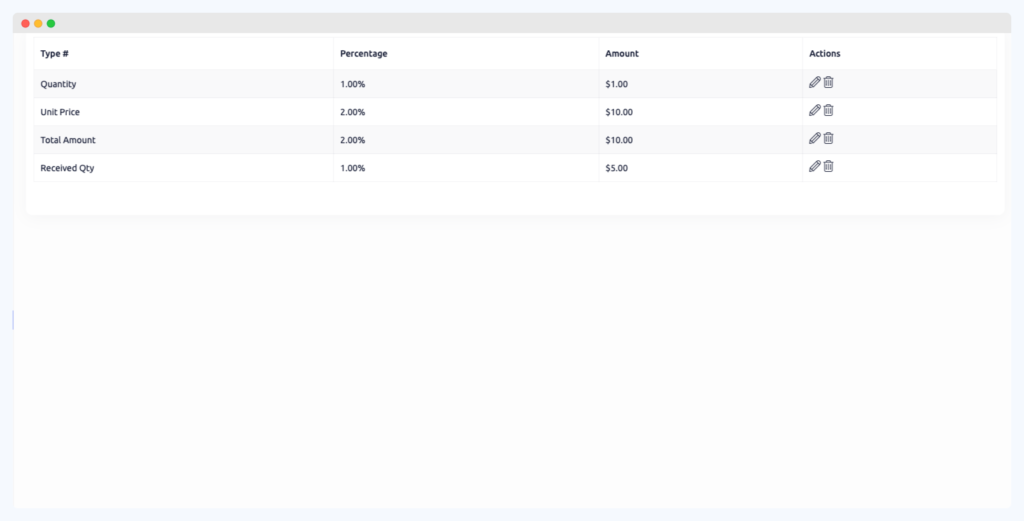
- Route for review: Send invoices with larger discrepancies to the designated buyer or approver for confirmation
These automated checks help your AP team process invoices faster, reduce approval delays, and maintain complete accuracy across your purchasing and payment workflows.
Real-Time Data Access for Audit
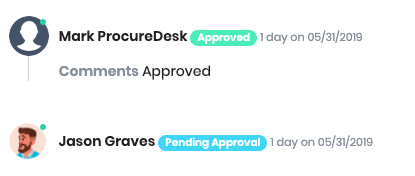
Digging through each invoice during audits leads to reporting errors and non-compliance risks.
ProcureDesk offers cloud storage that gives AP teams instant access to invoice data from anywhere. All your invoice data is consolidated to a single, searchable dashboard.
This allows you or your team to pull up an invoice in seconds, whether you’re at your desk, in a meeting, or working remotely.
The system also simplifies audits by creating a complete digital trail of every invoice and approval. Auditors can quickly access the entire transaction history, seeing exactly who approved each invoice, when it was approved, and the precise workflow it followed.
This digital audit trail eliminates manual reconciliation, reduces errors, and provides immediate transparency.
Bill Payments to Pay Vendors Faster
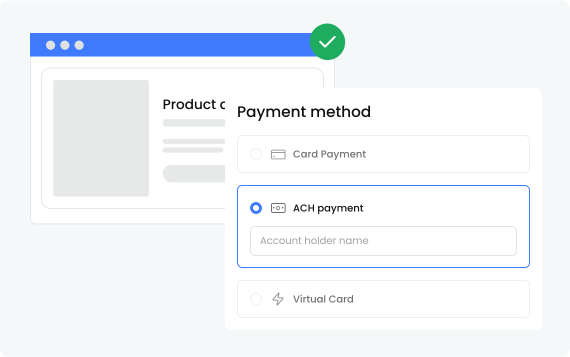
Relying on a third-party payment processor or physical checks can be a hassle. The process is time-consuming, costly, and error-prone, from printing and mailing to reconciling payments.
With ProcureDesk Bill Payments, you can pay vendors the way they prefer:
- ACH Transfers: Send payments electronically from your bank to your vendor’s account for faster, low-cost transactions.
- Virtual Credit Cards: Generate one-time digital card numbers for instant payments.
- Physical Checks: Create and record checks directly in ProcureDesk for vendors who prefer traditional payments.
Each payment is created, approved, and tracked in one centralized dashboard. This allows you to view which payments are pending, scheduled, or completed.
With ProcureDesk, you gain more control and visibility over your payments. Built-in workflows help you manage approvals and meet compliance with your internal policies.
The system also helps you adopt environmentally-friendly workflows through electronic payments. By eliminating paper checks, you reduce waste and contribute to sustainability efforts.
Integration With Your Accounting Software
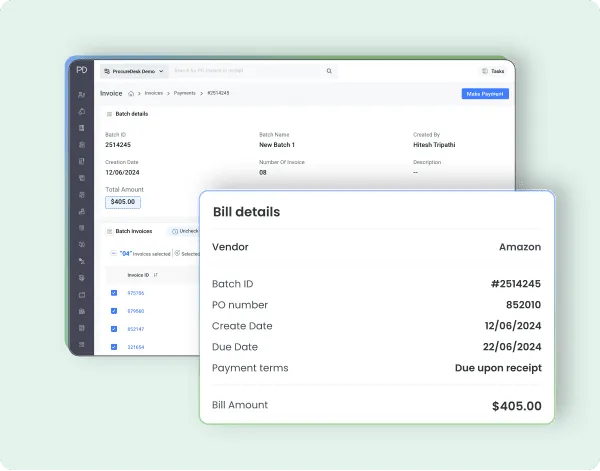
Switching from paper to electronic invoices requires a lot of effort. If you’re juggling invoices in multiple tools, you’re likely to face data entry errors and delays.
ProcureDesk integrates with your existing accounting or ERP systems. This allows you to keep all your financial data synchronized for a smooth workflow without manual data transfers.
Once the invoice is approved, the system automatically sends the approved invoice to the accounting system.
ProcureDesk integrates with the following systems, among others:
- QuickBooks Online
- QuickBooks Desktop and Enterprise
- Xero
- Sage Intacct
- Microsoft Dynamics 365 Business Central
- Oracle NetSuite
- Bill.com
Once connected, the system pulls all the relevant information, like the chart of accounts, supplier list, and project codes, into a single dashboard. It can also retrieve payment information from the accounting system and update the invoice’s payment status.
Real-time Analytics and Dashboard
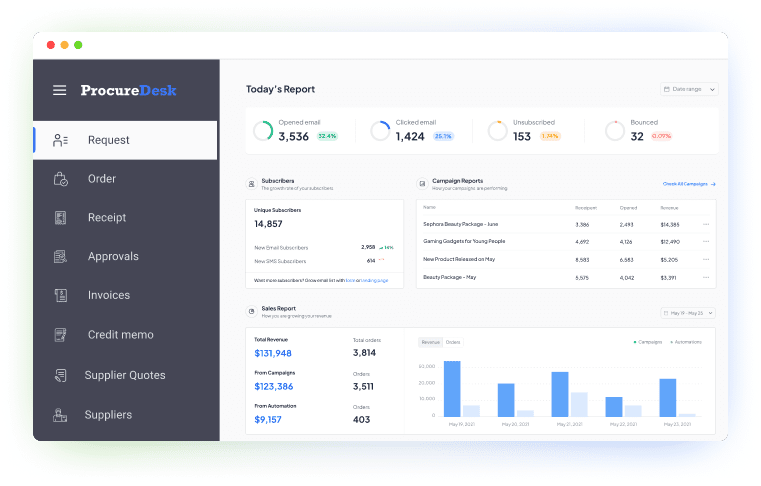
Without centralized tracking, it’s hard to track your spending, budgets, and cash flow.
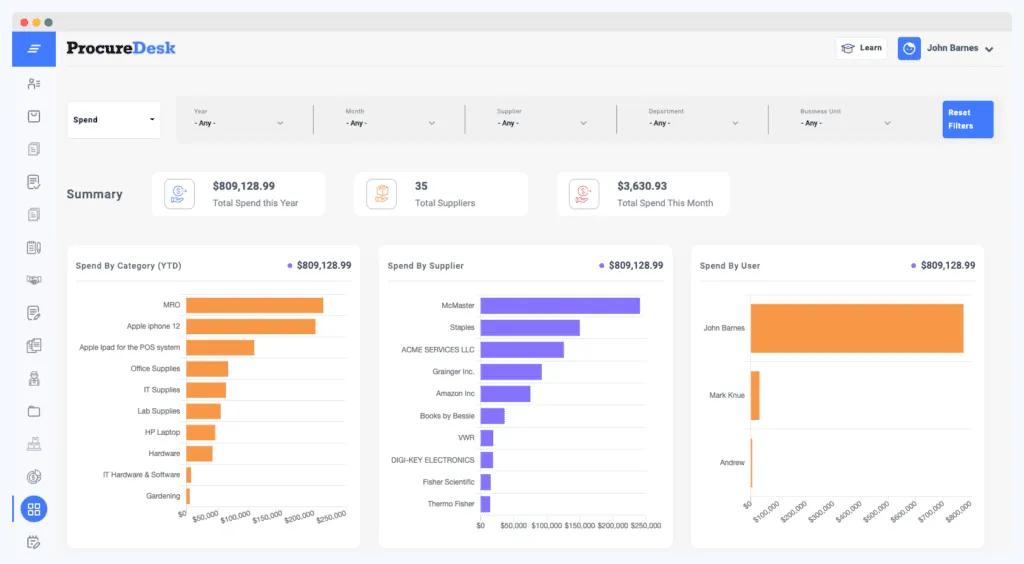
ProcureDesk offers an analytics dashboard that organizes your company’s raw spending data into valuable insights. Your teams can track spending by department or project, monitor unpaid invoices, and spot top vendors and buyers in one place.
This visibility helps you identify invoice delays, monitor spending trends, and make data-backed decisions. It also supports stronger financial control since you always know where your money is going and how it affects cash flow.
The system lets you generate ready-made reports using 30+ templates. You can quickly pull data on invoices, payments, budgets, and vendor performance without manual formatting or exports.
These reports give your finance team instant insights to track KPIs, manage cash flow, and adopt cost-saving strategies.
ProcureDesk Pricing
ProcureDesk offers three pricing plans, depending on your business size and AP feature needs.
| Plan | Price (Monthly) | Includes | Best For |
| Purchasing Automation | $598/mo | 10 users, Custom Approval Workflows, Onboarding Support, Purchase Order Automation | Teams automating purchasing and approvals |
| Purchasing & AP Automation | $1,020/mo | All Purchasing Automation features + Invoice Approval Workflows, 3-Way Invoice Matching, OCR for Invoices | Teams automating both purchasing and AP |
| Enterprise | Custom Quote | All features + Dedicated Account Manager, Vendor Portal, SSO, Custom System Integration | Enterprises needing white-glove support and custom workflows |
Benefits of Going Paperless With Accounts Payable
Switching to a paperless accounts payable system like ProcureDesk delivers measurable results across efficiency, accuracy, and visibility.
Here are some benefits of going paperless:
Faster Invoice Processing
Automating invoice capture and approvals removes manual workarounds. Your team can process invoices in hours instead of days, keeping payments on schedule and vendors satisfied.
Spending Visibility and Control
A paperless system gives you real-time insight into your accounts payable, spending, approvals, and cash flow. You can track invoice status, monitor budgets, and identify cost-reduction opportunities.
Better Vendor Relationships
Paperless workflows speed up vendor invoice approvals and payments. When payments are processed on time, your vendors don’t have to chase updates or resend invoices.
This reliability strengthens your relationships, improves collaboration, and often leads to better terms and service from your suppliers.
Scalability and Business Growth
A paperless AP system grows with your business. As invoice volumes increase, automation handles the workload without adding headcount. This frees your team to focus on strategic growth instead of manual processing.
Best Practices to Implement Paperless Accounts Payable: Step-by-Step Guide
The following is a step-by-step guide on how you can implement paperless accounts payable:
Assess Your Current AP Processes
Map out your existing accounts payable workflow from invoice to payment. Identify where errors happen most often, such as data entry mistakes, missing approvals, or late payments. Also, note which steps take the most time to complete.
Quantify how much paper your team handles each month, and estimate the related costs for printing, filing, and storage. This helps you see the real impact of manual processes.
Finally, evaluate your team’s readiness for digital adoption. Sit with your key stakeholders in finance, procurement, and IT to understand their concerns and expectations. This helps you adopt an effective paperless system.
Choose The Right Digital Solution
Choosing the right paperless accounts payable software depends on your unique needs, business size, invoice volume, and budget.
Focus on solutions that offer automated invoice capture, digital document storage, intuitive dashboards, OCR technology, and integration options. These features will help you reduce manual work and keep all your financial data connected.
ProcureDesk is the best AP automation solution for growing and mid-sized teams that manage 100+ invoices or 50+ POs per month. The software offers automated invoice capture, 3-way matching, real-time visibility, custom workflows, and integrations.
Implement and Train Your Team
Prepare your AP team for the digital transition. Provide hands-on training sessions so everyone understands how to use the new system with confidence. For example, ProcureDesk offers easy-to-follow tutorials and responsive support to make onboarding smooth.
Next, digitize your existing paper invoices using scanning or OCR technology. This helps you centralize records and keep everything organized in one place.
Make sure your new system also connects directly with your accounting software. This allows data to flow automatically between both platforms, making reconciliation faster and more accurate.
Finally, use electronic approval workflows to route and track invoices. Automated invoice approval processes help your team avoid delays, reduce back-and-forth communication, and keep payments moving on schedule.
Monitor and Optimize Your AP Workflows
As you implement the paperless accounts payable workflow, continuously monitor your progress toward achieving your goals.
Measure the success of your transition using key performance indicators (KPIs) such as processing time, error rates, and cost savings.
Regularly review your data and adjust as needed to optimize the workflow further.
Bottom Line
Switching to a paperless accounts payable system gives you better control and visibility over your invoices, purchase orders, and payments. This allows you to reduce invoice processing time, cut storage costs, and speed up vendor payments.
ProcureDesk provides paperless accounts payable and procurement software for growing and mid-sized teams that manage 100+ invoices per month. Our software uses advanced tools to streamline your accounts payable workflows with real-time visibility and controls.
Our customer support team helps you onboard your manual systems, so you can deploy faster without disrupting your daily operations.
Book a demo to see how ProcureDesk improves your AP processes and helps you scale faster.
FAQs About Paperless Accounts Payable Software
How secure is a paperless accounts payable system?
A paperless accounts payable system like ProcureDesk keeps your financial data protected with enterprise-grade security. All your information, such as invoices, approvals, and payment details, is encrypted during storage and transfer.
It also supports role-based access, so you can control who can view or approve invoices, reducing the risk of unauthorized activity.
ProcureDesk maintains detailed audit trails for every transaction. This gives you complete transparency and compliance with internal and external security standards.
Can ProcureDesk integrate with my existing accounting software?
Yes, ProcureDesk integrates with popular accounting systems, including QuickBooks, Xero, and Sage Intacct. Our system syncs all your invoice, payment, and PO data into a single dashboard without manual work.
During onboarding, our customer support team helps you connect and deploy multiple systems with ProcureDesk.
What is the typical implementation timeline?
Most businesses can transition to a paperless AP system in 2–3 weeks with ProcureDesk. We’ll handle 100% of the setup for you, including building custom workflows that make sense for your business.
How do you digitize accounts payable?
You can digitize accounts payable with automation tools like ProcureDesk. The system captures invoices electronically through email, vendor portals, or OCR scanning. It then matches invoices with purchase orders and receipts, routes them for approval, and syncs data directly with your accounting software.
This digital workflow eliminates data entry errors, speeds up processing, and gives you full visibility into every step.
How do I organize my accounts payable files in ProcureDesk?
You can organize accounts payable in ProcureDesk using filters to sort by vendor, date, status, or amount. Our system allows you to save custom views for quick access and combine filters for precise searches.
This improves document management and efficiency, and makes sure you quickly find what you need to keep your processes running smoothly.